What to prioritise when choosing a child’s first gaming setup
Games consoles
Consider when: the games your child wants are available on a console and play will mainly be for gaming.
Trade-off: controls may differ by account, console and store; online play or chat features can have separate membership requirements. Nintendo UK, PlayStation Support and Xbox Support document these distinctions.
Tablets
Consider when: portable games and other apps matter alongside gaming; Apple Screen Time and Google Family Link offer controls for their respective account and device environments.
Trade-off: app and web access extends beyond games, while purchase approvals may not cover every payment route. Apple Support UK and Google for Families set out the relevant limits.
PC gaming
Consider when: the intended games need a PC or the computer will also serve other family purposes.
Trade-off: supervision can involve separate Windows, browser, game-store and in-game settings. Microsoft Support and Steam Support describe controls for their own services and supported environments.
Additional control software
Consider when: the included family settings do not meet a specific need on a device the software supports.
Trade-off: it is an extra layer, not a replacement for game or platform settings; confirm the child profile and device are compatible before subscribing. Qustodio lists platform and profile limitations.
For families choosing a child’s first gaming setup in the UK, the figures below describe how consumers’ main priorities can differ; the source material supports the concerns, not the percentages.
| Concern |
What to check when buying |
Who this matters to |
| Contact during online play |
Check the child account’s age, permitted contacts and the game’s chat settings. Switch 2 GameChat has separate child controls, according to Nintendo UK. |
If your child plays with others online, you may want to check who can contact them and how the game handles chat. Around 31% of consumers put control over online contact first. |
| Age-appropriate games and content |
Check the game’s age rating and content descriptors, the age on the child’s account and how exceptions work. For tablets, review app and web access settings. |
If you want to decide which games and content are suitable for your child, check both the game and the account or device settings. Around 25% of consumers prioritise content suitability. |
| Purchases and ongoing costs |
Check which store and payment methods approvals cover, including existing funds or gift cards. Confirm whether the intended online feature requires a membership; Xbox Support and Google for Families specify limits on their approval settings. |
If you want to approve spending, consider the game’s payment route as well as the platform’s setting. Around 25% of consumers put purchase control and ongoing costs first. |
| Shared family use |
Check where the games can be played, whether the child needs a separate account and whether time limits apply to a user or the whole device. Nintendo UK says Switch restrictions apply to everyone using that console. |
If several people will share the device, you may want controls that fit the household’s play routines without affecting other users unexpectedly. Around 19% of consumers prioritise shared-use fit. |
Joybuy product choices for gaming and family play
These Joybuy choices include handheld gaming devices, Windows PC gaming and Nintendo Switch 2 consoles. For any option, check the intended games and the account, communication and purchase controls that will apply.
 No image available
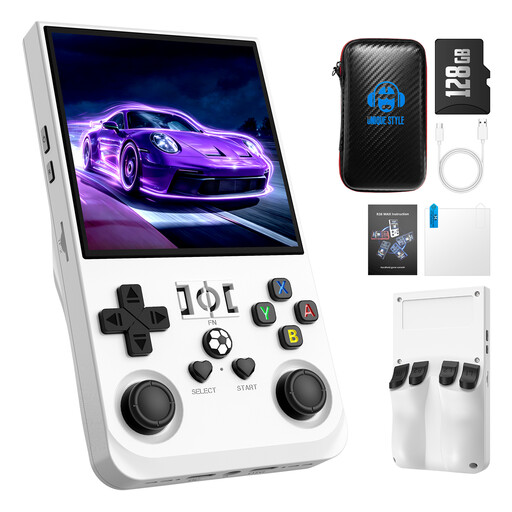
AISLPC R36MAX handheld game console, 128GB, White
A portable handheld option for gaming on the move; check that its controls and the intended games suit your child’s needs.
The product name specifies a 4.0-inch IPS display with 720 × 720 resolution, Linux system, 128GB storage and a 4000mAh battery.
The product name also states support for 22,000+ classic games; check the specific game and the device’s account, communication and purchase arrangements before choosing it for a child.
Joybuy
 No image available
ASUS ROG Zephyrus G14 GA403WR-QS088W
A Windows laptop option if the intended games need PC access or the computer will also be used for other family tasks.
The product name specifies a 14-inch WQXGA+ display, AMD Ryzen AI 9 HX 370 processor, 32GB LPDDR5x RAM, 2TB SSD and NVIDIA GeForce RTX 5070 Ti graphics.
The product name lists Windows 11 Home. Microsoft Family Safety app and game filters apply to Windows, while web filtering has supported-browser conditions; check game-store and in-game settings separately.
Joybuy
 No image available
Nintendo Switch 2 Console + Nintendo Switch Sports Resort
A dedicated console option for families considering handheld, television or tabletop play.
The listing describes a console, dock and Nintendo Switch Sports Resort game download, with handheld, TV and tabletop play.
Nintendo UK says console restrictions apply to everyone using the console, while eShop spending restrictions are separate. Nintendo Switch Online is required for Switch 2 GameChat, which has additional controls for users under 16.
Joybuy
 No image available
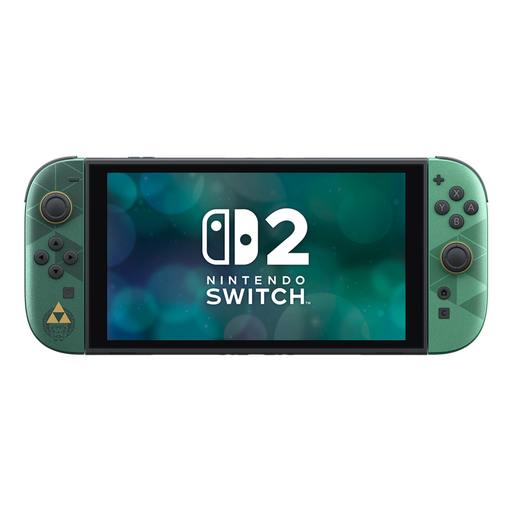
Nintendo Switch 2 The Legend of Zelda 40th Anniversary Edition console
A Switch 2 console option for families considering both handheld and docked television play.
The listing describes Switch 2 game compatibility and handheld use with TV play via the dock.
Nintendo Switch Online is required for online features including GameChat. The listing also notes that some accessories are sold separately; check what is included for this exact edition.
Joybuy
 No image available
Nintendo Switch 2 Console (UK Version)
A dedicated console option for handheld or television play; Nintendo Switch 2 restrictions apply to the console rather than an individual user.
The listing specifies 256GB storage and describes TV connection using the dock.
Nintendo UK says GameChat requires Nintendo Switch Online and separate parental-control approval for users under 16. eShop spending restrictions are managed separately through a supervised Nintendo Account.
Joybuy
Frequently asked questions
Should I set up a separate account for my child before they play?
Yes, if you plan to use account-based controls. PlayStation requires a family with the child added for its parental settings, Apple describes a child Apple Account in Family Sharing, and Nintendo eShop restrictions require a supervised account in a family group. Ofcom advises registering the child’s correct age.
Do parental controls themselves require a gaming subscription?
Not necessarily: Nintendo says parental controls are available without Nintendo Switch Online. Some Switch online play and Switch 2 GameChat require that membership, while PlayStation lists a paid Plus requirement for online multiplayer. Check the terms for the specific game and feature before subscribing.
Will one family-control app cover every game and device?
No single control option described here covers every game and device. Microsoft distinguishes Windows and Xbox app filters from supported-browser web filtering; Steam Families manages Steam features, and Qustodio lists supported computers and tablets rather than games consoles. Check the settings in each relevant game and service.
What if I need help after buying a device or paid control service?
Keep the receipt and check the seller’s terms and the manufacturer’s support options for the exact device or service. GOV.UK consumer-rights guidance covers goods, services and digital content; a retailer’s returns or warranty policy is separate from statutory rights.
What do UK game age ratings mean when choosing a game?
Darlington Borough Council Trading Standards guidance says games classified PEGI 12, 16 or 18 must not be supplied to someone below the specified age; PEGI 3 and 7 ratings are advisory. This concerns supply of a rated game, not a blanket legal minimum age for owning a console or tablet. Check the individual game’s rating and content descriptors.


