What to check before buying
For a child’s first tablet, start with the activities and account setup the child will actually use. Apple Support UK, Google For Families Help and the ICO describe platform and app-level checks that can help you assess that setup.
| Concern |
What to check when buying |
Who this matters to |
| School and communication apps |
Test each named app, login and required function in the exact operating system and child account before choosing other features. |
I want school and contact apps to work in the account my child will use before I choose extras. Around 25% of consumers put app compatibility first. |
| Account management and supervision |
Check who manages the child’s account, app permissions, purchases and screen time; review privacy settings within each app. Apple Support UK and Google For Families Help describe different device and account requirements. |
I want to manage app access, purchases and screen time, while checking privacy separately in each app. Around 25% of consumers prioritise supervision. |
| Separation on a shared device |
Check profile support, switching and adult-account access on the exact tablet. Google For Families Help says Family Link settings for a child’s account do not apply to other profiles; Apple Support UK describes Shared iPad as an organisation-managed feature. |
I want to share one tablet without giving the child unrestricted access to the adult environment. Around 20% of consumers prioritise separation between child and adult use. |
| Protection and accessories |
Check whether the exact bundle includes a suitable case, pen or keyboard, and whether any proposed accessory fits that model. Apple UK and Lenovo UK list different contents for their cited configurations. |
I want to know whether protection or input accessories are included before choosing a bundle. Around 15% of consumers prioritise protection and accessory costs. |
| Screen and input for learning |
Try representative reading, homework or calls, then check the exact screen and supported pen or keyboard. Apple UK and Lenovo UK list the display and pen details for their cited configurations. |
I want a screen and input method suited to the schoolwork my child actually does. Around 15% of consumers prioritise learning-related screen and input needs. |
Tablet brands for reference
These examples apply to the specified product lines and configurations, not every tablet from each manufacturer.
Apple
A standard-tablet route to assess when the required apps work on iPadOS and you can set up a separate child account with Family Sharing.
- Apple’s specifications list an 11-inch iPad (A16), starting at 128GB, with support for specified Apple Pencil models.
- Apple Support UK describes Screen Time controls that require account setup; the cited box contents do not list a Pencil.
Samsung
A standard Android-tablet option to assess when the required apps and child-account arrangements suit the exact device.
- Samsung UK describes an 11-inch Galaxy Tab A9+ Wi-Fi model with expandable storage, and provides information about Samsung Kids.
- Check child-account and app access on the exact model and software; the feature description does not establish that every Samsung tablet has identical controls.
Lenovo
A standard Android option to assess when a larger display or pen input is relevant to the child’s schoolwork.
- Lenovo UK lists a 12.7-inch, 8GB/128GB Idea Tab Pro configuration with a pen.
- Lenovo lists a folio case separately for the cited configuration; check the school apps, account setup and contents of the exact bundle.
Joybuy tablet choices
These Joybuy choices include standard tablets and child-focused or accessory-bundled tablets for schoolwork and supervised home use. Check the required apps, account setup and exact bundle contents before choosing.
 No image available
Apple iPad 11-inch, 128GB, Silver
Consider this standard-tablet option if the required school and communication apps work in the child’s account; Apple’s Screen Time setup uses Family Sharing and separate Apple Accounts.
11-inch display; 128GB storage. Check whether a pen or keyboard is needed and included in the chosen bundle.
View on Joybuy
 No image available
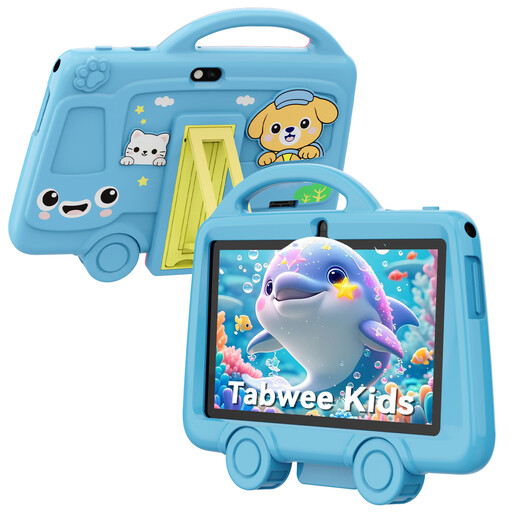
TABWEE K8 Kids Tablet, 7-inch, 3GB RAM, 32GB storage
Consider it if a child-focused 7-inch tablet and a wired headphone connection suit the intended use; check the required apps and account controls on the device before buying.
The product title describes it as drop-resistant; this is not a guarantee against damage. The product details list a 3.5 mm headphone jack and front camera.
View on Joybuy
 No image available
Alldocube Kido, 8-inch, Android 15, 3GB+32GB
The product description says its Child Lock feature manages screen time and content access; check the settings and required apps in the account the child will use.
The title specifies a blue protective case and a 3.5 mm socket. The AC adapter is sold separately.
View on Joybuy
 No image available
TABWEE T20, 10.1-inch, 24GB (8+16) RAM, 256GB storage
The listed keyboard, mouse and stylus may suit school tasks involving typing or handwriting, if the required apps work on the tablet.
The product title specifies a 10.1-inch display and a bundle with keyboard, mouse and stylus.
View on Joybuy
 No image available
TECLAST ArtPad Pro, 12.7-inch 2K, 256GB
Consider this option when a larger screen and pen input suit the child’s schoolwork; check app and account compatibility for the activities required.
The title specifies T-Pen compatibility, 4G LTE and an included case. Its stated 20GB RAM comprises 8GB plus 12GB virtual RAM.
View on Joybuy
Frequently asked questions
Can I use Google Family Link to supervise my child’s iPad?
No. Google For Families Help says iPads cannot be supervised with Family Link. For an iPad, check Apple’s Child Account, Family Sharing and Screen Time arrangement, including the software versions on family devices.
Can an ordinary family iPad give each person an organisation-style Shared iPad login?
Do not assume so. Apple Support UK says Shared iPad requires device management and organisation-issued Managed Apple Accounts. Family Sharing is a different arrangement, so check how child and adult use would be separated on the device you plan to share.
What should I check when setting up a child account?
Use the account arrangement supported by the chosen device, test app access and screen-time settings, and check privacy, location and advertising settings separately in each new app or game. The ICO advises reviewing those settings; they do not guarantee that controls prevent every risk.
Does a household tablet have to meet the school’s filtering and monitoring standard?
The Department for Education’s cited guidance addresses schools and colleges, not a blanket specification for every household-owned tablet. Ask the child’s school which platforms and arrangements its activities require; school safeguarding duties do not establish that a retail tablet is compliant or safe.
How should I assess headphones for lessons or calls?
Check connection, microphone compatibility and fit for the child. Royal Free London NHS Foundation Trust says hearing exposure depends on loudness and duration; its guidance does not certify a particular headset.


