Start with the apps and communication methods your child will actually use, then choose a tablet where you can set up a separate child account or profile and test the relevant controls. A Fire Kids bundle, an Android tablet and an iPad each involve different app, account and subscription checks, so compare those details alongside storage and the exact model’s security-support information.
Who this guide is for
Parents setting first-device boundaries
You want to manage downloads, content, privacy and screen time before your child starts using a tablet independently. Check the child account and controls you can set up and test, rather than relying on a “kids” label.
Families needing particular apps or calls
Your child needs specific learning, media or communication apps, so check store availability and how contacts are managed on the child’s account or profile.
Families planning for everyday use
You expect regular home use and want to compare the case, usable storage, subscription terms and model-specific security support before choosing.
What to check before buying
For a child’s first tablet at home, compare account setup and controls, essential apps, bundle terms, storage and security support against your household’s priorities.
| Concern |
What to check when buying |
Who this matters to |
| Controls on the child’s account |
Confirm the child-account setup and available app, content and time settings; test a restriction before handover. |
If I want downloads, content and screen time to be manageable before my child uses the tablet independently, I would check the child account and test the controls first. Consumers whose primary concern is workable supervision make up about 33%. |
| Apps and communication |
List essential apps and calling methods; check store availability and access from the child profile. |
When my child needs particular learning, media or communication apps, I would check store access and child-profile availability before choosing. Consumers prioritising specific apps or family contact account for about 27%. |
| Protection and ongoing costs |
Check whether the exact bundle includes a case, the included subscription period and its renewal or cancellation terms. |
If I want a device suited to everyday use and clear terms for any included content, I would check the case and subscription details for that offer. Around 20% of consumers put physical protection and ongoing costs first. |
| Storage and security support |
Compare the exact storage variant, memory-card support where applicable and the manufacturer’s update policy for that model. |
For regular home use, I would compare storage for the intended apps and media and check the exact model’s security-update statement. Consumers chiefly concerned with storage and support make up about 20%. |
Buying pitfalls
-
Assuming a child-focused tablet has every app
The store and child-profile access determine whether the apps your child needs are available for their intended use.
List essential apps and communication methods, then check each one in the relevant store and child profile before choosing.
-
Expecting one approval setting to cover every purchase
Google For Families Help says Family Link purchase approvals apply to purchases made through Google Play’s billing system. Apple Support (UK) notes that Ask to Buy does not request approval for every action, including a child redownloading their own purchase or installing an update.
Check the relevant store and the settings for the apps your child will use rather than assuming one control applies everywhere.
-
Assuming update arrangements are the same across a brand’s tablets
Samsung says available update types and versions depend on the device model.
Check the support information for the exact model and release rather than relying on a general brand name.
-
Treating included children’s content as permanently included
An included subscription can have a set term and renewal conditions, separate from the tablet itself.
Check the specific bundle’s subscription period, renewal terms and cancellation steps before setting it up.
Relevant tablet brands
Apple
iPad may suit families whose required apps and Apple account arrangements fit their plans.
- Apple Support (UK) documents Child Accounts, Family Sharing and Screen Time for managing access and communication.
- Ask to Buy does not send an approval request for every action. Check the relevant exceptions and the exact iPad’s storage configuration.
Samsung
Galaxy Tab offers an Android route for families considering a child account and model-specific storage.
- Samsung UK’s Galaxy for Families guidance describes child-account setup; its Galaxy Tab A11 listing describes expandable storage.
- Samsung says available update types and versions depend on the device model, so check the exact tablet’s support information.
Lenovo
Lenovo’s Tab One is an Android example for families considering Google Kids Space and Family Link.
- Lenovo UK describes Kids Space and Family Link on its Tab One product page.
- Check that the exact model and child account suit the apps your family needs.
Joybuy product choices
These product choices cover child-oriented tablets and Android tablets for home use. Compare app access and control setup with your child’s needs before choosing.
 No image available
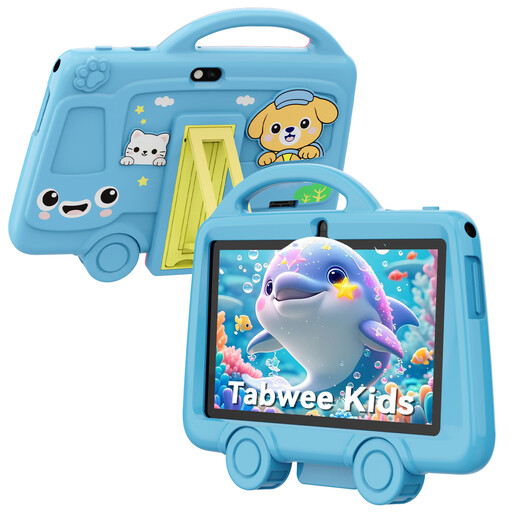
TABWEE K8 Kids’ Tablet, 7-inch, Blue
A child-focused tablet for home apps, media and headphone listening; the product information says adult supervision is required and it is not suitable for children under 3.
- 3 GB RAM and 32 GB storage
- 2.4 GHz Wi-Fi, Bluetooth 4.2 and a 3.5 mm headphone jack
- 3,000 mAh battery; stated weight 285 g
View on Joybuy
 No image available
SUMTAB 10-inch Android 15 Tablet
An Android option for home apps and media; the product description says a protective case is included.
- 8 GB RAM and 128 GB storage
- Expandable storage up to 2 TB
- 6,000 mAh battery
View on Joybuy
 No image available
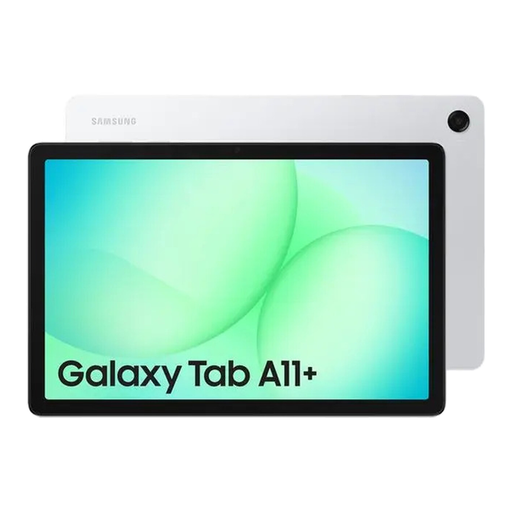
Samsung Galaxy Tab A11, 64 GB, Silver
For home media and video calls; check whether the included storage and any memory card meet your needs. The product details state that a charging adapter is not included.
- 8.7-inch display and 64 GB internal storage
- microSD expansion up to 2 TB
- 5 MP front camera; stated weight 335 g
View on Joybuy
 No image available
Alldocube Kido Children’s Tablet, 8-inch, Blue Case
The product description says Child Lock can manage screen time and content access; check how its controls work with the apps your child will use. The product title states that an adapter is not included.
- Android 15, 3 GB RAM and 32 GB storage
- 5,000 mAh battery and a 3.5 mm headphone socket
- Front and rear cameras listed as 2 MP and 5 MP
View on Joybuy
 No image available
TABWEE T20 10.1-inch Tablet Bundle
An Android tablet bundle for home use with a keyboard, mouse and stylus; check that the included accessories suit the child’s intended activities.
- 256 GB storage, expandable up to 2 TB
- 24 GB (8+16) RAM as stated in the product title
- Keyboard, mouse and stylus included in the listed bundle
View on Joybuy
Frequently asked questions
Should my child use a separate account on an iPad?
Apple Support (UK) advises setting up a separate Child Account rather than sharing an account. Family Sharing and Screen Time provide settings to review for your family’s intended use.
Will purchase approvals cover every app or change?
No single approval setting covers every kind of activity. Google For Families Help says Family Link purchase approvals apply to purchases through Google Play’s billing system, while Apple Support (UK) lists exceptions to Ask to Buy. Check the settings for the relevant store and apps.
What should I test before handing the tablet to my child?
Set up the relevant child account or profile, review app, content, communication and time settings, then test that a restriction works. UK government guidance also advises checking parental controls before giving a device to a child.
Does included children’s content stay included?
Check the terms for the exact bundle. Confirm how long any included subscription lasts, whether it renews and how to cancel it before the included period ends.
How can I compare security support between tablets?
Check the support information for the exact model and release rather than assuming every tablet from a brand has the same update arrangements. Samsung says the type and version of available updates depend on the device model.


