Choose a personal tablet if supervised learning, entertainment and calls at home are the main needs; consider a smartphone when the child needs independent contact away from home. A shared tablet can be a starting point if a personal device is not yet necessary. Whichever route you choose, check that the child account and the family controls you intend to use work with the exact devices and software involved; controls do not remove every online risk.
Who is each route for?
Families starting with use at home
If the child mainly needs supervised reading, learning, video and family calls, consider a tablet or shared profile before adding mobile communication. Samsung documents separate users on supported Galaxy tablets, giving families a shared-device option.
Families arranging contact away from home
When a child needs to call or message independently for collection arrangements, start by checking the calling plan and account setup. If location sharing matters too, check its settings: Apple requires Location Services, while Google’s Family Link location feature requires sharing to be enabled on the child’s compatible device.
Carers managing apps and routines
Child-specific accounts, download requests and time limits matter most when an adult can maintain the setup. Apple Screen Time uses Family Sharing and separate Apple Accounts; Google Family Link manages supervised accounts. Check which system works with the adult’s device as well as the child’s.
What matters before buying?
Personal tablet
Choose when: Supervised apps, learning and calls at home matter more than independent contact while out.
Trade-off: A home Wi-Fi setup will not meet a need for calls away from Wi-Fi; family controls also depend on the chosen account system.
Personal smartphone
Choose when: The child needs portable contact for journeys or collection arrangements.
Trade-off: Calling needs an appropriate plan, and location sharing and app permissions need active setup and review.
Shared tablet
Choose when: Use is mainly at home and the child does not yet need a device of their own.
Trade-off: Shared access needs an adult-managed account and may not suit independent contact or a persistent personal setup.
| Concern |
What to check |
Who this matters to |
| Accounts and supervision |
Check who manages the child account and whether the adult’s device supports the required family controls. For Apple Screen Time, each family member needs their own Apple Account in Family Sharing. |
If I need to approve apps and manage routines, I want an account setup I can keep using as my child grows; around 36% of consumers put adult-managed setup first. |
| Contact away from home |
Decide whether calls must work away from Wi-Fi, then check the calling plan. If location sharing matters, confirm the child-device settings and who can view the location. |
When my child needs to contact me about collection, home-only calls are not enough; for around 29% of consumers, independent contact is the primary need. |
| Learning and approved apps |
List the school services, reading apps and video-call tools the child needs. Check access through the child account and how download requests are handled. |
If lessons, books and games are the main use, I need those services to work under the child’s account; around 21% of consumers put managed learning and entertainment first. |
| Shared use and protection |
Consider whether a restricted shared profile is enough. For a child-focused tablet, check the included case, supported apps and any subscription terms. |
Before choosing a personal device, I would rather try shared use or a protected child tablet; for roughly 14% of consumers, limiting that initial commitment is the main concern. |
Mistakes to avoid
-
Handing over an adult’s account
Apple says its Screen Time parental management requires separate Apple Accounts within Family Sharing, while Google’s supervision route uses a child’s Google Account. Sharing an adult account is not a substitute for that child-specific setup.
Set up the child account before handing over the device, then try a download request and a time limit while the adult is present.
-
Assuming controls cover every app and activity
Google says Family Link purchase approvals apply to Google Play billing, system apps cannot have app limits, and parents cannot remotely view the child’s screen or listen to calls through the tool.
Check the controls for the particular apps, services and activities your family intends to use, rather than relying on a general parental-controls label.
-
Choosing a phone for home-only use
A tablet or shared profile may meet supervised learning and home-calling needs without taking on the phone’s portable-contact role. Samsung documents separate users on supported Galaxy tablets.
Write down when the child must contact someone away from Wi-Fi. If that need has not arisen, compare a tablet and shared-device setup first.
-
Expecting location sharing to work automatically
Apple family location sharing requires Location Services, and Google’s Family Link location feature requires sharing to be set up on the child’s compatible device. A location feature should not be assumed to be available in every situation.
Try the arrangement with the intended accounts and device before relying on it for collection plans, and explain to the child how it will be used.
Brands and family-management options
Apple
An iPhone or iPad route for families using Apple Accounts and Family Sharing.
- Apple Screen Time can manage apps, content, communications and device time; Ask to Buy can handle eligible requests within Family Sharing.
- Apple says a child under 13 in the UK needs a parent’s or guardian’s help and consent to create an Apple Account. Family members need separate accounts, and current feature access can depend on device updates.
Google
Supervised Google Accounts and Family Link provide an Android and Chromebook family-management route.
- Google describes app requests, screen-time controls and location sharing for compatible supervised devices.
- Location sharing needs setup, and Google Play purchase approvals cover Google Play billing rather than every payment route. Google also says parents cannot remotely view a child’s screen through Family Link.
Samsung
Galaxy tablets and phones offer Samsung family features alongside applicable Google controls; supported tablets can also provide a shared-device route.
- Samsung describes separate tablet users and positions Samsung Kids for use on a shared or adult device.
- Samsung says Galaxy for Families child-account parental controls require Galaxy devices running One UI 6.1 or later. Check the exact model and installed software before choosing that route.
Amazon
Fire Kids tablets are a child-focused tablet route for families concentrating on parent-managed content and time routines.
- Amazon’s Fire HD 10 Kids listing for ages 3–7 includes a protective case, one year of Amazon Kids+ and a two-year worry-free guarantee. Amazon Kids offers daily limits and age filters.
- Check that the required school and communication apps work for the child, and review the subscription terms after the included period.
Joybuy tablets for supervised home use
These children’s tablets relate to the personal-tablet route for learning and entertainment at home. Before choosing one, check the child-account controls and the apps your family needs; a protective case or children’s-tablet label does not establish those functions.
 Image unavailable
Alldocube Kido 8-inch tablet with blue case
Consider this for supervised learning and entertainment at home if its child controls work with your family’s accounts and required apps.
The listing identifies Android 15, 3 GB RAM, 32 GB storage, 5G Wi-Fi and a 5,000 mAh battery. It describes child-lock, screen-time and content-filter functions; check their setup and parent-device compatibility before buying.
The title says no adapter is included, so check the charging equipment you will need.
View on Joybuy
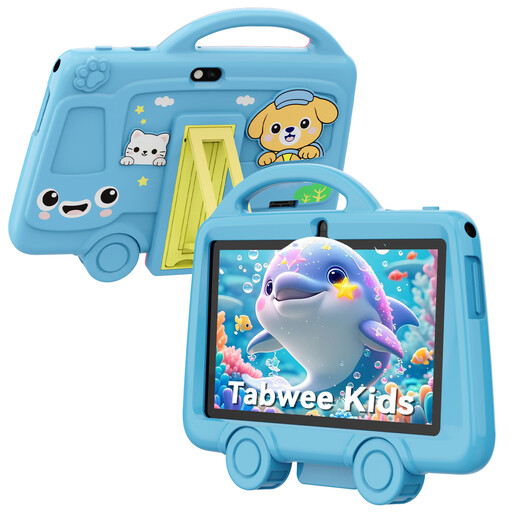 Image unavailable
TABWEE K8 7-inch children’s tablet, blue
Consider this for educational apps, games and video at home, subject to checking the child-account setup and the apps you need.
The listing identifies 32 GB storage, a 3,000 mAh battery and 2.4 GHz Wi-Fi. Confirm the RAM of this blue variant before ordering: its product information gives both 3 GB and 2 GB.
The product information calls for adult supervision and says the tablet is not suitable for children under 3.
View on Joybuy
 Image unavailable
TABWEE K8 7-inch children’s tablet, 2 GB RAM
Consider this for supervised educational apps, games and video at home after checking the required apps and child-account arrangements.
This variant lists 2 GB RAM, 32 GB storage, a 3,000 mAh battery, 2.4 GHz Wi-Fi and a protective case.
The product information calls for adult supervision and says the tablet is not suitable for children under 3.
View on Joybuy
Questions parents ask
Does a child under 13 need help setting up an Apple Account in the UK?
Yes. Apple says a child under 13 in the UK cannot create an Apple Account without a parent’s or guardian’s help and consent and must be in a Family Sharing group. Apple’s Screen Time parental management also requires separate Apple Accounts for family members.
Can Family Link manage apps, screen time and location on a child’s Android device?
Google says Family Link can manage app requests and screen-time settings for supervised accounts and show a compatible child device’s location. Check device compatibility and enable location sharing; Google Play purchase approvals apply only to Google Play billing.
Could a shared tablet work instead of a first personal device?
Yes, if the child’s use is mainly at home and independent contact is not required. Samsung documents separate users and restricted profiles on Galaxy tablets; an adult still needs to manage the administrator account and access to apps.
Do online-safety duties make a child’s device safe by default?
No. GOV.UK describes child-protection duties for in-scope online services under the Online Safety Act from 25 July 2025; those duties are not a guarantee about a tablet, phone or parental-control tool. Check the child’s accounts and apps, and agree how the device will be used.


