What to check before buying
Games console
Consider it when: your child’s intended games are tied to a particular console and you want gaming-focused family settings.
Trade-off: settings differ by platform, and you may need to check game-specific online membership and disc support.
Tablet
Consider it when: the intended games work on a tablet and the device will also be used for media or other apps.
Trade-off: purchase approvals and app limits depend on the account, software and payment system being used.
Smartphone
Consider it when: your family also needs phone functions and the intended games run on that phone.
Trade-off: phone communication features and controls for an individual game’s chat are not necessarily the same thing.
PC or laptop
Consider it when: your child needs a PC-only game or also needs a computer.
Trade-off: operating-system, game-service and individual-game settings can have different scopes.
Ofcom advises parents to check a child’s account age, the games they play and who they play with. Use those checks alongside the exact platform and game settings when comparing devices.
| Concern |
What to check when buying |
Who this matters to |
| Who can communicate with the child |
Check the game’s chat and friend settings against the platform’s child-account controls. On Switch 2, check GameChat separately. |
If my child wants to talk with friends while gaming, I need to check both the platform and the game. Around 29% of consumers put communication first. |
| Age-appropriate accounts and games |
Confirm how to set up a separately managed child account, then check age settings for the game and app store. |
I want my child’s account and game access to match our family’s age rules. Around 23% of consumers prioritise age-appropriate access. |
| Purchase permissions and ongoing costs |
Check where the game takes payment, which approvals apply and whether online play requires a membership. |
If I need oversight of game spending and subscriptions, I’ll check the store and the game’s payment route. Around 18% of consumers put spending first. |
| Play-time management |
Check whether the family needs device schedules, game limits or both, and which account must be signed in. |
I need play to fit our household schedule, including when my child uses more than one device. Around 18% of consumers prioritise time limits. |
| Game and format compatibility |
List the intended games and friends’ platforms, then check cross-platform play, disc support and online-play terms. |
If my child has a particular game, friends’ platform or disc collection in mind, I’ll check compatibility before choosing. Around 12% of consumers put game and format compatibility first. |
Joybuy product options
These Joybuy options cover supervised PC gaming, tablet use and console play. Match the exact games and family-account settings to your household before choosing.
 Image unavailable
Lenovo LOQ Essential 15ARP11, 16GB RAM, 1TB SSD, RTX 5050
A Windows gaming laptop for a family considering supervised PC gaming. Microsoft describes screen-time limits for devices connected to a family group.
Windows 11 Home; AMD Ryzen 7 170; 16GB RAM; 1TB SSD; GeForce RTX 5050; 15.6-inch 144Hz FHD display.
View on Joybuy
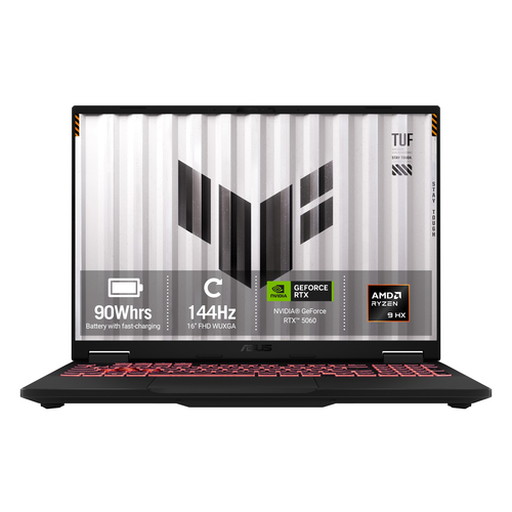 Image unavailable
ASUS TUF Gaming A16 FA608PM-TU091W, RTX 5060, 16GB, 1TB
A Windows gaming laptop for a family considering supervised PC gaming. Microsoft describes screen-time limits for devices connected to a family group.
Windows 11 Home; Ryzen 9 8940HX; RTX 5060 Laptop GPU; 16GB DDR5 memory; 1TB SSD; 16-inch WUXGA 144Hz display.
View on Joybuy
 Image unavailable
Nintendo Switch 2 Console, UK Version
A console option for a child whose intended games suit Nintendo’s platform. Nintendo documents separate GameChat approvals and eShop restrictions managed through a parent or guardian’s Nintendo Account in a family group.
The listing identifies a hybrid console for handheld and TV gaming and includes Joy-Con 2 controllers. Check the intended game’s online-play and membership terms.
View on Joybuy
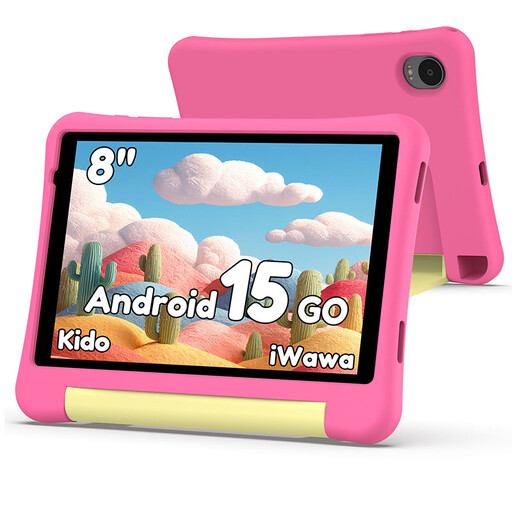 Image unavailable
Alldocube Kido Children’s Tablet, 8-inch, Android 15, 3GB+32GB
A children’s tablet option for games and media. The listing identifies Child Lock; check the intended games and the family’s supervision settings separately.
Android 15; 3GB RAM; 32GB storage; pink protective case. The product name specifies no adapter.
View on Joybuy
 Image unavailable
Xbox Series S 512GB Console, White
A console option for a child whose games suit Xbox. Xbox documents family settings for communication, multiplayer and screen time.
All-digital console with a 512GB SSD and an Xbox Wireless Controller. It does not play disc-based games.
View on Joybuy
Frequently asked questions
Does my child need a separate account?
For Apple’s documented child controls, the child needs their own Apple Account in Family Sharing, and Nintendo eShop restrictions require a supervised Nintendo Account in a family group. Xbox and PlayStation family settings also depend on managing the child as a family member, so check the account arrangement for the exact platform.
Will device parental controls stop every in-game message and purchase?
No single set of device controls should be assumed to cover every game’s messages and payments. Google limits purchase approval to Google Play billing, while Nintendo documents Switch 2 GameChat settings separately; check the intended game’s communication and checkout arrangements too.
Do online games require a paid membership?
It depends on the platform and game. Nintendo says many Switch games require Nintendo Switch Online but identifies free-to-play exceptions; PlayStation Plus is a paid online-multiplayer service. Check the current terms for the particular game and console.
What should I check when setting up or replacing the device?
Check the child account’s age and settings, the games they play and whom they play with. For a replacement, also confirm that the software version supports the parental-control features you plan to use and that the intended games and any existing discs work on the new device.
Are PEGI ratings relevant when choosing games for a child?
Yes. The UK government states that games rated PEGI 12, 16 or 18 cannot be sold or hired to someone below the stated age. That restriction concerns the supply of those games, not a requirement to buy a particular type of device; account and chat settings address separate questions.


