What to check before buying
Start with where the child will play, then check which account governs each game, payment route and chat feature. A family-management app helps with compatible accounts and devices, but does not replace a game’s own settings.
Games console
Consider it when: The child mainly plays on PlayStation, Xbox or Nintendo hardware and will use their own account in that console’s family setup.
Keep in mind: Controls differ by manufacturer and feature; Nintendo says GameChat settings are separate from some other Switch communication restrictions.
Tablet or phone
Consider it when: The child also needs a general-purpose device and the intended apps fit an Apple Screen Time or supported Google Family Link setup.
Keep in mind: Apple and Google controls have different account requirements, and a game’s own chat or payment service may need separate settings.
Windows PC
Consider it when: The child needs PC games and you can set up both a standard child Windows account and the relevant game-platform accounts.
Keep in mind: Microsoft Family Safety and a launcher such as Steam manage different parts of the experience; Microsoft warns that family features may not work properly with an administrator account.
| Concern |
What to check when buying |
Who this matters to |
| Chat and multiplayer |
Identify whether each intended game uses console chat, a publisher account or another voice service; check the corresponding child-account settings. |
I want to know who my child can contact during online play, even if tighter settings limit multiplayer features. Around 27% of consumers put communication control first. |
| Game and app access |
Check age-based filters and whether the store or launcher the child will use allows individual-game requests or exceptions. |
If my child finds games through more than one store, I need access restrictions that apply where those games are obtained. Roughly 27% of consumers make suitable content their primary concern. |
| Purchase approval |
Check the intended store, payment methods, subscriptions and whether approval also covers existing credit or gift cards. |
I do not want an approval setting to miss a payment route my child can use. About 20% of consumers prioritise spending control. |
| Time across devices |
Check which devices and game accounts can join the family setup, and where app or playtime limits apply. |
When play moves between devices, I need limits I can manage across the accounts my child actually uses. Around 26% of consumers put cross-device management first. |
Joybuy product choices
These choices cover an Xbox console for console-based play and an Android tablet for apps and games. Compare their account setups against the games and controls your child needs; a hardware choice alone does not settle those settings.
 No image available
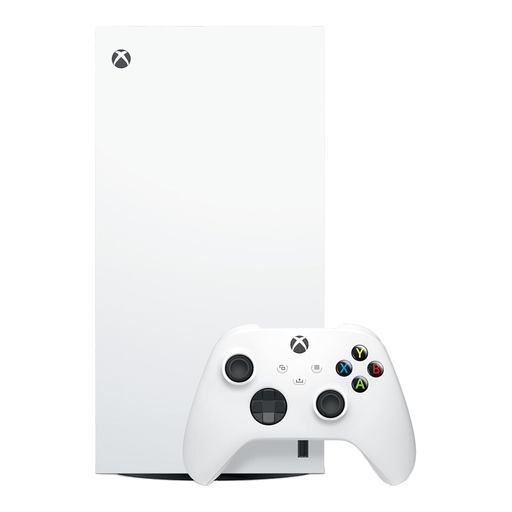
Xbox Series X 1TB Digital Edition, White
Consider this for a child mainly playing on Xbox if you will set up their own account in an Xbox family group.
This is the 1TB Digital Edition; it has no optical drive, so check how the child will access their games.
Xbox family settings cover content, communication, multiplayer and screen time. Check each game’s separate services and the payment methods available to the child.
View on Joybuy
 No image available
Alldocube Kido 8-inch Android 15 tablet, 3GB+32GB, blue case
Consider this tablet for a child using Android apps and games if its supported account setup covers the controls you need.
The listed variant has a Unisoc T310 processor, a 5000mAh battery, two speakers and a 3.5 mm socket; no adaptor is included.
Check what the advertised Child Lock controls and whether this tablet supports your intended Family Link setup. Google Play purchase approvals apply to Google Play billing, not every payment route.
View on Joybuy
Common questions
Are a device’s parental controls enough for online games?
Not necessarily: device and family-account settings can manage some access, spending, playtime and communication permissions, while a game may use its own account or chat feature. Check the intended game’s privacy and communication settings as well as the device controls.
Should a child use a parent’s gaming or app-store account?
Use the child or supervised account required by the family-control system you plan to use. Apple, Microsoft/Xbox, Google and Steam describe controls tied to their respective family setups; an unrestricted adult account can bypass the account-level settings you intended for the child.
Will purchase approval cover every game-related payment?
No single approval setting should be assumed to cover every payment route. Google says its approval setting applies to Google Play billing, while Xbox says available currency or Xbox gift cards do not require purchase approval. Check store credit, gift cards, subscriptions and any separate in-game billing the child could use.
What needs setting up on a child’s Windows gaming PC?
Start with the child’s own standard Windows account in the Microsoft family group and connect the device. Then configure the relevant Microsoft controls and any game-platform family settings, such as Steam Families, separately. Microsoft warns that Family Safety features may not work properly if the child is an administrator.


