Choose a console, tablet or family PC around the games and communication features your child wants, then check whether its account and parental controls meet your household’s needs. Consoles offer family-control tools, tablets also give access to other apps, and a family PC calls for checks across the computer account and individual game services. Whichever route you choose, review each game’s age information, chat features and payment settings separately.
Who this is for
Parents managing online chat and multiplayer
If a child wants to play or talk with other players, the choice of device needs to include a check of both platform controls and the game’s own social features. Ofcom advises parents to check gaming settings and talk with children about who they play with online.
Parents managing digital spending
Downloads, in-game purchases and access to an adult account can all affect the setup. A separate child account helps parents apply controls, but purchase approvals have different limits: Xbox, Google and Apple each describe controls tied to their own accounts or payment systems.
Parents choosing a shared family device
When several people use one console, tablet or computer, check whose account each child will use and whether rules apply per child or to the whole device. Nintendo says its Switch parental controls apply to the console rather than to each individual player.
What to check before choosing
Start with the games your child wants to play, then check the account, communication, purchase and time controls for each possible device. A control that works at platform level may not cover every feature or payment route within a game.
| Concern |
What to check |
Who this matters to |
| Chat and multiplayer |
Check child-account communication and multiplayer settings, then the intended games’ chat and friend features. Nintendo Switch 2 GameChat needs separate attention. |
If I want my child to play with others but limit unwanted contact, I need to know which interactions I can manage. Around 33% of consumers put communication control first. |
| Accounts and spending |
Set up a child account and protect the adult profile. Check which purchases require approval and whether account funds or other payment routes fall outside it. |
If my child can download games or reach a payment method, I want their own sign-in and clear spending rules. Around 27% of consumers make account and purchase control their main concern. |
| Game suitability |
For each intended game, check platform availability, its PEGI rating and descriptors, and its online and in-game-purchase features. |
If a particular game is driving the purchase, I need to establish that it runs on the device and suits my child before choosing the hardware. Around 20% of consumers put game suitability first. |
| Shared use and play time |
Find out whether limits apply per child account or to the whole console or device, and how each child will sign in. |
With more than one child using the setup, I need rules we can apply consistently without relying on a shared adult profile. Play-time and shared-use controls come first for around 20% of consumers. |
Common buying mistakes
-
Assuming parental controls cover every chat and payment feature
Platform settings have boundaries. Nintendo treats Switch 2 GameChat separately from some communication restrictions; Google says Google Play approvals cover only Google Play billing; and Xbox says a child can still spend gift cards or money already in their Microsoft account.
Check each intended game’s chat, friend, multiplayer and payment features, then try its settings while signed in to the child account.
-
Letting a child play through an adult account
Age-based settings and family-management roles depend on the account being used. Ofcom advises registering children with their correct age, while Xbox says its child and teen account categories depend on details supplied at account creation.
Create a separate account with the child’s correct age, add it to the relevant family group and protect adult profiles with a PIN, passcode or password.
-
Overlooking how rules apply on a shared console
Nintendo says Switch parental controls apply to the whole console, not separately to each player. That distinction matters when children sharing a device need different rules.
Decide whether one console-wide setting works for your household. If each child needs different limits, check how another shortlisted setup handles individual child accounts before buying.
-
Checking the hardware before the games
The games a child expects to play determine which platform, PEGI information and online features need reviewing. A game’s age rating alone does not describe every chat or payment decision.
List the intended games first. Check availability, PEGI ratings and descriptors, online requirements, communication and in-game purchases for each one.
Relevant platform brands
These brands illustrate different family-control arrangements to examine alongside the games your child wants; the controls and limitations below apply to the specified platforms and accounts.
Nintendo
Nintendo Switch 2 and Nintendo Switch offer a portable or shared-console route with a dedicated Parental Controls app.
- Nintendo describes app-linked activity checks, play-time limits and communication restrictions for its Switch consoles.
- Nintendo says controls apply to the whole console rather than each player. Switch 2 GameChat settings need a separate check.
Xbox
Xbox consoles and Microsoft family accounts may suit households also considering Windows PC gaming.
- Xbox describes family settings for content, screen time, social communication, multiplayer and purchase approval.
- Xbox says purchase approval does not prevent a child account from using gift cards or money already held in that Microsoft account.
PlayStation
PlayStation 5 and PlayStation 4 family setup centres on a family manager adding separate child members.
- PlayStation describes child-account controls, including settings for game age ratings, play time and spending.
- A child playing through a shared adult profile is not using the controls configured for a child member.
Apple
An iPad can combine gaming with other apps under Family Sharing, a Child Account and Screen Time.
- Apple describes controls for downloads, purchases, communication, apps and content through its family tools.
- Use the child’s own Apple Account and check each game’s online and payment features separately. Apple advises keeping family devices updated so settings synchronise.
Google
Family Link offers supervision for supported Android tablets and Chromebooks.
- Google describes app-access, screen-time, Google Play maturity and eligible purchase-approval controls for supervised devices.
- Google says Family Link cannot supervise iPhones, iPads or non-Chromebook computers, and Google Play approvals cover only Google Play billing.
Joybuy console choices
These Nintendo Switch 2 listings are choices for households considering a shared or portable console. Compare the listed variants, then check the child’s intended games and whether Nintendo’s console-wide controls suit everyone who will use it.
 No image available
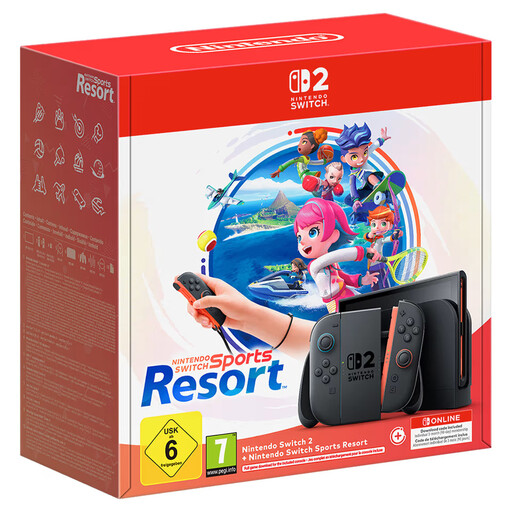
Nintendo Switch 2 Console + Nintendo Switch Sports Resort
Consider this listing if you are choosing a Switch 2 console alongside the named game; check that the game and its online features suit your child before purchasing.
Nintendo describes app-managed activity checks and play-time limits for Switch 2. Its parental controls apply to the whole console rather than each player, and GameChat needs a separate settings check. Confirm the relevant account and payment settings for your household.
View on Joybuy
 No image available
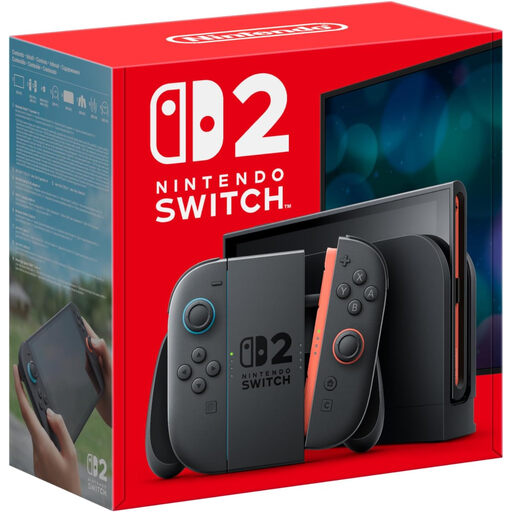
Nintendo Switch 2 Console (UK Version)
This UK Version listing suits a household considering the Switch 2 console route; check the precise contents of the listing against what you intend to buy.
Nintendo’s Parental Controls app can help manage play activity and time, but its rules apply to the whole console. Review the intended games’ age and online features, along with the account and payment settings, before deciding.
View on Joybuy
Questions parents ask
Should I use my child’s real age when creating a gaming account?
Yes. Ofcom advises registering children with their correct age because platform features and restrictions can depend on it. Xbox also says its child and teen account categories depend on the date of birth and country or region supplied during setup.
Can my child use my adult account on a shared console?
Use a separate child account if you need age, spending or communication controls for your child. Xbox, PlayStation and Apple each describe family settings built around individual child members or accounts; an adult sign-in is not a substitute for that setup.
Will purchase controls cover every game payment?
No single approval setting should be assumed to cover every payment route. Xbox says child accounts can still use gift cards or existing Microsoft account funds, and Google says its approvals apply only to Google Play billing. Apple offers Child Account purchase controls, but you should also check the payment options within each intended game.
Is a PEGI rating enough to decide whether a game is suitable?
No. PEGI information helps with age suitability and game content, but also check the game’s online interaction and in-game-purchase features. Ofcom advises parents to review settings and talk with children about who they play with online.


