What to consider before buying
Start with the games and other activities the child needs, then check how the device, account and individual games handle communication, content, time and spending.
| Concern |
What to check when buying |
Who this matters to |
| Who can communicate |
Check the child’s age and account permissions, cross-network settings where available, and chat controls in each game. |
If I need to know who can reach my child through a game or platform, I would prioritise communication settings; around 31% of consumers put control over contact first. |
| Age-appropriate access |
Check the child account’s age details and access settings separately from each game’s age rating. On a shared Switch 2, note that restrictions apply to the console. |
When I want the account and available games to reflect my child’s age, those access controls come first; around 25% of consumers prioritise age-appropriate accounts and content. |
| Device fit |
Check that the games and apps the child wants work on the device, and whether the household needs handheld or TV play or a disc drive. |
If the child needs particular games alongside other activities, I would match the device to those uses before choosing; around 19% of consumers put device fit first. |
| Playtime rules |
Check whether limits apply to a console, account or app, and whether they notify or stop use. Some controls require a parent app. |
When devices are shared, I would check whose play the limits affect and how they fit the household routine; around 13% of consumers prioritise playtime rules. |
| Purchases and ongoing costs |
Check the payment route for each game, store approval settings, disc compatibility and any membership needed for online play. |
If I want to manage game spending and recurring online-play costs, I would check each service rather than relying on one store setting; around 12% of consumers put spending and costs first. |
Relevant brands to consider
These brands document different device and account-control options; their features apply to the relevant products and services, not necessarily to every product from a brand.
Nintendo
Switch and Switch 2 consoles for households considering handheld and TV play with console parental controls.
- Nintendo documents console restrictions and playtime features through its parental-controls app.
- Switch 2 restrictions apply to the console rather than an individual user. Nintendo also requires additional app-based parental setup for under-16s using GameChat.
PlayStation
PS5 options for households whose intended games are on PlayStation and that plan to use child-member controls.
- PlayStation documents child-account controls for games, communication, playtime and spending.
- The cited Digital Edition has no disc drive, and PlayStation says paid PlayStation Plus is required for online multiplayer on that model page.
Xbox / Microsoft
Xbox consoles and Windows PCs for households considering Microsoft family-group management.
- Xbox lists age-based content, screen-time, social communication and multiplayer settings; Microsoft also documents Family Safety features on Windows.
- The Xbox Series S is all-digital. Xbox settings should not be assumed to govern every game’s chat or billing.
Apple
iPad options for households that want a tablet for games and other apps alongside Family Sharing and Screen Time.
- Apple’s documented Screen Time setup uses Family Sharing and individual Apple Accounts for family members.
- Apple’s Mac Communication Limits cover calls, FaceTime, Messages and iCloud contacts; check the intended iPad software and each game’s own settings separately.
Google
Family Link for households considering a compatible Android device or Chromebook.
- Google documents supervised-account controls for apps, screen time and selected Google services.
- Google’s purchase-approval route applies to Google Play billing, so check other payment routes separately.
SteelSeries
Arctis headset accessories for households considering a physical microphone-mute control alongside separately managed chat settings.
- SteelSeries describes a physical mute on Arctis microphones.
- A microphone mute is not an account control and does not determine who can contact the child. Check compatibility with the exact device.
Joybuy product choices
These Joybuy options cover games consoles and children’s tablets for gaming and other uses. Check the exact games, account settings and controls the child will need before choosing a device.
 No image available
Nintendo Switch 2 Console (UK Version)
Consider it if the child wants games available on Nintendo Switch 2; check the console-wide restrictions when the device is shared.
Nintendo says Switch 2 restrictions apply to the console rather than an individual user. Under-16s need additional parental setup to use GameChat.
View on Joybuy
 No image available
Sony PlayStation 5 Console, Digital Edition, Slim Version
Consider this variant if the child’s intended games are on PlayStation and the household is comfortable with digital games.
PlayStation documents child-account controls. This all-digital console has no disc drive; PlayStation says paid PlayStation Plus is required for online multiplayer on the cited model page.
View on Joybuy
 No image available
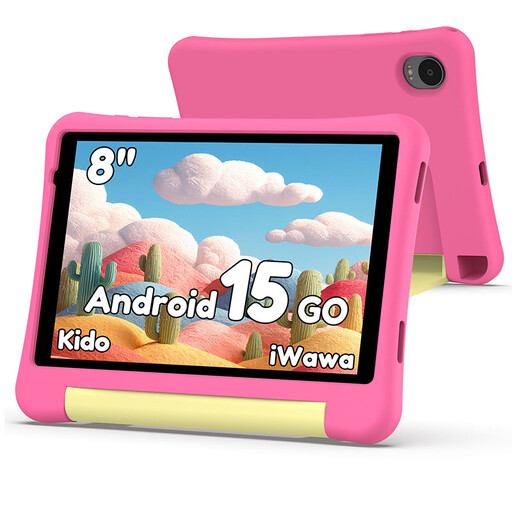
Alldocube Kido Children’s Tablet, 8 Inch, Android 15, Pink Protective Case
Consider it if a child needs a tablet for games and other apps; check how its child controls work with the accounts and services they will use.
The product name specifies Android 15, Child Lock, Unisoc T310 and 3GB+32GB. The AC adapter is not included.
View on Joybuy
 No image available
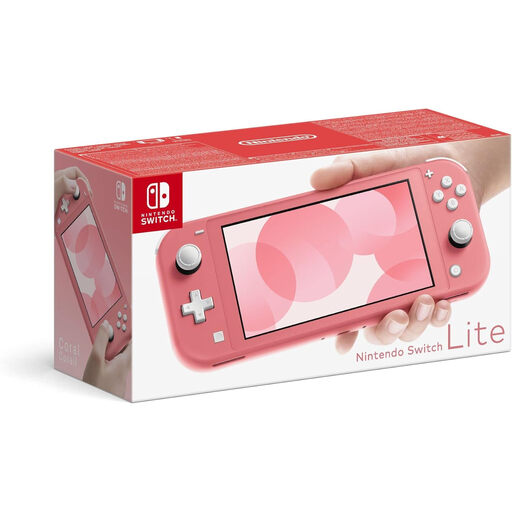
Nintendo Switch Lite - Coral
Consider it if the child wants a handheld Nintendo console; check that handheld-only play suits the household.
This model has Wi-Fi and online features, but no TV output, detachable controllers or kickstand.
View on Joybuy
 No image available
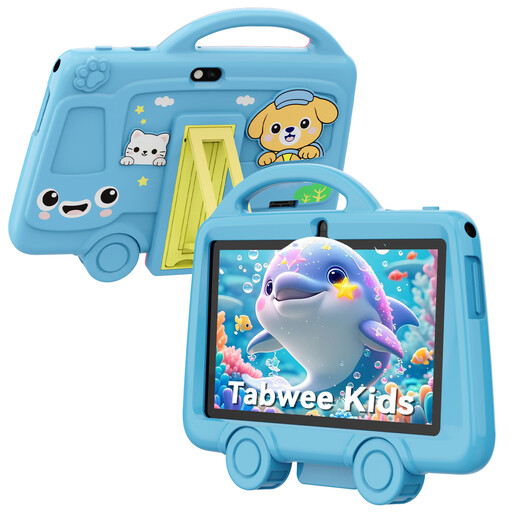
TABWEE K8 Kids’ Tablet, 7-inch, 3 GB RAM + 32 GB storage
Consider it if the child needs a tablet for games and apps; check the settings for the accounts and services they will use.
The product description lists Wi-Fi, Bluetooth 4.2 and a 3.5 mm headphone jack. Its stated weight is 285 grams.
View on Joybuy
Frequently asked questions
Will a child-account setting control chat inside every game?
Do not assume it will. Check the platform account and the particular game or linked service: Nintendo documents separate GameChat controls, while Roblox says a linked parent account is needed to manage a child’s Roblox parental controls.
What should I set up before handing over a new device?
Create or link the child’s own account with the correct age, set the relevant platform controls, then test them on the games and apps the child will use. UK government guidance recommends checking that parental controls work before giving a device to a child.
Does a headset’s mute button make online chat safe?
No. SteelSeries describes its Arctis microphone mute as a way to mute that microphone; it does not set account or game communication permissions. Check those settings separately.
Could online play or purchases cost more after buying the device?
Yes, depending on the games and services chosen. PlayStation says paid PlayStation Plus is required for online multiplayer on the cited PS5 Digital Edition page. Check each game’s membership requirements and payment route; Google Play purchase approvals apply to transactions using Google Play billing.
Does a UK PEGI rating replace parental controls?
No. UK government guidance says games rated PEGI 12, 16 or 18 cannot be sold or hired to someone below the respective age requirement. A rating does not configure online chat or spending permissions, so check those controls separately.


