What to prioritise when choosing
Start with the child’s correct-age account and intended games, then compare communication, household settings and ongoing online-play costs. Device controls do not necessarily cover every game’s chat or purchase system.
| Concern |
What to check when buying |
Who this matters to |
| Who can contact the child |
Check account-level communication and multiplayer permissions, then review the intended game’s chat and friend settings. |
If I need to manage who can message or speak with my child, I want to know which settings apply in the account and in each game. Around 28% of consumers put contact controls first. |
| Correct-age accounts and content |
Use the child’s correct registered age and check the platform’s content settings against the games they want to play. |
I want age settings to reflect my child’s actual age and to understand what that means for content access. Around 22% of consumers prioritise age and content controls. |
| Shared use and playtime |
Check whether limits apply to a console, an account or each device, and how they work for everyone who shares it. |
When several people use the same device, I need settings that fit our household’s routine. Around 22% of consumers focus on shared-device arrangements and playtime. |
| Purchases and online-play costs |
Check where purchase approvals apply and whether the specific game or feature needs a paid membership. |
If I want to manage spending and recurring memberships, I need to check the rules for the game and payment system we will use. Around 17% of consumers make these costs their main concern. |
| Fit with the intended games |
Confirm that each game works on the device and check whether the household needs handheld play, a TV connection, discs or a computer. |
I need the child’s intended games to work in the way our household plans to play them. Around 11% of consumers prioritise game and device fit. |
Joybuy product options
This selection includes a Windows gaming laptop and handheld consoles, including Nintendo Switch 2 and retro handheld models. Before choosing a device for a child’s online play, check the intended games, account settings and communication controls for that specific device.
 No image available
Lenovo LOQ Essential 15ARP11 Gaming Laptop
A Windows gaming laptop to consider if the child’s intended games need a computer; check the relevant account settings and whether the child has administrator access.
AMD Ryzen 7 170 processor; GeForce RTX 5050 graphics; 16GB RAM; 1TB SSD; 15.6-inch 144Hz FHD display; Windows 11 Home.
View on Joybuy
 No image available
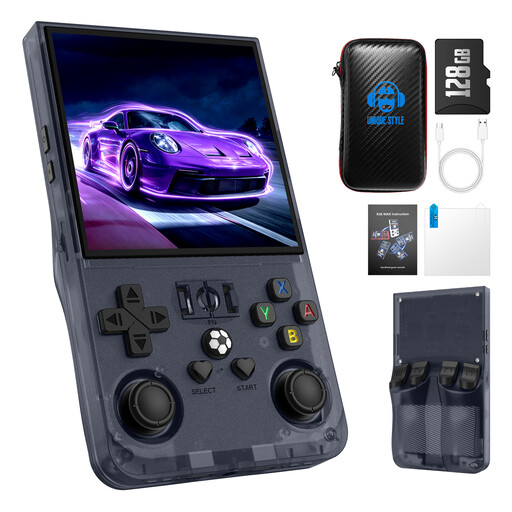
AISLPC R36MAX Retro Handheld Game Console, 64GB, Grey
A portable retro handheld to compare for on-the-go play. Before choosing it for online gaming, confirm that the intended games and their account and communication controls are supported.
4.0-inch IPS display; 720 × 720 resolution; Linux system; 64GB storage; 4000mAh battery.
View on Joybuy
 No image available
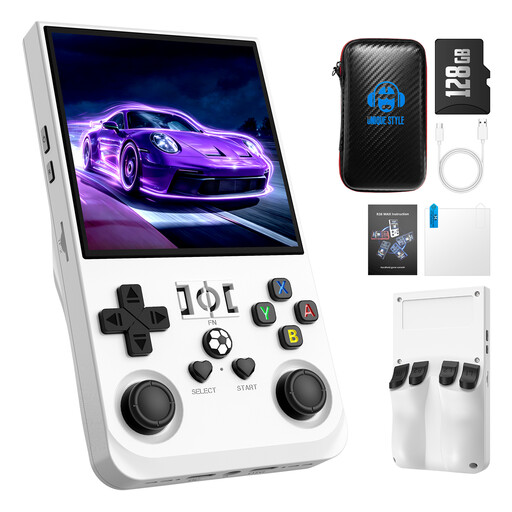
AISLPC R36MAX Retro Handheld Game Console, 128GB, White
A portable retro handheld to compare for gaming on the go. Check that the child’s intended games and any required account or communication features work with the device.
4.0-inch IPS display; 720 × 720 resolution; Linux system; 128GB storage; 4000mAh battery.
View on Joybuy
 No image available
Nintendo Switch 2 Console + Nintendo Switch Sports Resort
Consider this bundle if handheld and TV play both matter and the intended games fit Switch 2. Nintendo’s general console restrictions apply to everyone using the console; supervised GameChat has separate parental-control settings.
The bundle is described as including Nintendo Switch Sports Resort and a 3-month Nintendo Switch Online Individual Membership. Nintendo says GameChat requires Nintendo Switch Online and parental approval for children.
View on Joybuy
 No image available
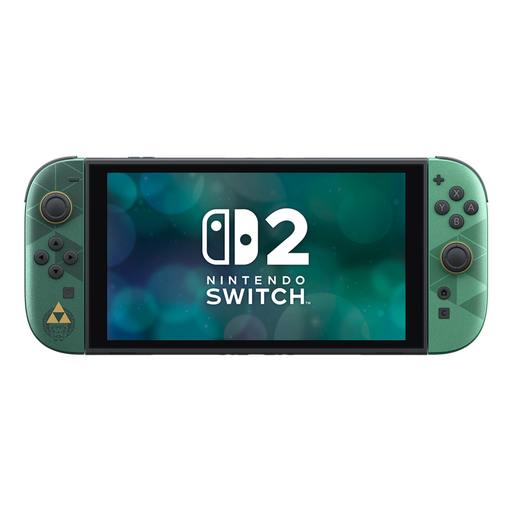
Nintendo Switch 2 The Legend of Zelda 40th Anniversary Edition Console
A Nintendo Switch 2 option to compare if the child’s intended games fit the platform and the family wants handheld or TV play. Check the account setup and online requirements of each intended game.
Nintendo documents handheld and docked TV play for Switch 2. Supervised users need parental-control setup to use GameChat, which requires a Nintendo Switch Online membership.
View on Joybuy
Questions parents ask
Can I use my own account for my child?
Set up the child using their correct age and the platform’s child or supervised-account option. Ofcom notes that registered age can affect features and content; Sony requires a child to be added to a family for its parental controls, while Apple advises children to use their own account rather than share one.
Will the console’s parental controls stop every in-game conversation?
Do not assume they will; compare the console’s communication and multiplayer settings with those in each intended game. Nintendo documents separate approval settings for supervised users of Switch 2 GameChat, and Ofcom advises parents to review settings and talk with children about who they play with.
What should I set up before my child uses the device?
Create or add the child’s account, review device and game settings, and test that the controls work before play. UK government guidance recommends checking parental controls and revisiting them when children get access to new games or devices and as they grow older.
Does online gaming always require a console subscription?
No; it depends on the game and feature. Nintendo says some games can be played online without Nintendo Switch Online, while Switch 2 GameChat requires it. Sony says PlayStation Plus is needed for online play in the majority of purchased games but not most free-to-play games; Microsoft says free-to-play multiplayer is open to every Xbox player.
Is a child’s account age the same as a game’s UK age rating?
No. The account age can affect platform features and restrictions. Separately, UK government guidance says games rated PEGI 12, 16 or 18 cannot be sold or hired to someone below the relevant age; this concerns the supply of rated games, not a universal age limit for online play.


