Friends-first families
If your child has particular friends and games in mind, check whether their game editions, devices and child accounts can play and communicate together.


Start with the games your child wants to play, the editions their friends use and the devices those friends have; then check each game’s multiplayer and communication rules before choosing a device. A console may suit TV or tabletop play, a tablet may suit compatible mobile games, and a family computer may suit PC games and wider household use, but accounts, storage and ongoing service requirements differ.
If your child has particular friends and games in mind, check whether their game editions, devices and child accounts can play and communicate together.
If your child will play with family at home as well as online, consider the game’s local-player options, screen arrangement and controller needs.
If you want to set access, communication and spending controls before play begins, compare the device’s family settings with the controls available in each game.
Start with the games and people your child wants to play with, then compare the device route, family controls and physical setup that fit those plans.
Consider it when: the intended games run on the console and TV, tabletop or controller-based play fits your household.
Trade-off: console game libraries and accounts differ; some models are disc-free, and online services depend on the game.
Consider it when: the specific games and friend-play features are available in the tablet’s app ecosystem and touch controls suit your child.
Trade-off: a tablet does not establish access to a console or PC edition, and account controls vary by ecosystem.
Consider it when: the intended PC game or edition is supported by the chosen computer and the household also needs a general-purpose device.
Trade-off: a computer’s listed specifications alone do not establish that it will meet an individual game’s requirements.
| Concern | What to check when buying | Who this matters to |
|---|---|---|
| Game and friend compatibility | List the games, editions, friends’ devices and required accounts; confirm cross-play and online-play requirements for each title. | If I am choosing mainly so my child can join particular friends, their game editions and devices need to work together. Around 25% of consumers put game-and-friend compatibility first. |
| Online interaction | Check the child account’s communication permissions and the specific game’s chat, friend and age-check settings. | If I want to decide who can contact my child, I need to check both device and game settings. Around 25% of consumers prioritise setting boundaries for online interaction. |
| Family controls | Compare child-account setup, content and playtime tools, purchase approvals and any separate game settings. | If I want to manage access, playtime and spending, I need controls that fit the chosen device and games. Around 20% of consumers make family oversight their primary concern. |
| Ongoing costs | Check disc compatibility, each game’s online-service requirement, its purchase model and optional in-game spending. | If I am weighing the cost beyond the device, I need to know whether the games and online features require separate purchases or a membership. Around 15% of consumers focus first on ongoing costs. |
| Home setup and storage | Check the intended screen and local-player arrangement, included controls, usable storage and supported expansion format. | If space, shared play or downloads will shape where and how my child plays, I need the screen and storage arrangements to fit our home. Around 15% of consumers prioritise the physical setup and storage. |
A shared game name does not guarantee that different editions support the same multiplayer route. Minecraft, for example, distinguishes its PC-only Java Edition from Bedrock, which supports cross-platform play on supported devices.
Confirm the intended game edition, compatible devices and multiplayer permissions with the people your child hopes to play with.
Device family settings and a game’s own age checks or communication features can be separate. Ofcom has reported parental concern about children encountering strangers in online games; controls do not eliminate every risk.
Set the child’s actual age and account permissions, then review communication settings in each intended game.
Xbox Series S and PS5 Digital Edition are disc-free. Some console games also require an online membership for multiplayer, so an existing disc collection or a device purchase alone may not cover the intended use.
Check disc compatibility, the game’s online requirements and purchase permissions before choosing a console.
Nintendo Switch 2 has a built-in GameChat microphone, while game-storage expansion for that console requires microSD Express rather than a standard microSD card.
Confirm that chat is permitted and wanted, and check the console model, connection and storage format before adding accessories.
These brands illustrate the console, tablet and family-computer routes discussed here; the details below apply to the named products or product lines, not every device from each brand.
Nintendo Switch 2 offers handheld, tabletop and TV play for households considering a console route.
Xbox Series S is a disc-free console option, while Microsoft family tools cover connected Xbox and Windows accounts.
PS5 Digital Edition is a PlayStation library route for households choosing digital games.
The iPad (A16) is a tablet route for compatible mobile games and other household tablet use.
A Windows laptop can be a family-computer route when the intended PC game and broader computing needs justify it.
The products below span a family-computer route, console play and tablet-based gaming. Check that your child’s specific games and intended friend-play features are supported before choosing.
 No image available
A family-computer option to consider when the intended game’s requirements are met and the household also needs a Windows computer.
The listing specifies Windows 11, an AMD Ryzen 7 170 processor, GeForce RTX 5050 graphics, 16 GB RAM, a 1 TB SSD and a 15.6-inch 144 Hz FHD display. Check the requirements of each intended game.
 No image available
Consider this console bundle if the intended games suit Switch 2 and you want to assess TV or tabletop play for your household.
The listing describes TV and tabletop play and a Nintendo Switch Sports Resort download. Nintendo requires a Nintendo Switch Online membership for GameChat since the free welcome period ended in March 2026; check the child-account setup and each game’s online requirements.
 No image available
Consider a child-focused tablet if the intended games are available in its app ecosystem and touch-based play suits your child.
The listing specifies an 11-inch Full HD display, 4 GB RAM and 128 GB storage, with parental controls described for screen time, content access and approved apps. Check each game’s device compatibility and account features.
 No image available
Consider this tablet if its supported games and child-focused controls suit the intended use.
The listing specifies Android 15, 3 GB RAM and 32 GB storage, and describes Child Lock and screen-time and content controls. It says the AC adapter is not included.
 No image available
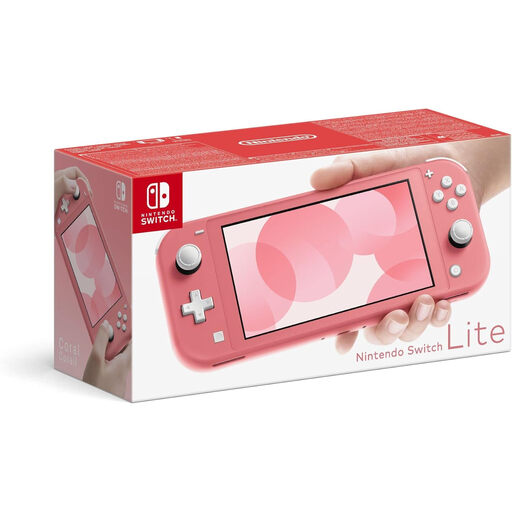
Consider this handheld-only console if portable play fits your household and the intended games support the required online features.
The listing specifies Wi-Fi, 32 GB internal storage and microSD expansion. It also states that this model has no TV output, kickstand or detachable controllers, so check whether its single-player handheld arrangement fits your plans.
No. UK Government guidance states that games rated PEGI 12, 16 or 18 cannot be sold or hired to someone below the stated age. Check the game’s online features and the platform and child-account communication settings separately; this is not a blanket legal age for owning a console or using every online game.
Not necessarily: Nintendo says Switch 2 has a built-in microphone. Nintendo requires Parental Controls app setup for GameChat users under 16, and a Nintendo Switch Online membership is required now that the free welcome period ended in March 2026. Check whether a separate headset suits your preferred audio setup before buying one.
No; check the specific game edition and its cross-play support. Minecraft, for example, distinguishes Bedrock cross-platform play from its PC-only Java Edition. Also check the game’s account and communication permissions.
No. Nintendo says Switch 2 needs a microSD Express card for game-storage expansion; an older, non-Express Switch microSD card cannot save or load digital games on Switch 2. Check internal free space and planned downloads before buying an expansion card.
Do not assume so. Nintendo identifies games that require a Nintendo Switch Online membership in their product information, and Sony states that paid PlayStation Plus is required for online multiplayer on its cited PS5 Digital Edition. Check the specific game and service terms before choosing.
Start with a child account in the chosen ecosystem, then check the individual game’s settings. Sony documents Family app settings, Microsoft provides Xbox and Windows family tools, Apple documents Family Sharing and Screen Time, and Google documents Family Link controls for a child’s Google Play use. Device settings do not establish that every game interaction is covered.