Choose the account setup and app ecosystem before settling on screen size: if a child will use the tablet independently, the household needs controls it can configure, and the required learning, video and game apps must work under the child’s account. A Fire Kids bundle may suit a younger child when its case and Amazon Kids setup fit the household; iPad and compatible Galaxy or Android tablets offer different family-account routes, so check the exact controls, storage and protection before buying.
Who is this for?
Parents setting up a child’s first independently used tablet
If a child will browse, watch or request downloads without an adult beside them every time, check how the intended platform handles a separate child account, purchase approvals, content restrictions and time limits. Apple Support and Google For Families describe controls that depend on their respective account setups.
Families combining learning and entertainment
For a device that needs to run particular educational activities alongside videos and games, start with those apps. Then check usable storage and whether a keyboard or stylus is compatible if the child will need one; a child-focused bundle and a general tablet need not offer the same app choices.
Households expecting frequent child handling
When the tablet will be carried and handled regularly, look at its size and weight with a fitted case, not just the bare device. Check what protection is included and read the applicable guarantee terms rather than assuming they cover every kind of damage.
What matters when choosing?
For one tablet serving learning and entertainment, settle the child-account and essential-app questions first. Protection and handling then help distinguish devices that otherwise fit the household’s activities.
Fire Kids bundle
Consider it when: A younger child would use a child-focused setup and the included case and Amazon Kids content fit the household; Amazon’s cited Fire HD 10 Kids listing is aimed at ages 3–7.
Check: Amazon says Fire tablets do not support Google Play, and the included Amazon Kids+ period on the cited bundle renews unless cancelled.
iPad with Family Sharing
Consider it when: The household wants iPadOS apps and can set up a separate Apple Account for the child within Family Sharing.
Check: Apple’s Screen Time and Ask to Buy features need the appropriate family setup and settings; protection must be considered for the particular iPad chosen.
Android or Galaxy tablet
Consider it when: The household needs particular Google Play apps and wants to assess a supervised Google Account or Samsung Kids.
Check: Google Play purchase approvals apply to Google Play billing, while Samsung says certain Galaxy child-account controls require One UI 6.1 or later.
| Concern |
What to check |
Who this matters to |
| Family management |
Confirm the exact model’s child-account setup and how it handles content, time limits and purchase requests. |
If my child will use the tablet without me beside them, I need to set boundaries for downloads and content that I can review as they grow. Around 33% of consumers put family management first. |
| Apps and storage |
Check essential apps on the intended platform and under its child profile; compare storage with planned downloads and offline content. |
A tablet needs to accommodate the learning activities, videos and games our household actually uses. App access and storage are the main priority for around 27% of consumers. |
| Protection and ownership |
Check whether a fitted case is included, what any guarantee covers and whether an included service renews. |
With frequent child handling, I would rather understand the protection and ongoing arrangements before choosing a bundle. Around 27% of consumers make those considerations their primary concern. |
| Size and portability |
Compare dimensions and weight with a case fitted; let the child try holding the size where possible. |
If the tablet will move between rooms or come on journeys, my child needs to hold and carry it comfortably. Handling comes first for around 13% of consumers. |
Buying pitfalls
-
Assuming included digital content lasts indefinitely
An included service period and the continuing tablet are different parts of a bundle. Amazon’s cited Fire HD 10 Kids bundle includes one year of Amazon Kids+ before the service renews unless cancelled.
Before activation, check when the included period ends, the renewal terms and how to cancel if the child no longer uses the content.
-
Choosing the tablet before checking essential apps
A child-focused interface does not establish that a particular learning or video app will run. Amazon states that Google Play is not supported on Fire tablets.
List the apps the child needs, then check their availability on the precise platform and within the intended child-account restrictions.
-
Treating parental controls as a one-time setting
Controls need to match the apps and independence a child has now, and those needs can change. UK government guidance also advises checking controls and discussing online safety with children.
Configure the child account before handing over the tablet, test the restrictions that matter to your household and review them as use changes.
-
Comparing a protected bundle with a bare tablet
The cited Amazon Fire HD 10 Kids configuration includes a case and a two-year worry-free guarantee; a different tablet and bundle may have different included items and terms.
Check case fit, screen-protector compatibility and the exact guarantee or fault terms for each configuration. Do not assume a guarantee covers accidental damage without reading its conditions.
Brands to consider for a child’s tablet
Apple
A general-purpose iPad route for households wanting iPadOS apps and a separate child Apple Account rather than a preconfigured child-tablet bundle.
- Apple Support describes Screen Time controls for content, communication and purchases, with Ask to Buy available for eligible requests.
- Ask to Buy depends on the child having their own Apple Account within Family Sharing. Check the selected iPad’s storage and any needed case or accessories separately.
Samsung
A Galaxy tablet route for families considering Samsung Kids alongside the account-management options available on their exact device.
- Samsung UK describes Samsung Kids settings for playtime and access to selected apps, contacts and media.
- Samsung says child-account parental controls in its Galaxy family setup apply only to Galaxy devices running One UI 6.1 or later. Confirm the model and software version before relying on them.
Amazon Fire
A child-focused bundle route for households considering Amazon Kids controls and the contents of a particular Fire Kids configuration.
- Amazon’s cited Fire HD 10 Kids listing for ages 3–7 includes a protective case, an Amazon Kids+ period and a two-year worry-free guarantee.
- Amazon says Fire tablets do not support Google Play. Check required apps and the renewal terms of any included service before choosing a bundle.
Child-oriented tablets on Joybuy
These child-oriented tablets are choices for a household combining learning activities with videos and games. Compare the exact device’s app compatibility and child-account controls rather than assuming its name establishes how those features work.
 No image available
Alldocube Kido children’s tablet, 8-inch, 3GB/32GB, blue case
Consider this child-oriented Android tablet if an 8-inch model with a protective case fits the intended use. The title specifies Android 15, 3GB RAM, 32GB storage and a 5000mAh battery; an adapter is not included.
Check the child-account controls and the availability of essential apps before buying.
View on Joybuy
 No image available
HONOR X8A Kids 11-inch Wi-Fi tablet, 128GB, Space Grey
Consider this model if an 11-inch child-oriented tablet and 128GB of stated storage suit the household’s planned activities. Check its essential-app support, child-account controls and handling comfort for the intended child.
View on Joybuy
 No image available
TABWEE K8 kids’ tablet, 7-inch, 2GB/32GB
Consider this 7-inch model where a smaller tablet is easier for the child to handle. Its title specifies 2GB RAM, 32GB storage, a 3000mAh battery and a weight of 285g. Confirm the required apps and child-account controls for this device.
The product information advises that it is unsuitable for children under 3 and recommends adult supervision.
View on Joybuy
 No image available
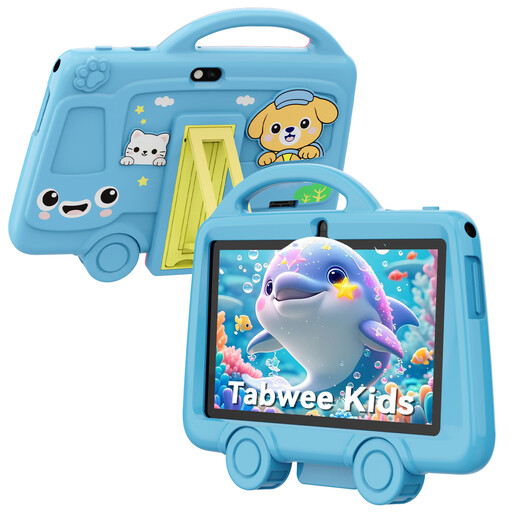
TABWEE K8 kids’ tablet, blue, 7-inch, 3GB/32GB listing
Consider this blue 7-inch K8 only after confirming its configuration: the product title and description state 3GB RAM, while the specifications state 2GB. The title states 32GB storage, a 3000mAh battery and a weight of 285g.
Check essential apps and child-account controls for the exact device. The product information advises that it is unsuitable for children under 3 and recommends adult supervision.
View on Joybuy
Common questions
Do parental controls make a child’s tablet safe on their own?
No. UK government guidance says parental controls can help limit time and access to inappropriate content, but parents should check the settings and keep talking with children about online safety. Configure the accounts before the child starts using the tablet and revisit the settings as their activities change.
Does my child need a separate account for tablet controls?
A separate child account is necessary for some platform family features. Apple says a child needs their own Apple Account within Family Sharing for Ask to Buy; Google’s supervision is set up through the child’s Google Account. Check the chosen platform’s account requirements before buying.
What should I do with an old tablet?
Take it to an appropriate electrical recycling point rather than putting it in household rubbish, as GOV.UK advises for electrical products. Sign out of accounts and erase the child’s data before handing it over.


