Choose a tablet when reading, video and touch-based apps are the priority; choose a games console when particular games or shared play matter more. Before buying, check the child’s required apps or games and how the chosen device and account handle time, content, communication and purchases. UK Government guidance notes that parental controls can help, but they cannot address everything.
Who this guide is for
Parents choosing a first home tablet
Check that the child’s essential apps and media are available, then consider child-profile, time and purchase settings. Apple Support explains that Screen Time setup depends on Family Sharing and separate Apple Accounts; Google For Families Help describes the limits of Family Link across device types.
Families buying for particular games
Choose the platform that supports the games the child wants, then check how its account and console settings handle playtime, communication and spending. Nintendo UK, Xbox Support and PlayStation UK each document different family-control arrangements.
Households adding another control layer
Device and account settings, broadband filters and headphones address different parts of home use. UK Government guidance says controls can help but cannot fix everything; BT describes parental controls for its broadband customers, so check which connection and devices a provider’s settings cover.
What to check before buying
Tablet
Choose when: reading, video and touch-based apps are central to how the child will use the device.
Trade-off: app availability varies by tablet ecosystem, so check essential apps against the exact model’s supported store.
Games console
Choose when: particular games or shared play are the main reason for buying.
Trade-off: control settings differ by platform; Nintendo UK says Switch and Switch 2 console restrictions apply to everyone using that console.
For consumers choosing a child’s first tablet or games console for home use, the key is to match the device to its main use and then check the relevant account, content and connection settings.
| Concern |
What to check when buying |
Who this matters to |
| Content and time controls |
Check child-account setup, content restrictions, time limits and whether a parent app is needed. |
I want to set the child’s content and time limits on the right profile before handing over the device; about 28% of consumers prioritise manageable content and time controls. |
| Apps and media |
Confirm that essential apps are available in the exact tablet’s supported store, and check what any child profile includes. |
I have particular reading, video or other apps in mind and want them to work on the tablet; about 22% of consumers put app and media availability first. |
| Games and play setting |
Check the named games, console version, intended play location and how restrictions apply to the child’s account. |
I’m choosing around specific games or shared console play, rather than tablet apps; about 22% of consumers make game fit their primary concern. |
| Chat and purchases |
Review purchase approvals, communication and multiplayer settings separately, including any feature-specific setup. |
I want to decide who the child can contact and what they can buy before online play begins; about 17% of consumers prioritise communication and spending controls. |
| Home setup |
Check which home connections a broadband filter covers and whether the chosen device supports the intended headphones. |
I need the device to fit the household’s Wi-Fi and listening arrangements; about 11% of consumers focus first on the wider home setup. |
Buying pitfalls
-
Buying a child-focused tablet before checking an essential app
An app that is not available in the tablet’s supported store may not be usable on that device.
Check the exact model’s app support before comparing bundles.
-
Assuming an age or web filter also controls chat and spending
Purchase approvals and communication settings can be separate from content restrictions. Nintendo UK also says GameChat for users under 16 requires parental setup and a Nintendo Switch Online membership.
Review content, purchases, communication and online access separately for the chosen child account and each feature.
-
Assuming console limits apply separately to each child
Nintendo UK says parental-control restrictions on Switch and Switch 2 apply to everyone using that console.
If the console is shared, check whether each setting is console-wide or account-specific before you set limits.
Relevant brands
Apple
iPad is a general-purpose tablet option for families prepared to set up Family Sharing and a separate child account.
- Apple Support documents Screen Time controls and Ask to Buy for eligible transactions.
- Apple notes that some actions, including updates and redemption-code use, do not trigger Ask to Buy requests.
Google
Family Link is an account-control option for compatible Android tablets with a supervised Google account.
- Google For Families Help documents app and screen-time management on supervised devices.
- Google says Family Link cannot supervise an iPad, and its purchase approvals apply to Google Play billing.
Nintendo
Switch and Switch 2 suit a game-first choice where the wanted games and play format fit the household.
- Nintendo UK documents console parental controls and separate Nintendo Account eShop restrictions.
- Console restrictions apply to everyone using the console, and some controls require the phone app. For users under 16, GameChat requires parental setup and a Nintendo Switch Online membership.
Microsoft Xbox
Xbox is a console option for households choosing Xbox games and account-managed play.
- Xbox Support documents settings for content, screen time, communication and multiplayer.
- Xbox Support says purchase approval is not needed when a child uses currency or Xbox gift cards.
Sony PlayStation
PlayStation is a console option for families choosing PlayStation games and setting up a child account.
- PlayStation UK describes family-app settings for playtime, spending, messaging and more.
- PlayStation Support says child-specific playtime settings require a separate child account.
Related Joybuy products
These Joybuy options cover child-focused tablets and games consoles, so compare the intended apps or games and the home-use features that matter to your family.
 No image available
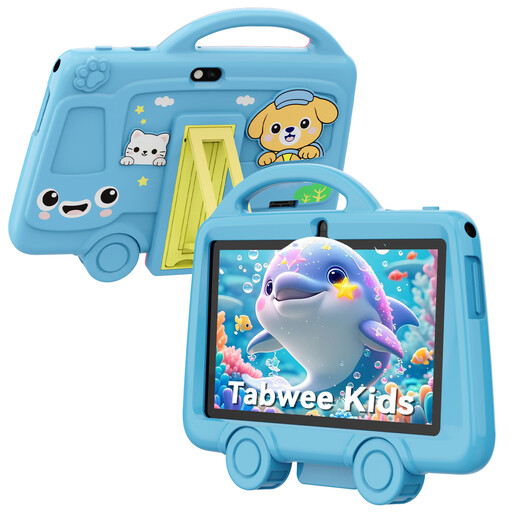
TABWEE K8 Kids’ Tablet, 7-inch, 3 GB RAM + 32 GB storage, blue
A child-focused tablet for apps, games and videos, with Wi-Fi and a 3.5 mm headphone jack.
3 GB RAM; 32 GB storage; 3,000 mAh battery; 2.4 GHz Wi-Fi; Bluetooth 4.2; 2 MP front camera and 5 MP rear camera; 285 g; drop-resistant.
Joybuy
 No image available
Nintendo Switch Lite, Coral
A handheld console for a game-first choice; check that each intended game supports handheld mode.
Handheld mode only; no TV output, detachable controllers or kickstand. 275 g; 3.5 mm headphone jack.
Joybuy
 No image available
Nintendo Switch 2 Console, UK Version
A game-first console with handheld and docked TV play. Nintendo UK says its parental-control restrictions apply to everyone using the console.
For users under 16, GameChat requires parental setup through the Nintendo Switch Parental Controls app and a Nintendo Switch Online membership, according to Nintendo UK.
Joybuy
 No image available
Alldocube Kido Children’s Tablet, 8 Inch, Android 15, blue protective case
A child-focused tablet with a Child Lock feature listed for screen-time management and content filtering.
Unisoc T310; 3GB + 32GB; 5G WiFi; 5000mAh; two speakers; 3.5 mm socket; 2 MP front camera and 5 MP rear camera. The title states that no adapter is included.
Joybuy
 No image available
Sony PlayStation 5 Console, Disc Edition, Slim
A console option for households choosing PlayStation games. PlayStation UK documents family-app controls for playtime, spending and messaging.
Disc edition with a built-in disc drive. PlayStation Support says child-specific playtime settings require a separate child account.
Joybuy
Frequently asked questions
Should I set up the child account before handing over the device?
Yes, if you plan to use the platform’s child-specific controls. Apple, Google and PlayStation describe controls tied to a child account or supervised device; Nintendo distinguishes console restrictions from Nintendo Account eShop restrictions. Follow the setup instructions for the device you choose.
Will a home broadband filter cover the device wherever it connects?
Do not assume it will. UK Government guidance describes broadband settings for devices connected to home Wi-Fi and recommends considering device controls as well. Check the coverage of the filter with your broadband provider.
Does a free child profile mean all child content is free?
Not necessarily. Check whether the profile and any extra content access have separate terms, and review any included subscription period, renewal and cancellation settings before relying on a bundle.
What if a new tablet or console is faulty?
UK Government consumer guidance says a seller must offer a full refund if an item is faulty, not as described or does not do what it is supposed to do. Check the seller’s process, and remember that a manufacturer’s warranty does not replace statutory rights.


