Buying priorities
Choose the family account and connection route first, then check the exact model’s controls, protection and charging arrangement.
| Priority |
What to check |
Your needs |
| Child account and supervision |
Create a separate child account or profile before regular use. Check screen-time, app and web-content controls, then review them periodically. |
I want household rules to apply to my child’s own profile rather than leaving them on an unrestricted adult account. |
| Download and spending approval |
Check which transactions the platform can approve. Apple Ask to Buy covers eligible App Store activity; Google says Family Link purchase approval applies to purchases through Google Play billing. |
I need to know which purchases can be approved and which payment routes need separate settings. |
| Privacy and activity settings |
Review activity, search, location and app-permission settings for the child account. Check privacy information and age terms for important apps and games. |
I want to manage account settings while recognising that each online service can have its own privacy choices. |
| Protection and charging |
Choose a case made for the exact model and confirm screen protection separately. Check what is in the box, charger compatibility and how the tablet will be charged in a shared household. |
The tablet needs to cope with routine handling and be ready to use without confusion over charging accessories. |
| Updates and exact variant |
Confirm the model code, storage and connectivity variant before purchase. Check the manufacturer support information and install available operating-system and security updates after setup. |
I want a tablet whose exact version can remain practical for the apps and services our household uses. |
Joybuy product options
Joybuy tablet options for supervised home use, including Wi-Fi models for Google-family households and child-focused tablets with stated parent-managed features.
 No image available
Samsung Galaxy Tab A11+ 11-inch 128GB Wi-Fi Grey
A Wi-Fi option for a Google-family household, provided a supervised child account and Family Link are set up before regular use.
Stated specifications include 128GB storage, microSD expansion up to 2TB, an 11-inch WUXGA display, USB-C, a 7,040mAh battery and a 3.5mm jack.
Check the controls available for the exact child-account setup. A protective case and screen protector are not listed, and the stated 25W charger is sold separately.
Joybuy
 No image available
HONOR X8A Kids 11-inch Wi-Fi 128GB Space Grey
A first home tablet option where the listing’s separate parent and child accounts, approved-app access and time-limit features match the household’s setup plan.
The listing states an 11-inch Full HD display, 4GB RAM and 128GB storage.
Check the scope of app-store, payment and third-party purchase controls, as well as the update-support policy for this exact variant.
Joybuy
 No image available
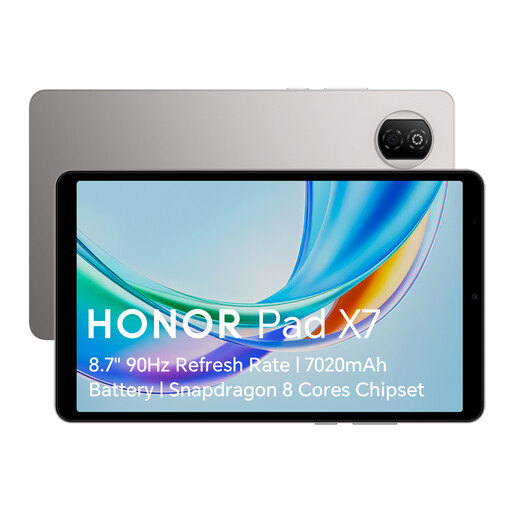
HONOR Pad X7 8.7-inch 4GB 64GB Grey
A compact Wi-Fi choice for shared home use where the stated Kids Corner controls fit the parent’s intended setup.
Stated specifications include an 8.7-inch HD+ display, 4GB RAM, 64GB storage expandable to 512GB, dual speakers and a stated 335g weight.
Check whether Kids Corner covers downloads, store purchases and payments. Confirm the supplied charger and update-support terms for this SKU.
Joybuy
 No image available
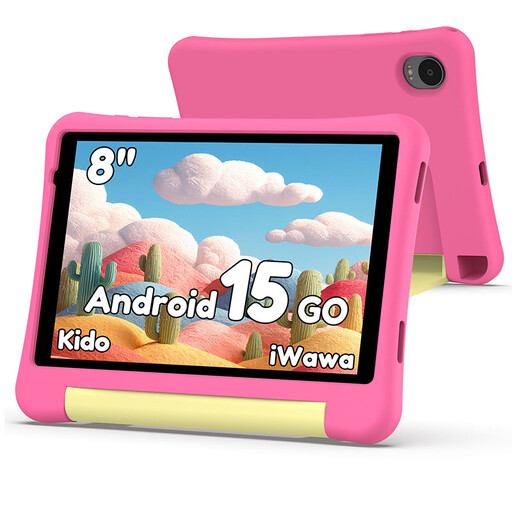
Alldocube Kido 8-inch Android Tablet with Pink Protective Case
A basic home Wi-Fi option for a younger child when the stated child lock, screen-time management and content filtering meet the household’s requirements.
Stated specifications include an 8-inch display, 3GB RAM, 32GB storage, 5G Wi-Fi, a 5,000mAh battery, dual speakers and a 3.5mm socket. A protective case is included.
An adapter is not included. Check the child-lock scope, required app availability and update-support policy before use.
Joybuy
 No image available
Samsung Galaxy Tab A11+ 8GB 256GB Wi-Fi Grey
A larger-storage Wi-Fi tablet for a household already using Android services, subject to confirming the child-account controls for this variant.
Stated specifications include an 11-inch 1920 × 1200 display, 8GB RAM, 256GB storage, microSD expansion, USB-C and IP52 protection against light splashes and dust.
Check whether Family Link and the stated optional parental safety mode provide the required controls. A child case is not listed, and a compatible adapter is sold separately.
Joybuy
Frequently asked questions
Should a child’s home tablet normally be Wi-Fi or cellular?
Choose Wi-Fi first when use is mainly at home or in places with trusted Wi-Fi. Consider cellular only when the child genuinely needs a direct data connection where Wi-Fi is unavailable and the household is willing to manage a carrier plan; Apple says Wi-Fi + Cellular iPads can connect to mobile-data plans. Cellular access does not replace child-account, purchase-approval or privacy settings.
Should my child share my Apple Account or Google Account?
No. Apple says a child should have their own Apple Account rather than sharing another family member’s account. For Google households, use or create a supervised child account in Family Link so that the applicable settings can be managed separately.
Do parental controls stop every in-app charge?
No. Check the payment route. Apple says Ask to Buy can require approval for eligible App Store downloads, purchases and in-app purchases, while Google says Family Link purchase approval applies only to purchases made through Google Play billing. Review payment methods, subscriptions and settings for services that process payment outside the platform store.
What privacy checks should I make before allowing apps on a child’s tablet in the UK?
Review the child account’s activity, search, location and app-permission settings, then read privacy information for significant apps and games. The ICO says the UK Children’s code covers online services likely to be accessed by children and identifies high privacy by default as a relevant measure for covered services. Assess each service and its age terms before allowing access.
How should I check update support?
Identify the exact model code and storage or connectivity variant, check the manufacturer support information before purchase, and install available operating-system and security updates after setup. Samsung says software updates enable current security features and help apps run smoothly, but another model in the same range may have a different update timetable.


