Choose a child-configured smart speaker if your child will request songs independently and you want controls over content, shopping, listening time and volume. If an adult will manage playback, a general smart speaker suits households that also want voice features, while a portable Bluetooth speaker suits those who would rather start a playlist from a phone or tablet and move the music between rooms. For a shared home office, check where the speaker will sit during calls, how its microphone is turned off, and which child controls apply to the exact device and service.
Who is each approach for?
Parents setting listening boundaries
If your child will ask for songs without an adult starting each one, check the controls for explicit content, shopping, volume and listening time. Amazon describes these controls for Alexa devices configured with Amazon Kids; they require a child profile and the relevant settings.
Home-office workers protecting focus and privacy
When music shares a room with calls or concentrated work, speaker placement and a clear way to turn off voice listening matter. Check the microphone control on the exact smart speaker rather than assuming all models work alike.
Families choosing songs from their own device
If an adult will start the playlist from a phone, tablet or computer, Bluetooth playback may be enough. A portable speaker can then move between rooms without making child-operated voice requests central to listening.
What matters when choosing?
Child-configured smart speaker
Choose when: A child will regularly request songs and you want controls tied to their profile.
Allow for: Wi-Fi, account setup and parental settings; household rules still matter.
Adult-managed smart speaker
Choose when: An adult will usually run the music, but voice features are also useful at the desk.
Check: Child-filter availability varies by device, service, account and region.
Portable Bluetooth or Wi-Fi speaker
Choose when: An adult will start the playlist and may move the speaker between rooms.
Allow for: A nearby source device for Bluetooth playback, or additional setup for Wi-Fi features.
| Concern |
What to check |
Who this matters to |
| Child content and boundaries |
Check which controls the exact UK device, child profile and music service offer for explicit songs, shopping, time limits and maximum volume. |
If my child chooses songs independently, I need boundaries for what they can request rather than relying on an adult to start every track; around 36% of consumers put child-content controls first. |
| Work focus and microphone control |
Look for a physical microphone-off control and check its indication; consider where the speaker will sit relative to your call microphone. |
When songs overlap with work calls, I need to protect concentration and decide when voice listening is on. For around 29% of consumers, work focus and microphone control come first. |
| Parent-controlled playback |
Check pairing with the phone, tablet or computer you will use and whether the source device needs to stay nearby. |
I want to start a playlist from my own device rather than give a child voice control; around 21% of consumers prioritise parent-controlled playback. |
| Moving between rooms |
Check battery life, charging and controls; decide whether Bluetooth alone is enough or you also need Wi-Fi features. |
If songs follow us into another room, I need a speaker I can move and charge easily; portability comes first for around 14% of consumers. |
Mistakes to avoid
-
Assuming child controls work straight out of the box
Amazon’s described filtering, shopping blocks and listening limits depend on setting up Amazon Kids and the relevant child profile. Controls do not replace family rules about requests and listening times.
Before letting a child make requests, check which settings work with your device and music service, enable them and try a music request together.
-
Overlooking setup and software support
An internet-connected speaker can involve an app, account and ongoing updates. The National Cyber Security Centre advises against buying smart devices whose manufacturer support has ended or will end soon.
Check setup requirements and the manufacturer’s stated security-update support period before buying, then keep the speaker and its app updated.
-
Treating rated battery life as a fixed runtime
Playback time can change with volume and use. Which? tests portable-speaker battery life by playing music continuously at a moderate volume, so a manufacturer’s rated figure should not be read as a promise for every listening session.
If the speaker will often leave the desk, check how it charges and assess playback at the volume you normally use.
-
Putting the speaker beside a work microphone
Children’s songs and voice responses may interfere with calls or concentration when the speaker shares a workspace.
Place it away from the call microphone where possible and keep background playback low. If voice listening concerns you, check for a physical microphone-off control on the exact model.
Relevant brands to consider
Amazon Echo
Relevant if a child will make voice requests and the household wants to configure Amazon Kids on Alexa. Amazon positions Echo Pop as a compact speaker for small spaces, while its child-oriented Echo options focus on child use.
- Amazon says Amazon Kids can filter explicit lyrics, block shopping and provide time and maximum-volume controls through Parent Dashboard.
- These controls require the appropriate child profile and settings, and depend on compatible services. An Echo also requires internet, account and app setup.
Google Nest
Relevant to households already using Google Home or Cast that want music playback alongside household voice features.
- Google lists Wi-Fi, Bluetooth, Google Cast and a two-stage microphone-off switch for the Nest Mini (2nd generation); it also describes music-content filters.
- Google says some child-control features vary by country, region or language, so check what the intended account and service offer in the UK.
Sonos
Relevant when moving a parent-selected playlist matters more than child-operated voice requests. Sonos describes Roam 2 as a portable speaker with Bluetooth and Wi-Fi.
- Sonos lists up to 10 hours of playback and IP67 water and dust resistance for Roam 2; Bluetooth playback can begin after pairing.
- Wi-Fi grouping requires Sonos app setup. The rated battery figure should not be assumed to match every volume or pattern of use.
Joybuy products for parent-controlled playback
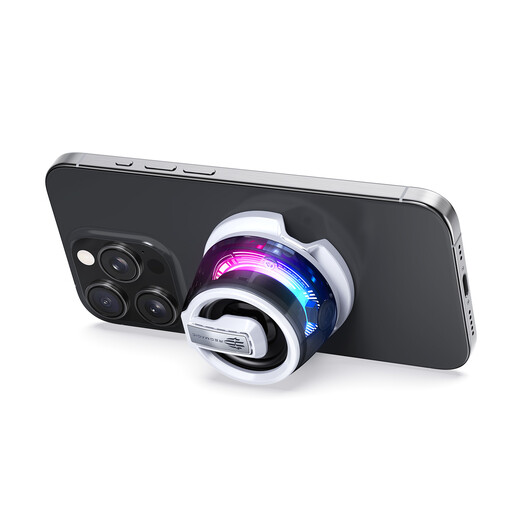
This Bluetooth speaker fits the approach where an adult starts children’s songs from a paired device and wants to move the speaker around the home. Check its charging and playback time for your plans, and keep the included small metal ring away from young children.
 No image available
Red Magic Rock Magnetic Bluetooth Speaker, White
A Bluetooth option for an adult who will select and start the children’s playlist from a paired device.
The included small metal ring can pose a choking hazard; keep it away from infants and young children.
View on Joybuy
Common questions
Do I need a child-focused smart speaker for children’s songs?
No, not if an adult will choose and start the music. A child-configured smart speaker is more relevant when a child will make independent requests and you want supported controls for content, shopping, time or volume; check the exact device and service before relying on those settings.
Can a smart speaker play music with its microphone off?
Turning off a supported physical microphone switch stops voice requests, so music must be controlled another way. Google says its physical switch prevents wake-word detection; check the exact speaker’s instructions for music controls while its microphone is off.
What setup does a portable Wi-Fi speaker need?
Setup depends on whether you use Bluetooth alone or Wi-Fi features. Sonos says Roam 2 can play after Bluetooth pairing, while grouping it with other Sonos products over Wi-Fi requires the Sonos app and home-network setup.
What security information should I check for an internet-connected speaker?
Check how long the manufacturer says it will provide important security updates. The National Cyber Security Centre advises avoiding smart devices whose support has ended or will end soon; keep the speaker and its app updated after setup.


