
24/7 Customer Support

Free returns

Same-day & Next-day Delivery

Quality Guaranteed

Unlock Your Welcome Offers: FREE Delivery | Up to 80% OFF | Free 30-day JoyPlus trial
Download the APP
Choosing a first tablet for your child can feel like navigating a minefield of marketing claims and technical jargon. As a parent in the UK, you want a device that is safe, educational and won't break the bank—or break in the hands of an enthusiastic child. However, many find themselves with a device that gathers dust after a few months, either due to hidden costs or frustrating limitations.
Before you make a decision, it's crucial to understand the common pitfalls. Many parents are caught out by a few recurring issues that turn a promising purchase into a source of frustration.
To ensure you get a device that serves your family well, focus on a few core specifications. These are the non-negotiable features that determine a tablet's safety, longevity and overall value.
This is more than just a simple on/off switch. A robust tablet with parental controls should give you granular command over your child's digital experience. Look for the ability to:
A truly durable kids tablet is designed from the ground up for rough handling. Pay close attention to the protective case. It should be made from a thick, shock-absorbent material like silicone and feature a raised bezel that lifts the screen away from flat surfaces when dropped.
For children aged 4-9, an 8 inch tablet for kids often hits the sweet spot. It's large enough for immersive viewing and gameplay but small and light enough for them to hold comfortably without strain.
Opting for a kids android tablet running a recent version of the Android OS provides significant advantages. It gives you access to the vast Google Play Store, which is home to thousands of high-quality educational apps, many of which are free. This freedom of choice means you are not tied to a single manufacturer's limited and potentially expensive app library. It ensures the device can grow with your child, adapting to their changing interests and learning needs.
We've analysed the market to identify tablets that balance safety, functionality and value. Instead of a single "one-size-fits-all" option, we've matched our recommendations to different family needs.

Why This Fits Their Persona: An excellent choice for parents seeking an affordable, all-in-one package for a child's first tablet. The 8-inch screen is manageable for small hands, and the included purpose-built case means it's ready for action straight out of the box, saving the hassle and cost of finding a separate one.
It includes a substantial, shock-absorbent case, not a flimsy afterthought. It runs a full version of Android 15, avoiding restrictive app stores and its built-in child lock feature is comprehensive and free to use.
A complete, affordable package with a durable case, full Android access and a 5000mAh battery for hours of use. The dual speakers and headphone jack are practical additions.
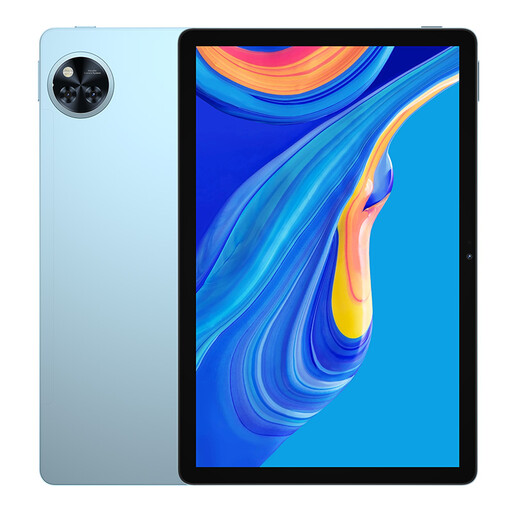
Why This Fits Their Persona: A solid step-up for families with slightly older children (8-11) or for use as a shared household device. The large 11-inch HD display is better for watching films or school-related research and the huge battery can handle extended use by multiple family members.
This is a full-featured tablet, not a limited 'toy' that a child will quickly outgrow. It runs Android 15, giving you access to the full Google Play Store and its range of parental control apps, ensuring long-term usability.
The large 11-inch screen with a 90Hz refresh rate offers a smooth viewing experience. Its substantial 8580mAh battery is designed for all-day use, reducing arguments over charging.
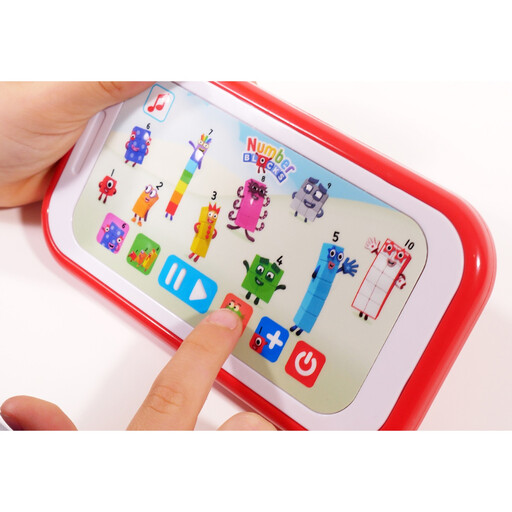
Why This Fits Their Persona: A great option for parents of preschoolers (3+) who want to introduce educational technology without committing to a full-screen device. It leverages the popular Numberblocks IP to make learning basic maths concepts feel like a game, providing a focused, interactive experience.
This device sidesteps the screen-time debate. It is a dedicated learning tool, not a gateway to open-ended video streaming. There are no hidden subscriptions or complex parental controls to configure.
Provides screen-free, focused educational play that builds early numeracy skills. Its portable, lightweight design makes it easy for small hands to hold and use independently.
We have compiled a complete, real-time list of products that fully satisfy these strict selection criteria and UK safety regulations.
The physical lifespan of a durable kids tablet with a quality protective case should be around 3-4 years of typical childhood use. However, the software is just as important. A device running a recent version of Android will receive security updates and remain compatible with new apps for longer, extending its useful life.
A higher price doesn't always equate to better value. Instead of focusing on price, scrutinise the core features. An affordable kids tablet UK model that offers robust parental controls, a durable build and a flexible Android operating system can provide everything a child needs for their first device, often at a fraction of the cost of big-name brands.
Before you hand the tablet to your child, your first priority should be to configure the safety settings. Connect to your home Wi-Fi and immediately locate and set up the tablet with parental controls. Create a restricted user profile for your child, set daily screen time limits, use the content filters to ensure age-appropriate access and, crucially, go into the Google Play Store settings to require a password for all purchases and downloads.