What matters when choosing?
Choose a route that runs the child’s games with their friends, then check how that route handles accounts and communication. A headset or controller can support the setup, but it cannot resolve a game-platform mismatch.
| Concern |
What to check |
Who this matters to |
| Games and friends |
Confirm the exact game and edition on the proposed device, plus cross-play with friends’ platforms. |
If joining an established group is the point, I need to know we can enter the same game together. Around 33% of consumers would put friend-group compatibility first. |
| Chat and social settings |
Review both the child’s platform account and the game’s voice, text and friend permissions. |
I want my child to play with friends without opening up every way to be contacted. For around 27% of consumers, manageable communication is the primary concern. |
| Online access |
Check each intended game’s multiplayer membership requirement and any free-to-play exception. |
Before choosing the device, I want to understand what is needed to keep playing online. Around 20% of consumers would prioritise ongoing access requirements. |
| Home setup |
Check the play location and internet coverage; decide whether controls need to work per child, per game or across a shared device. |
A shared screen and our household rules need to work together in the room where my child plays. Home setup would come first for around 20% of consumers. |
Relevant brands to consider
These platforms offer different account and online-play arrangements. Their relevance depends on the child’s particular games and the household’s setup.
Xbox
A console and PC gaming ecosystem to consider when the child’s games and friends use Xbox or confirmed cross-network play.
- Xbox Support describes family settings for privacy and communication, while Xbox says free-to-play console games can use online multiplayer without a charge for that access.
- Cross-play and chat permissions are separate checks. Confirm the chosen game’s support and any multiplayer membership requirement beyond free-to-play titles.
PlayStation
A console route for games and friend groups using PlayStation, with child-account management through the PlayStation Family app.
- PlayStation describes phone-based management of playtime, spending, privacy and selected social permissions.
- PlayStation says most PS4 and PS5 online multiplayer games require PlayStation Plus, with exceptions; check the exact title.
Nintendo
A Switch or Switch 2 route when the intended games are available there and the friend group’s play arrangements fit.
- Nintendo provides playtime, age-rating and communication restrictions, and says a Nintendo Switch Online family membership can cover up to eight accounts.
- Nintendo says Switch parental controls apply to the console rather than individual users. Many games require Nintendo Switch Online for online features, though exceptions exist.
Apple
An iPad route for suitable tablet games when the household uses Apple family accounts.
- Apple Support explains how parents can manage a child’s Screen Time remotely after setting up Family Sharing and a separate Child Account.
- Device-level controls do not replace checks on the game’s own chat, friend and spending settings.
Google
An Android tablet or Chromebook account route for households considering supervised Google accounts.
- Google For Families says Family Link can set screen-time limits on eligible Android devices and Chromebooks.
- Google notes that system apps cannot have app limits. Check game-account social settings separately.
Joybuy products for this setup
These headphones and headsets are accessories to consider once you know how the child will communicate; the tablet is a device option if the intended games run on Android. Check game and device compatibility before treating any of them as a way to join friends online.
 No image available
JBL Junior 470NC Wireless Over-Ear Headphones, Pink
For a child who needs headphones alongside online games, check whether this wireless model connects to the intended device and whether its microphone works for the chosen game’s chat. The product name identifies an over-ear, noise-cancelling design.
Joybuy
 No image available
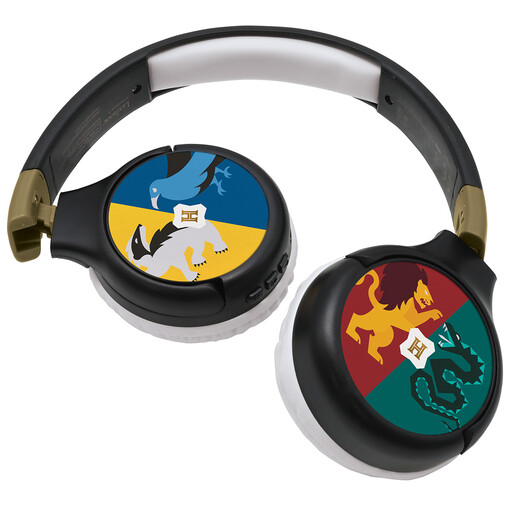
Lexibook Harry Potter Wireless/Wired Children’s Headphones, Black/Grey
For a child who may use different audio connections, this model is named as both wireless and wired. Check which connection works with the intended gaming device and whether the microphone carries game chat through it.
Joybuy
 No image available
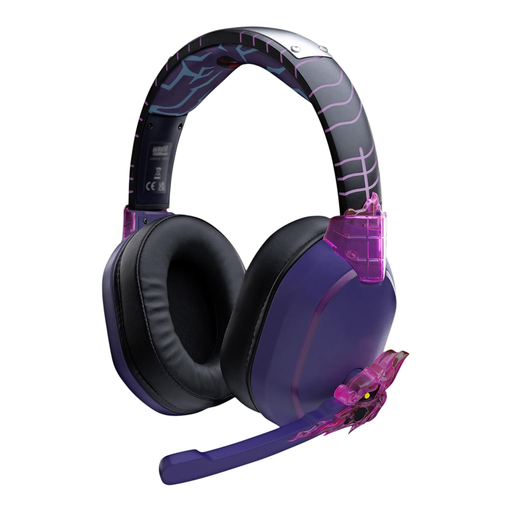
Lexip Naruto Sasuke Headset
For game chat, check the headset’s connection and microphone operation with the child’s exact device and game. Also assess its fit for the child before choosing it.
Joybuy
 No image available
Alldocube Kido 8-inch Android 15 Tablet, 3GB+32GB, Blue Case
If the child’s intended games are available on Android, check their requirements, performance on this tablet and whether friends can join from their platforms. The named configuration includes a child lock, a 3.5 mm socket and a blue protective case; an adapter is not included. Review each game’s chat controls separately.
Joybuy
Common questions
Does my child need the same platform as their friends?
Not always: Xbox Support says some games allow cross-network play between platforms. Check the exact game and edition, the friends’ platforms, child-account eligibility and whether cross-play is enabled before choosing a different device.
Can I allow online play but restrict voice and text chat?
You can manage communication separately in supported platform and game-account settings, though the options vary. Review the child account on Xbox, PlayStation or Nintendo as applicable, then check the game’s own permissions; Epic Games and Roblox both describe additional social controls.
Will my child need an online multiplayer membership?
It depends on the platform and game, so check the intended title. PlayStation says most PS4 and PS5 multiplayer games need PlayStation Plus; Nintendo says many Switch games need Nintendo Switch Online; Xbox says free-to-play console multiplayer is available without a charge for that access.
Should my child play through my account?
Set up a separate child account where the chosen platform supports one. Xbox and PlayStation use family-management settings for child accounts, while Apple says each family member needs their own Apple Account for its Family Sharing and Screen Time setup.
Is a PEGI rating enough to judge a game’s online social features?
No. Use the rating to consider the game’s age-suitable content, then check who can send friend requests or use voice and text chat, as well as the game’s blocking and reporting options.


