Families starting independent walks or activities
For parents who want a child to be reachable on journeys to school, clubs or nearby activities without handing over a general-purpose smartphone.


Choose a child-focused watch when parent-managed calls or messages with approved contacts matter more than a general-purpose device. Check the required SIM plan, local coverage and the school’s own rules before buying; a cellular Apple Watch needs a compatible iPhone and supported network plan, while a basic phone suits families who value a larger screen and conventional handset use. Location features can help with family coordination, but they depend on network and device conditions.
For parents who want a child to be reachable on journeys to school, clubs or nearby activities without handing over a general-purpose smartphone.
For families whose main concern is deciding who may call or message the child, alongside guardian-app control of contact and location-related settings.
For parents who need contact before or after school and must check whether the school treats a connected watch as a prohibited phone or similar smart device.
Start with the child’s communication needs, then check the service, privacy settings and school rules that determine whether the device will work in everyday use.
| Priority | What to check | Your needs |
|---|---|---|
| Parent-managed communication | Check whether calls and messages can be limited to approved contacts, how contacts are managed, and whether the companion app is required. | I want my child to reach a parent or trusted adult without receiving an unrestricted calling list or a full smartphone experience. |
| Coverage and subscription | Confirm the SIM or LTE arrangement, plan term and coverage at home, school and along the usual route. Ofcom says postcode-level coverage results are a guide rather than a guarantee. | I need calls and messages to work where my child actually travels, not only where the device was set up. |
| Location privacy | Review who can access the guardian app, which people can view location information and whether routine location collection is necessary. The ICO advises high privacy settings for children’s geolocation data. | I want location sharing to be limited to a clear family purpose and to people I trust. |
| School compatibility | Ask the individual school about smartwatches, SIM-enabled watches, phones, cameras, storage and before-or-after-school use. A focus setting does not override a school policy. | I need to know whether the device can be worn or carried without causing problems during the school day. |
| Setup and daily upkeep | Set up guardian controls and contacts before independent use, match charging to the child’s routine, and test calls on the relevant route. The Independent’s 2026 UK test considered setup, battery life and parental controls. | I want a device the family can maintain consistently, rather than one that is only convenient on the first day. |
Location features depend on network and device conditions. Ofcom describes coverage information as an area-level guide, while Garmin says LTE availability is not guaranteed.
Use the relevant network checker and test the device on the actual school or activity route. Treat location as a family-coordination feature, not a safety or accuracy guarantee.
Calling, messaging and location services can depend on an ongoing plan, so the longer-term commitment may affect the route that suits the family.
Compare the exact SIM or LTE plan, minimum term, cancellation conditions and any household network requirements alongside the device.
Xplora publishes connected-service plans with contract terms, and Garmin states that each Bounce watch needs its own subscription plan.
A device setting may reduce distractions, but it cannot override the school’s rules. Department for Education guidance in England concerns policies on prohibiting mobile-phone use, and schools may apply their own rules to similar connected devices.
Ask specifically about wearable, camera-equipped and SIM-enabled watches, including whether they may be worn, stored or used only before and after school.
Connected children’s devices can process contact, location and other personal data. ICO guidance emphasises high privacy settings and avoiding unnecessary passive geolocation collection.
Limit guardian-app access and approved contacts to trusted people, explain location sharing in an age-appropriate way, and review settings whenever a caregiver or phone changes.
A UK child-focused connected-watch route, with SIM-enabled calling, messages, location functions, School Mode and Guardian-app management described on Xplora’s UK pages.
A children’s LTE watch route through Bounce and Bounce 2, managed through the Garmin Jr. app and Garmin’s subscription service.
A cellular family-watch route for households with an iPhone that can manage a child’s GPS + Cellular Apple Watch through Apple Watch For Your Kids.
A lower-cost children’s smartwatch and play-focused route rather than a confirmed independent-journey communications route.
A child-watch brand relevant to UK comparison shopping because Mumsnet lists the imoo Watch Phone Z1 as a GPS-oriented option.
Joybuy options for the basic-phone route: conventional handsets for families who prefer calls and texts over a wrist-worn connected watch.
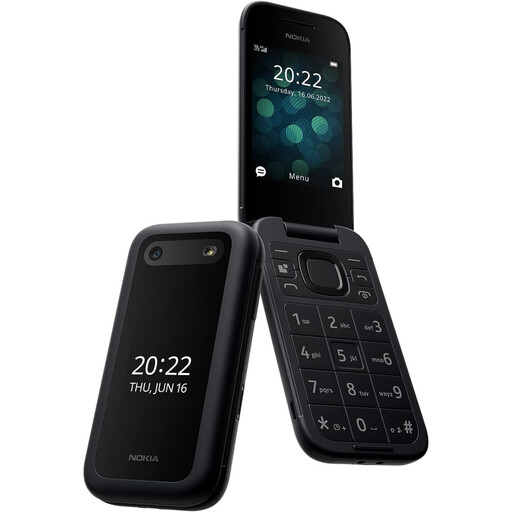 No image available
A conventional phone option for a child who needs straightforward 4G calls and SMS rather than a wrist-worn device.
Stated features include tactile buttons, a 2.8-inch display, dual-SIM support and a removable battery.
Check UK network compatibility, route coverage, contact restrictions and the software features for this exact variant. Its emergency button is described for up to five preset contacts and is not a substitute for emergency services.
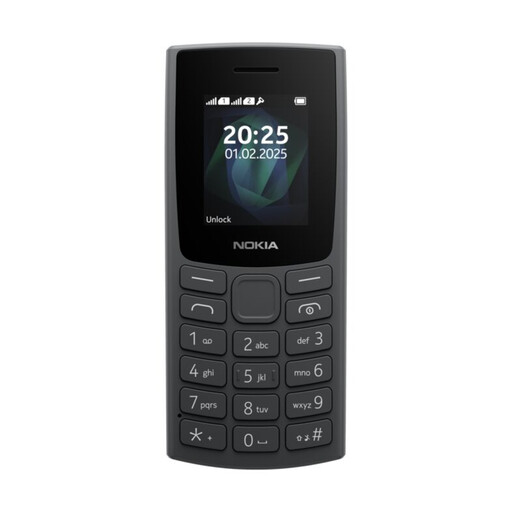 No image available
A compact basic-phone route for families who want calling and SMS in a conventional handset format.
Stated features include a tactile keypad, 1.8-inch display, dual Mini-SIM support and a torch. The listing states up to 12 hours of talk time and up to 22 days of standby.
Confirm UK network compatibility, local coverage, contact controls and the exact software features before relying on it for independent journeys. Check the school’s policy on carrying or using a phone.
It can, when the child mainly needs parent-managed calls or messages and the family accepts the required mobile service and local coverage limits. A child-focused watch is the narrower route; a cellular Apple Watch offers a broader platform but needs a parent’s compatible iPhone, suitable watch model and supported UK network service.
For the connected watch routes considered here, a subscription is required. Xplora’s UK tariff information covers calls, messages, data and location services through 4G/LTE, while Garmin states that each Bounce watch needs its own subscription plan. Check the exact model, plan term and cancellation conditions before buying.
No. Ofcom’s coverage checker can help compare service by postcode, but its results are a guide, and Garmin says LTE availability depends on network coverage and conditions. Check home, school and the usual walking or activity locations before relying on the device.
The answer depends on the individual school. In England, Department for Education guidance on mobile phones in schools became statutory in 2026; ask whether the school’s policy also covers smartwatches, SIM-enabled watches, School Mode, storage and emergency-contact exceptions.
Review who can access the guardian app, which contacts may be added and whether location collection is needed for the family’s purpose. The ICO’s Children’s Code guidance says geolocation tracking should be off by default unless essential to the core service.