Families deciding whether independent contact is needed
Calls or messages away from home may justify a personal phone. If the device will stay at home, a tablet is a different starting point.


Choose a personal smartphone if your child needs to contact you away from home and you are ready to manage a child account, communication settings and a mobile plan. For learning, video and games mainly at home, a Wi-Fi-only tablet—personal or shared—avoids the mobile-plan decision, but still needs a separate child profile and tested controls. Whichever route you take, review those settings as your child’s apps and routines change.
Calls or messages away from home may justify a personal phone. If the device will stay at home, a tablet is a different starting point.
A Wi-Fi-only device can serve approved learning, reading, video and games without making a mobile plan part of the first-device decision.
An existing Apple, Google, Samsung or Amazon family setup may influence which child account a parent can manage. Check the controls on the exact device rather than choosing hardware alone.
Start with where your child needs to use the device, then decide whether it will be personal or shared. Check the account and controls you can manage before handing it over.
Choose when: Your child needs calls or messages beyond home Wi-Fi and a parent can manage the account and communication settings.
Trade-off: Mobile service adds a carrier-plan decision and connectivity outside the home to manage.
Choose when: Reading, learning, video or games at home matter more than independent mobile-network contact.
Trade-off: It still offers internet and app access, while ordinary mobile-network access away from Wi-Fi is not part of this route.
| Concern | What to check | Who this matters to |
|---|---|---|
| Child account and privacy | Check child-account support and the parent’s management-device requirements. Test app approval and privacy settings on the chosen software. | If I am handing over a device for regular use, I want my child’s settings separate from my own account and a way to review approvals. Around 37% of consumers put account and privacy management first. |
| Contact away from home | Decide whether calls or messages must work beyond Wi-Fi. If so, check the chosen carrier’s plan and account terms and the device’s communication controls. | When my child is away from home, I need to know whether we can stay in contact without relying on Wi-Fi; around 27% of consumers place independent communication first. |
| Learning and family media | Decide whether the tablet will be shared or personal, and check child profiles, approved content and relevant time settings. | If the device is mainly for reading, learning and approved video at home, I would rather settle how it is shared than arrange mobile service. For around 18% of consumers, home learning and media are the primary need. |
| Games and entertainment | Check game and app access, download approvals and purchase controls within the services the child will use. | I want to agree which games and videos my child can open and how downloads are handled. Keeping entertainment within those boundaries comes first for around 18% of consumers. |
A shared adult account can expose personal account activity and interfere with child-specific approval settings. Apple advises giving a child their own Apple Account within Family Sharing.
Create the child account or profile before handover, then check app, web, contact, privacy and purchase settings that apply to it.
Settings have boundaries: Google says Family Link purchase approvals cover purchases made through Google Play billing, not every payment route.
List the apps, games, browsers and payment methods your child will use, then test the relevant controls in each service.
A phone adds mobile-service decisions even when the intended activities are reading, video or games on home Wi-Fi.
Write down where your child needs connectivity. Consider a cellular device and suitable service only if contact or access away from Wi-Fi is needed.
Available settings can vary with the device and a child’s age. UK government guidance recommends checking that controls work and revisiting them as a child’s use changes.
Try an app download, a purchase request and a restricted website before handover; review settings after new apps, software updates or changes in routine.
The account system matters alongside the device: check what a parent can manage on the specific model and software version under consideration.
For an iPhone or iPad household using Family Sharing and Screen Time.
For families considering Google-account supervision on an Android device.
For a Galaxy phone or tablet household considering Samsung child-account features alongside Family Link.
For a Fire tablet household using an Amazon Kids child profile for home activities.
These Wi-Fi tablet options fit a home-based first-device route for reading, learning, video and games. Check the exact child-account and control functions your family needs before choosing either one.
 No image available
A Wi-Fi tablet to consider when your child’s connected activities will mainly happen at home.
The listed variant has an 11-inch screen and 128GB storage. Before choosing it for supervised use, confirm the child-account, purchase and privacy controls on the exact model and its software, including what device a parent needs to manage them.
 No image available
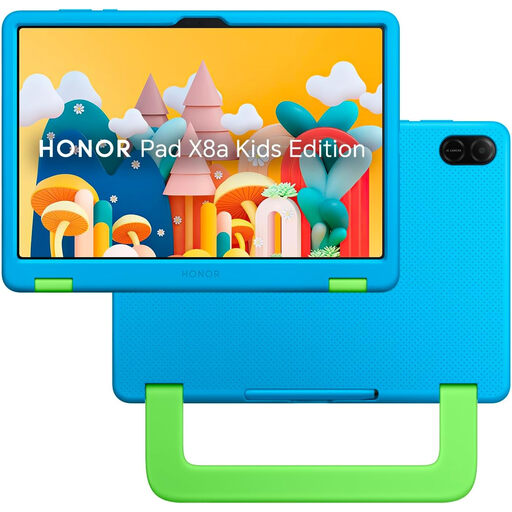
Consider this Wi-Fi tablet if a smaller home device with an included protective case suits the planned setup.
The listed variant has 3GB RAM and 32GB storage; no adapter is included. Confirm how its child lock works, which account and purchase settings it supports, and whether you have a suitable adapter before buying.
Give your child a separate account for the relevant family-control setup. Apple advises against sharing a family member’s Apple Account with a child; Google’s supervision setup likewise uses a child’s Google Account supervised by a parent.
No single setting covers every service or situation. Google says Family Link purchase approvals apply to Google Play billing, while UK government guidance recommends testing controls and continuing conversations with your child about their online use.
Check Google’s age and account requirements before starting. Google says parental consent is required below the applicable country minimum age; for supervision of an existing account, parent and child need Google Accounts and must live in the same country, and the parent must meet the applicable adult-age requirement.