Families joining friends online
Start with the games your child wants to play, the platforms their friends use and the available ways to communicate. Ofcom’s research on children’s online experiences covers gaming and connected devices.


Start with the games your child wants to play and the devices their friends use, then check the child’s age and account settings and each game’s multiplayer and chat rules. A console, tablet or computer may suit different play patterns, but none makes chat safe simply by adding a headset.
Start with the games your child wants to play, the platforms their friends use and the available ways to communicate. Ofcom’s research on children’s online experiences covers gaming and connected devices.
Decide who can contact your child and whether voice or text chat should be available before choosing communication accessories. Ofcom and Ygam–Mumsnet report on parents’ gaming concerns; platform support information explains the relevant settings.
Check whether controls apply to a child account, an individual app or everyone using the device. Nintendo, Apple, Google and Microsoft describe different account and device boundaries for their family tools.
Start with the child’s games and friends’ platforms, then settle chat and account permissions; compare device formats and the complete setup only after those requirements are clear.
| Concern | What to check when buying | Who this matters to |
|---|---|---|
| Playing games with friends | Check that the specific game supports the friends’ platforms and that the child’s account can use its multiplayer features. | If my child wants to play particular games with friends, I need their platforms and multiplayer arrangements to work together. About 25% of consumers put playing with friends first. |
| Who can communicate | Check platform privacy settings, approved contacts and the game’s own chat options; confirm any headset connection separately. | If I want to manage who can contact my child, I need to check voice and text permissions in both the platform and the game. About 25% of consumers prioritise communication boundaries. |
| Age and account fit | Check the game’s UK age rating, the child account’s age requirements and access to the intended multiplayer or chat features. | If I need age-suitable games and an account that can use the intended features, I’ll check the game and account rules before buying hardware. About 20% of consumers put age and account fit first. |
| Shared or multipurpose use | Choose between portable app-based play, console play or computer use, then check how controls work for each user. | If gaming needs to fit around portable, computer or shared-household use, I want a device that suits those other tasks too. About 15% of consumers prioritise multipurpose use. |
| Complete setup requirements | Check whether the intended games need a membership, whether the console accepts discs and which communication accessories are actually required. | If I want to understand what the complete setup involves, I’ll check the chosen games and services rather than assume the device alone covers everything. About 15% of consumers focus first on the whole setup. |
A microphone provides a way to speak, but it does not grant a child account access to chat. A game may also have communication settings separate from the console.
Check the child account’s permissions and the game’s chat rules first, then confirm that the headset’s connection suits the device.
Buying an accessory before checking permissions can leave the family with an unnecessary headset and more setup to complete.
The Xbox Series S 512 GB and the specified PS5 Digital Edition are disc-free models, so they cannot play physical game discs through a built-in drive.
Decide whether you want to use existing or borrowed discs before settling on a console edition.
A disc-free model rules out using compatible physical games you already own or borrow.
Some online features can require a membership, and the requirements differ by platform and game. Nintendo’s free Switch 2 GameChat offer ended in March 2026; Nintendo and PlayStation specify membership requirements for relevant services.
Check the intended games and communication features, then identify which services or accessories those uses require.
A required membership can add an ongoing service commitment, while an accessory may be unnecessary if the selected feature works without it.
Family tools have different device and account boundaries. Google Family Link does not supervise iPads or computers other than Chromebooks, while Nintendo’s general console play-time limit combines users’ time.
Check which tool supports the selected device and whether each setting applies to a child account, an app or the whole console.
A console option for families considering compatible handheld, tabletop and TV play, with separate account and GameChat setup to consider.
Xbox consoles and Microsoft family tools may suit households whose intended games and settings fit the Xbox or Windows ecosystem.
A home-console route to consider when the child’s intended games and friends use PlayStation.
An iPad can be a portable, multipurpose option for compatible games and other apps, managed through Apple accounts and Screen Time.
Family Link may be relevant when considering a supervised Android gaming tablet or a compatible Chromebook.
The Arctis Nova 1 is an example of a wired communication accessory to consider after checking the chosen platform and chat permissions.
These choices cover console play, an Android tablet for portable app-based gaming and a wired headset. Check each game’s compatibility and the child’s account and chat settings before choosing a device or accessory.
 No image available
Consider it when the intended games and friends’ multiplayer arrangements work on Nintendo Switch 2.
Nintendo describes handheld, tabletop and TV play. Under-16 GameChat users need parental setup, and Nintendo Switch Online is required after the free GameChat offer ended in March 2026.
 No image available
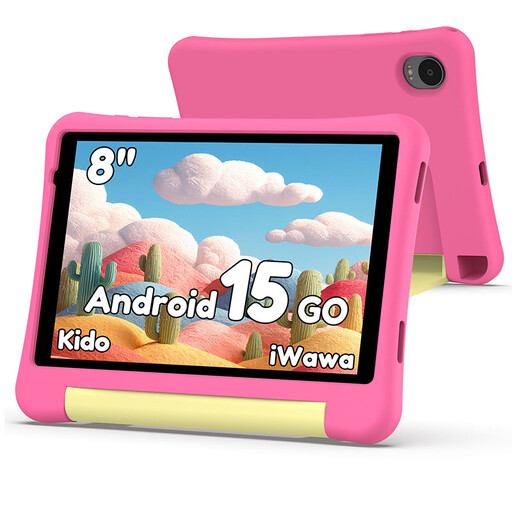
Consider it for portable app-based gaming only after checking that the intended games support this Android device and its child account.
The product name specifies an 8-inch Android 15 tablet with Child Lock, 3GB+32GB storage and a 3.5 mm socket. An adapter is not included.
 No image available
Consider it when the intended games and friends’ multiplayer arrangements suit Xbox and the household wants a dedicated home console.
This is a 512 GB all-digital console with no disc drive. Microsoft documents Xbox family settings for communication, multiplayer, screen time and age-based content.
 No image available
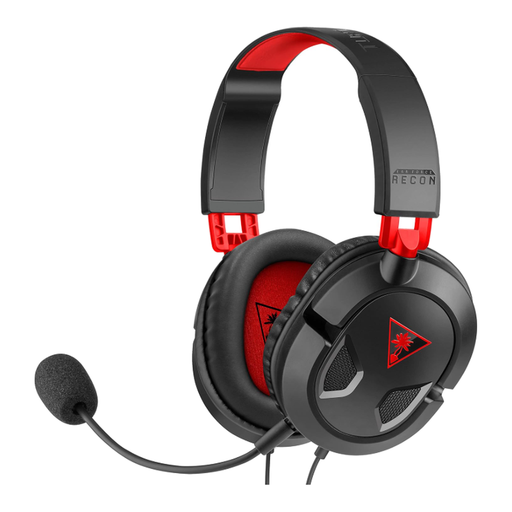
Consider it only if voice chat is permitted for the child and the headset connection suits the selected device.
The listing specifies 40 mm speakers, a removable microphone and in-line volume and microphone-mute controls. Check the device and game settings; a headset does not grant chat permission.
 No image available
Consider it when the child’s intended games and friends use PlayStation and the household wants a dedicated home console.
This digital edition has no disc drive. PlayStation Plus is required for online multiplayer when the chosen game requires it.
Not necessarily. Check the child’s account permissions, platform communication settings and the particular game’s chat rules first. Nintendo requires parental setup for under-16 Switch 2 GameChat users, while Roblox has separate age checks and permissions for its chat features.
Set up the child’s own account with their genuine age, configure the platform’s game and communication controls, then check for additional controls in the game. PlayStation requires a child to be added to the family before parental controls can be set; an Xbox family organiser can configure communication and multiplayer settings.
No. Google says Family Link cannot supervise iPads or computers other than Chromebooks. For an iPad, check Apple Screen Time; for Windows, check Microsoft Family Safety and the limits of the relevant features.
UK Government guidance says games with PEGI 12, 16 or 18 ratings cannot be sold or hired to someone below the applicable age; PEGI 3 and 7 are advisory rather than the same age-restricted sales categories. A game rating addresses content and does not by itself establish whether online chat is suitable.
That depends on the platform and feature. Nintendo says Switch 2 GameChat requires Nintendo Switch Online after the free offer ended in March 2026, and the console has a built-in microphone. PlayStation says a paid PlayStation Plus subscription is required for online multiplayer when the game requires it. Check the chosen game before deciding whether a membership or accessory is needed.