Who this setup suits

Parents choosing a first shared-screen route

For households deciding between PlayStation, Xbox or Nintendo when a child will mainly play on a shared television or in a communal room. Start with the games the child wants, then compare the platform’s family controls, communication settings and online-service requirements. PlayStation, Nintendo and Microsoft describe these controls in their family-support guidance.

Parents considering a PC for games and everyday use

For families considering a gaming-capable computer for schoolwork, creative software or PC-only games as well as gaming. Microsoft advises using a standard child account, rather than an administrator account, when Family Safety controls are part of the setup.

Parents starting with an existing mobile device

For households considering Android phone or tablet gaming. A supervised child account, device-level content restrictions and separate checks of game chat and payment settings are central to this route, according to Google’s Family Link and Google Play guidance.

What to check before buying

Console with a child account

Choose it when: play will mainly happen on a household TV and the child’s chosen games are available on one console platform.

Trade-off: online multiplayer for many paid games can require a separate subscription, depending on the platform and title.

Gaming-capable computer

Choose it when: the child needs one device for schoolwork, creative tools or PC-only games.

Trade-off: controls may need managing in Windows, game launchers, games and separate chat services.

Existing Android phone or tablet

Choose it when: mobile games are the main interest and the household already has a suitable supervised device.

Trade-off: Google Play restrictions and approvals do not replace checks of game-specific chat, content and payment systems.

Priority What to check Your needs
Communication settings Check voice and text chat, friend permissions, matchmaking and platform privacy settings. Decide whether a headset microphone is needed before enabling chat. I want to choose whether my child can communicate online, and if so, with whom.
Age suitability Check the PEGI rating, then review multiplayer, user-generated content and chat separately. Create a child account before online play begins. I want an age-appropriate game library without assuming a PEGI rating controls every online interaction.
Spending and subscriptions Set spending limits or purchase approval on the relevant child account. Check the selected game’s store listing for online-multiplayer membership requirements. I want to prevent unapproved purchases and understand whether online play needs an ongoing membership.
Shared home connection Consider Wi-Fi coverage near the usual play area, other devices using the connection and, where practical, a wired connection. Lower latency matters for responsive real-time gaming, according to Ofcom. I need online play to remain reliable when other people in the household are also using the internet.
Blocking and reporting Locate mute, block and report tools in the platform and game. Set a household plan for what to do if abusive behaviour or unwanted contact occurs. I want my child to know how to limit contact and ask for help if online play becomes unpleasant.

Common setup mistakes

  • Buying hardware before checking the child’s games

    A device can support a game without including the membership needed for its online features. Requirements differ by game and platform, and free-to-play titles may follow different rules.

    List the intended games first, then check supported platforms, PEGI ratings, chat and multiplayer features, in-game purchases and any stated subscription requirement.

    Many paid PlayStation and Nintendo games may need an online membership for multiplayer; paid Xbox console multiplayer depends on the applicable Game Pass plan.

  • Treating a PEGI rating as the complete online setup

    PEGI helps assess game content, but online games can also include voice or text chat, matchmaking, strangers, user-generated content and in-game purchases. UK Government guidance identifies these as areas to consider for children’s online gaming.

    Use PEGI as the starting point, then review the game’s communication, privacy, multiplayer and spending settings through the child account.

  • Giving a child administrator access on a Windows PC

    Microsoft warns that an administrator child account can change or break Family Safety controls.

    Use a separate standard child account, add it to the Microsoft family group and keep parent or organiser credentials protected.

  • Assuming parental controls cover every app and payment route

    Google Play controls are device-specific, and purchase approvals apply only to payments processed through Google Play billing. Platform controls also do not automatically configure every game’s chat or user-generated-content settings.

    After configuring device or platform controls, open each game and account to review chat, friend requests, multiplayer access, reporting tools and payment methods.

Relevant platform brands

PlayStation

A console route for households looking for PlayStation games and a family-management app for play time, age restrictions, spending, privacy and communication permissions.

  • Sony says the PlayStation Family app can manage activity visibility, age restrictions, monthly spending limits and requests to use communication features.
  • Most PS4 and PS5 games require PlayStation Plus for online multiplayer, according to Sony; check the selected game because exceptions exist.

Xbox

A console and Windows-adjacent route for households that want Microsoft Family Safety controls across connected Xbox and Windows devices.

  • Microsoft states that Xbox family settings can manage age-based filters, social communication, multiplayer settings and activity reports.
  • A Windows child account should be a standard user rather than an administrator. For online console multiplayer, check the applicable Game Pass plan and the individual game.

Nintendo

A portable and television-connected console route for families considering Nintendo Switch or Switch 2 games with parent-managed play-time and account controls.

  • Nintendo says its parental-controls app can restrict content and features and set play-time limits.
  • Nintendo Switch Online is needed for online play in many games, though not all. Nintendo also requires app-linked parental controls for children under 16 and supervised users to use Switch 2 GameChat.

Google / Android

A mobile-gaming route for an Android device used with a child Google account managed through Family Link.

  • Google Play content restrictions can limit downloadable or purchasable content by maturity level for a Family Link child account.
  • Google says these restrictions are device-specific and purchase approvals apply only through Google Play billing, so each game’s chat and payment systems still need review.

Joybuy product options

Joybuy accessories for a child’s online gaming setup, focused on headsets for permitted voice chat and an additional controller for a compatible Nintendo Switch-family console.
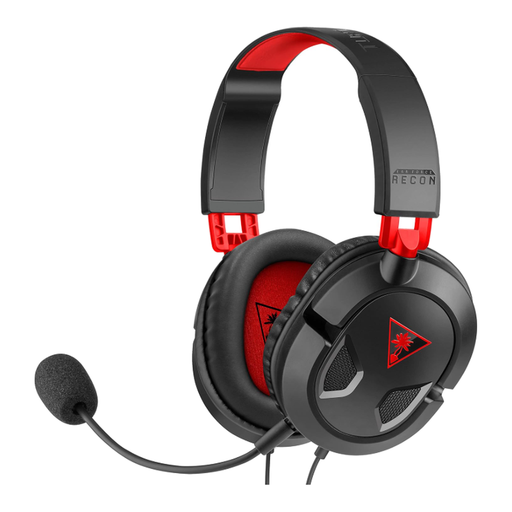
Turtle Beach Recon 50 wired gaming headset

Turtle Beach Recon 50 Wired Gaming Headset

For supervised voice chat on a compatible PC, PlayStation or Xbox controller with a 3.5 mm headset jack.

Stated features include 40 mm speakers, wired 3.5 mm connectivity, a removable microphone and in-line volume and microphone-mute controls. Confirm headset support on the selected controller, game and chat setup before buying.

Joybuy

Siukie CH25 wired gaming headset with microphone

Siukie CH25 Wired Gaming Headset

A communication accessory to consider only after household voice-chat permissions have been set.

The product description lists a flexible microphone, 50 mm drivers, 3.5 mm audio and microphone connections, plus USB lighting. Check that the selected console, controller or adapter supports full microphone and audio use.

Joybuy

Turtle Beach Rematch wireless controller for Nintendo Switch

Turtle Beach Rematch Wireless Controller for Nintendo Switch

An additional controller option for shared-screen play where the household already has a compatible Nintendo Switch-family console.

It is stated to work with Switch, Switch Lite, Switch OLED and Switch 2, with wireless use, motion controls, two mappable buttons and a rechargeable battery. Switch 2 use does not include a C Button, so check the intended games’ control requirements.

Joybuy
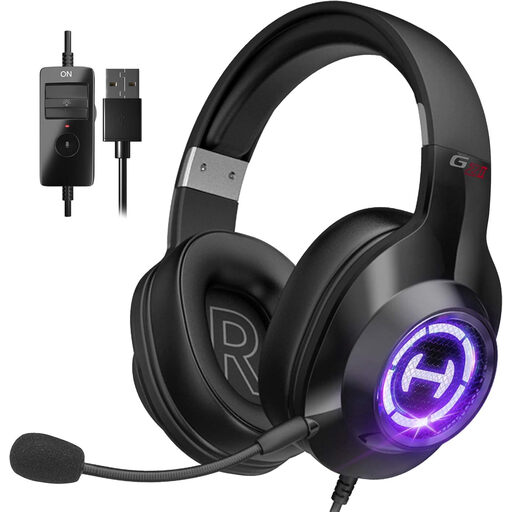
Edifier G2II wired gaming headset

Edifier G2II USB Wired Gaming Headset

A fixed wired headset option for a PC, Mac or stated PS4 arrangement where chat has been deliberately enabled.

The description lists a USB wired connection, 50 mm drivers, detachable microphone and in-line controls, with stated PC, PS4 and Mac compatibility. It is described as not for Xbox; confirm USB and microphone support for the exact PS4 configuration and game.

Joybuy
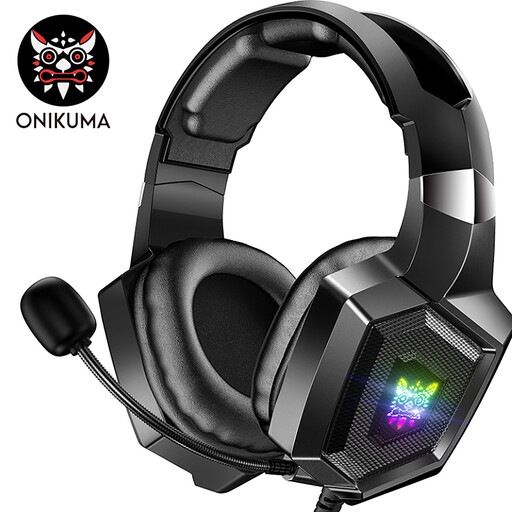
ONIKUMA K8 wired gaming headset with flexible microphone

ONIKUMA K8 Wired Gaming Headset

A wired headset to check for occasional supervised online play on a compatible computer or console audio-jack setup.

Stated features include separate 3.5 mm headphone and microphone connections, USB-powered lighting, a flexible microphone and in-line controls. Verify ports, controller support and any adapter needed for full audio and microphone operation.

Joybuy

Frequently asked questions

Are PEGI ratings legally enforceable in the UK?

Yes. UK Government guidance states that PEGI 12, 16 and 18 games cannot be sold or hired to someone below the stated age. Use the rating to assess game content, then also check online chat, multiplayer, user-generated content and in-game purchases.

Do I need an online subscription as well as the console?

It depends on the platform and game. Sony says most PS4 and PS5 games need PlayStation Plus for online multiplayer; Microsoft says free-to-play Xbox console games have free online multiplayer while paid-game access depends on the applicable Game Pass plan; Nintendo says many Switch and Switch 2 games need Nintendo Switch Online. Check the chosen game’s product page before buying.

Should a child use the parent’s gaming account?

A separate child account is the more manageable default. It allows content filters, play-time controls, purchase permissions and communication settings to be applied to that child through the relevant platform family group.

What should be checked before allowing voice chat?

Check whether the game offers voice or text chat, who the account can communicate with and whether chat should be enabled at all. Ofcom notes that voice chat, text chat and matchmaking can bring players into contact with strangers, so review both platform and game-level settings before use.

Does faster broadband automatically fix online-game lag?

No. Ofcom says in-home Wi-Fi performance, wiring, congestion from other devices, device limitations and server performance can all affect the experience. For real-time online games, lower latency matters alongside download speed.