Who this decision suits

Parents choosing a mainly home-based device

A first device for supervised video, learning apps, games, reading and family calls can start with a family-managed tablet and layered home controls. Ofcom and Apple and Google guidance support this home-first approach.

Parents considering a first phone

If a child needs to contact family away from home, weigh that benefit against the wider access to apps, browsers, messaging and mobile data that a smartphone can bring. Ofcom, Google, Apple and app-provider guidance all make account and age settings relevant.

Parents seeking limited communication

A child-focused smartwatch may suit journeys and activities where approved-contact communication and a wearable form matter more than broad internet access. Xplora’s UK materials describe this type of parent-managed route.

What to check before buying

Family-managed tablet

Choose it when: home learning, video, reading, games and occasional family calls are the main uses.

Keep in mind: app and internet access still need a child account, permissions and household rules.

Supervised smartphone

Choose it when: the child genuinely needs portable contact with family during travel or activities.

Keep in mind: messaging, browsers, app stores and mobile data create the broadest supervision workload.

Child-focused smartwatch

Choose it when: calling, messaging and location-related features are needed without a general internet device.

Keep in mind: SIM, coverage and parent-app requirements can be central to how the watch works.

Priority What to check Your needs and relevant use
Match access to purpose Decide whether the child needs a home screen, portable calls, or approved-contact communication. Check whether Wi-Fi, mobile service or a SIM is required. I want the least broad device that still covers everyday use. Ofcom reported that 77% of UK children aged 8–17 who go online used a mobile phone and 59% used a tablet; these are overlapping device-use figures, not recommendations for a particular age.
Layer controls Set up the child account, device permissions, app settings and suitable home or mobile-network filters. Check what the chosen ecosystem can supervise. I want settings for browsing, downloads, contacts and screen time rather than relying on one switch. Ofcom reported that 55% of UK children aged 8–17 interacted with people they had met only online at least sometimes.
Plan for entertainment Review video, games, app-store permissions, in-app purchase settings and routines before handing over the device. Confirm the intended services work with the family account. Video and games may become part of everyday use. Ofcom reported that 89% of UK children aged 8–17 watched video content online and 72% played games online; participation does not make every service suitable for every child.
Respect age rules Check the minimum age and feature restrictions for every intended app. A managed device does not override an app’s own account terms. I need the device to remain useful without services my child cannot use. Ofcom found that 40% of parents of UK children aged 8–17 felt social-media benefits outweighed risks, while 38% disagreed; these are parent attitudes, not a device recommendation.

Common buying pitfalls

  • Choosing a smartphone when approved-contact communication is enough

    A phone can open routes to browsers, app stores, messaging, video and social services, creating more choices about contacts, content, screen time and mobile data than a limited-function wearable.

    List the child’s required actions first: home learning and calls, portable family contact, or approved-contact calls with location-related features. Choose the narrowest route that meets those actions and review it as needs change.

  • Treating one parental-control setting as complete protection

    Device, account, app and network settings cover different pathways. For example, home broadband filtering applies to devices using that connection, while Google Play purchase approvals apply to Google Play billing.

    Configure the child account and device controls, review app privacy and contact settings, use suitable mobile or broadband filters, and agree regular check-ins.

  • Buying around an app the child cannot use

    A device may be able to install an app even where the child does not meet the service’s minimum age or feature-level requirement. TikTok states that accounts are for people aged 13 and over, with direct messaging from age 16; Snapchat states a minimum account age of 13, with regional and feature variations.

    Before buying, list the services the child expects to use, check each current UK-facing age rule, and select a device that remains useful without ineligible services.

  • Comparing smartwatch hardware without checking connectivity commitments

    Calling, messages and location-related features can depend on an activated SIM plan, coverage and a parent-managed service.

    Check the required SIM arrangement, minimum term, included data or minutes, coverage where the child will use the device, roaming conditions, cancellation terms and included accessories.

    A connected watch may add an ongoing service commitment beyond the device itself.

Relevant brand references

Apple

An iPad, iPhone and Apple Watch route for households using Apple Family Sharing and a Child Account.

  • Apple states that Child Accounts can provide age-based safeguards, Screen Time and parent controls through Family Sharing.
  • In the UK, Apple says a parent or guardian is required to create a Child Account. These controls do not govern every third-party app or mobile network.

Google

An Android and compatible Fitbit route for families using Google accounts and Family Link supervision.

  • Google states that Family Link can manage apps, screen time, Google Play mature-content restrictions and compatible-device location.
  • Features vary by device, Family Link cannot supervise iPhones or iPads, and purchase approvals apply only through Google Play billing.

Xplora

A child-focused smartwatch and limited-function phone route for families prioritising approved-contact communication over general internet access.

  • Xplora’s UK materials describe GPS, SOS, approved contacts and parent-app controls without internet access on its children’s devices.
  • Features and service requirements are model-specific, so check coverage, parent-app requirements and ongoing connectivity terms for the exact watch.

Joybuy product options

Joybuy options for a first connected device, including family-managed tablets for home use and a child-oriented smartwatch for portable calling and location-related use.

HONOR X8A Kids 11-Inch WiFi 128GB tablet in Space Grey

HONOR X8A Kids 11-Inch WiFi 128GB, Space Grey

For supervised learning, entertainment and family use at home, with stated Kids Mode and parental-control functions.

11-inch Full HD display, 4GB RAM, 128GB storage, Wi-Fi, Bluetooth and cameras. Check that the parental-control and companion-app functions are supported for this UK listing during setup.

Joybuy

Alldocube Kido 8-Inch children’s tablet with blue protective case

Alldocube Kido 8-Inch Children’s Tablet, 3GB+32GB

A compact Wi-Fi tablet for educational apps, games and videos at home, with stated Child Lock functions for screen time and content filtering.

8-inch display, 3GB RAM, 32GB storage, 5G Wi-Fi, 5000mAh battery, dual speakers, cameras, headphone socket and protective case. No adapter is included; check the Child Lock scope for apps, browser access and purchases.

Joybuy
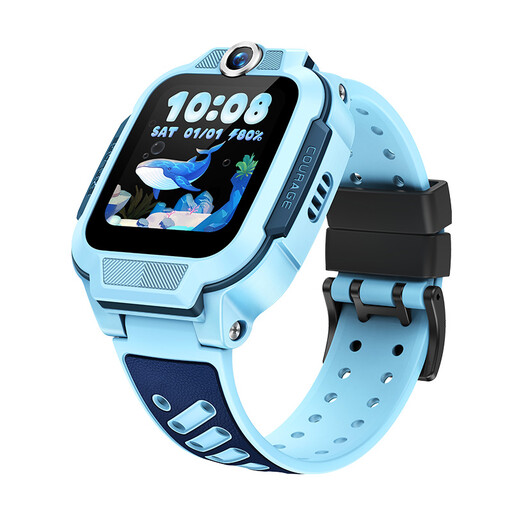
imoo Z3 4G Kids Smartwatch in blue

imoo Z3 4G Kids Smartwatch, Blue

For portable family contact and location-related use when a wrist-worn device is the priority.

1.5-inch TFT display, 8GB storage, Triple-GNSS positioning, VoLTE calls, 740mAh battery and stated 4G-band support. Confirm UK SIM compatibility, coverage, parent-app requirements, internet access and approved-contact controls before buying.

Joybuy

TABWEE K8 7-inch children’s tablet

TABWEE K8 7-Inch Kids’ Tablet, 2GB+32GB

A compact tablet for basic learning, games, videos and video calls with close adult involvement.

7-inch IPS display, 2GB RAM, 32GB storage, 2.4GHz Wi-Fi, Bluetooth 4.2, cameras, headphone jack, protective case and 3000mAh battery. The product information says adult supervision is required; check child-account and content-control options separately.

Joybuy

Frequently asked questions

Is a child-focused smartwatch safer than a smartphone?

It can be the more suitable route when approved-contact calls, messages and location-related functions are needed without general internet or social-media access. This depends on the model and parent-app setup: Xplora describes its X6Play as having no internet access and no unknown contacts, but a smartwatch is not automatically safer simply because it is wearable.

Can Family Link supervise an iPad or iPhone?

No. Google states that Family Link cannot supervise iPhones or iPads. For an Apple device, set up an Apple Child Account within Family Sharing and configure Screen Time and related controls instead.

Do home broadband filters protect a child when they leave home?

No. Ofcom explains that ISP network-level filters protect devices using the home broadband service. They are a household layer rather than a replacement for device, account, app and mobile-network settings, and Internet Matters notes that network filters may not work on public or shared Wi-Fi.

Can a child under 13 use social apps on a supervised phone?

A supervised phone does not override app terms. TikTok states that accounts are for people aged at least 13 and direct messages are limited to ages 16 and over; Snapchat states that the minimum account age is 13, subject to regional and feature-specific requirements. Check each intended app before buying a phone for a particular purpose.

What ongoing commitment should be checked before choosing a child smartwatch?

Check whether the watch needs a proprietary SIM, a mobile subscription, a minimum term, suitable coverage and roaming terms. Also confirm activation steps, parent-app requirements and whether calling or location-related features depend on the service being active.