Quiet numeric-register updater
You regularly enter attendance totals or member references beside another person. A dedicated number pad and less disruptive typing matter more to you than saving desk width.


Choose a quiet full-size keyboard with a dedicated number pad if you often enter attendance totals or member references beside someone else. A compact multi-device keyboard makes more sense when clearing the desk or switching devices matters more than the number pad; for prolonged administration, consider keyboard comfort as part of the whole workstation. Check the exact key layout and connection before buying.
You regularly enter attendance totals or member references beside another person. A dedicated number pad and less disruptive typing matter more to you than saving desk width.
You use more than one device or clear the desk after a session. A compact keyboard and straightforward device switching matter more than a permanent full-size setup.
You spend extended periods maintaining records. Keyboard size and position need to work with your desk, chair, display and work routine, rather than being considered in isolation.
Start with how often the register calls for number entry, then decide whether the keyboard will stay at one computer or move between devices. If administration takes up extended sessions, assess how the keyboard fits the whole workstation.
Choose when: Frequent number entry makes a dedicated number pad useful. Logitech describes its MK295 combo as quiet, while Dell lists quiet keys on the English-UK KB216.
Allow for: A wider footprint. The MK295 uses a wireless receiver; the KB216 uses a USB-A cable, so the connection also needs to suit the desk.
Choose when: Clearing a small desk or switching between devices matters more than a dedicated number pad. Logitech Pebble Keys 2 K380s and CHERRY KW 7100 MINI BT each offer connections for up to three devices.
Allow for: A different number-entry layout and the need to pair each intended device.
Choose when: Administration is a regular, extended desk task and the keyboard's position suits your workstation. Logitech's ERGO K860 has a split layout, an integrated number pad and adjustable palm-lift positions.
Allow for: Its wider layout and a change in typing position. The keyboard does not replace an assessment of the desk and working routine where one applies.
| Concern | Buying checks | Who this matters to |
|---|---|---|
| Quiet numerical entry | Look for a dedicated number pad and the layout you use; treat quiet-key claims as model-specific. | I enter attendance totals beside another person and want convenient number keys without distracting them. Around 36% of consumers put quiet numerical entry first. |
| Device switching | Check how many devices the keyboard can remember and whether each supports its connection method. | When the register moves between a laptop and another device, I want to switch without repeatedly setting up the keyboard. Device switching comes first for around 29% of consumers. |
| Desk space and carrying | Measure the usable desk space and check the compact keyboard's number-entry layout. | I need to clear the shared desk after each session, even if a smaller layout changes how I enter numbers. Around 21% of consumers prioritise space and portability. |
| Comfort during extended work | Consider keyboard position alongside desk depth, display, chair and work routine. | During long record-maintenance sessions, I need a setup that fits my working position, not just a different keyboard shape. Sustained-use comfort is the primary concern for around 14% of consumers. |
Dell lists an English-UK QWERTY KB216, but a Joybuy KB216 listing identifies a US International QWERTY variant. The printed keys and familiar symbol positions can therefore differ.
Check the exact layout in the listing and inspect the pictured keys and variant where possible.
Logitech's claim of over 90% less keyboard and mouse noise concerns its MK295 combo; it does not establish how loudly competing keyboards type under the same conditions.
Use quiet-key descriptions to narrow your choices, then compare the layout and connection needed at your desk.
A smaller keyboard may be easier to put away, but its key arrangement can be less convenient if register updates involve repeated numerical fields.
Review the fields you enter most often before deciding whether desk space or a dedicated number pad takes priority.
For workers within the scope of display screen equipment guidance, the Health and Safety Executive says employers must assess workstations and reduce risks. Keyboard choice is only one part of that setup.
For regular prolonged work, consider the display, desk, chair and routine as well as whether a split keyboard fits your typing position.
Its MK295, Pebble Keys 2 K380s and ERGO K860 illustrate different approaches to this shared-desk task.
The English-UK QWERTY KB216 is a wired, full-size option for a keyboard that stays at one desk.
The KW 7100 MINI BT is a compact option for a desk that needs clearing or a keyboard that moves between devices.
These choices span compact multi-device keyboards and larger desk-based options. Match each stated layout and connection to your shared desk, especially if you need familiar UK key positions or a dedicated number pad.
 No image available
Consider this compact option if the keyboard must be cleared from the desk or used across devices. The product name specifies 78 keys, a US QWERTY layout, 2.4 GHz and Bluetooth 5.0/4.0 connections, and support for four devices.
Check whether its key arrangement gives you the number-entry workflow and printed symbols you need.
 No image available
Consider this Bluetooth multi-device keyboard if the register is updated on different devices. Before choosing it for frequent numerical entry, check the exact key layout and whether it has a dedicated number pad.
 No image available
Consider this combo for a keyboard kept at a shared desk. Its product name specifies a full-size US layout and a 2.4 GHz wireless connection; check that the key legends suit you and that the keyboard has the number pad your register work requires. Silent is part of the product name, not a comparative noise rating.
 No image available
Consider this larger mechanical keyboard if desk space allows and you want the tri-mode connection stated in its product name. The name also specifies 108 keys and a US layout; confirm the number-pad arrangement and whether the printed symbols fit your work. The switch name does not establish a measured noise level.
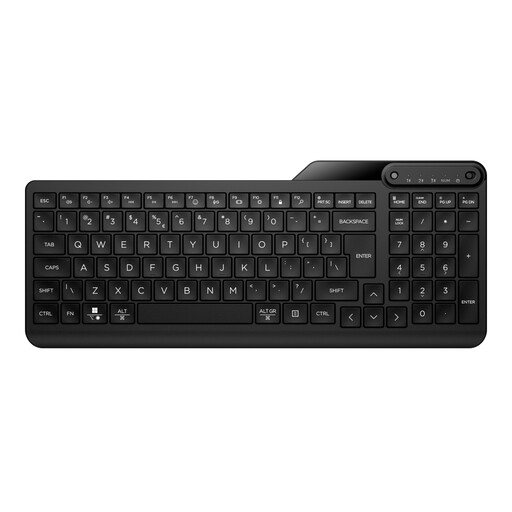
A dedicated number pad is worth prioritising if you regularly enter attendance totals or member numbers. Logitech specifies one for the MK295, and Dell lists one for its English-UK KB216; if numerical fields are occasional, check whether a compact layout is comfortable for the way you enter them.
No. Dell lists an English-UK QWERTY KB216, while a Joybuy KB216 listing identifies a US International QWERTY variant. If printed key positions matter, check the exact variant rather than relying on the model number alone.
Yes, if the chosen keyboard offers multi-device switching and each intended device supports its connection method. Logitech specifies switching among three devices for Pebble Keys 2 K380s, while CHERRY specifies three Bluetooth 5.1 channels for the KW 7100 MINI BT; check the pairing process for your devices.
The Health and Safety Executive does not identify a particular ergonomic keyboard as a universal requirement. It says the display screen equipment rules apply to workers who use DSE daily for continuous periods of an hour or more, and that employers must assess applicable workstations and reduce risks, including in hot-desking arrangements. Consider the keyboard within the whole workstation and work routine.