
24/7 Customer Support

Free returns

Same-day & Next-day Delivery

Quality Guaranteed

Unlock Your Welcome Offers: FREE Delivery | Up to 80% OFF | Free 30-day JoyPlus trial
Download the APP
A computer mouse can look like a simple purchase, yet the wrong model may cause daily frustration. A wireless mouse with an awkward receiver, a gaming mouse with unnecessary features or an ergonomic mouse that does not suit your grip can quickly become poor value.
For UK home users, office workers, students and PC gamers, the most useful choice depends on how and where you use your computer. Before buying, look beyond appearance and headline specifications. Check the connection type, sensor, comfort, compatibility and ongoing power requirements.
DPI describes cursor sensitivity, not overall accuracy. A very high DPI setting may be useful for some gaming preferences, but office work and browsing often require a lower, controlled setting. An adjustable DPI mouse is more practical when you switch between detailed editing, general navigation and fast cursor movement.
Also check whether the stated DPI levels are genuinely adjustable. Some basic optical mice use a fixed setting, which is suitable for straightforward tasks but offers less flexibility.
A wireless mouse normally uses either a 2.4GHz USB receiver or Bluetooth. A USB receiver is usually simple to set up, but it occupies a USB-A port and can be misplaced. Bluetooth is useful for compatible laptops and tablets because it does not require a separate dongle.
A wired mouse or USB mouse avoids batteries and pairing, but the cable may restrict movement or create desk clutter. Before ordering, check whether your computer has USB-A, Bluetooth or another connection requirement. Some newer laptops may need an adaptor for a traditional USB receiver.
Slim designs are convenient for travel, but they may feel less supportive during long working sessions. Conversely, a large ergonomic mouse may be comfortable at a fixed desk but inconvenient to carry between university, home and the office.
Pay attention to the mouse’s dimensions, weight, button layout and handedness. An ambidextrous shape can suit both left- and right-handed users, while a vertical or contoured design may feel more natural for users who prefer a handshake-style grip.
For general UK home and office use:
Check the operating system listed by the seller. Compatibility can vary, especially for side buttons, custom software and macro functions. A mouse may work for basic cursor movement on macOS while some additional buttons remain unavailable.
Most everyday models use an optical mouse sensor, which tracks movement using an LED or optical system. For office work, study and browsing, 800–1600 DPI is often sufficient. Gaming users may prefer a wider adjustable range and software controls.
Do not assume every surface will track equally well. Reflective or glass desks can cause inconsistent movement, so using a suitable mouse mat remains sensible, particularly with a wired gaming mouse or optical mouse.
A three-button layout is enough for standard navigation. Additional side buttons can help with browser forward and back functions, productivity shortcuts or gaming commands. However, more buttons may add weight and complexity.
For wireless models, check:
For products sold in the UK, review the safety information, warranty and relevant conformity markings, such as CE or UKCA where applicable. Keep batteries and small USB receivers away from young children, and follow the manufacturer’s cleaning and charging instructions.
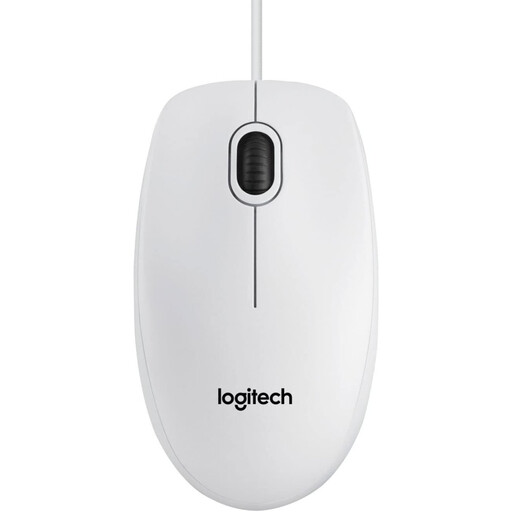
Why This Fits Their Persona: A straightforward USB mouse for home computers, classrooms and office desks where simple setup and predictable running costs matter.
Its wired USB connection avoids battery replacement and wireless pairing issues. The fixed 1000 DPI sensor keeps the specification clear rather than overstating sensitivity.
Ambidextrous full-size design, 1.8m cable, optical tracking and compatibility with Windows, macOS, Chrome OS and Linux.
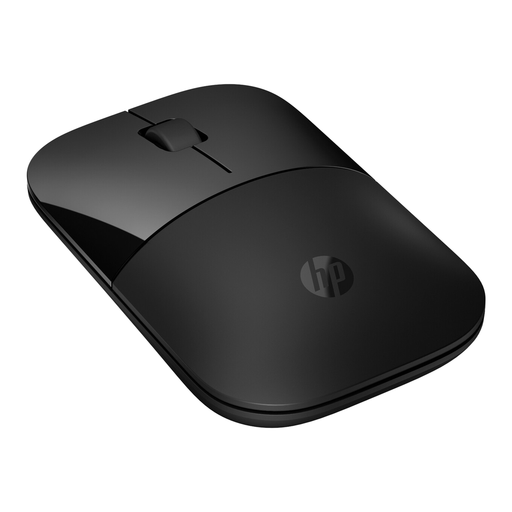
Why This Fits Their Persona: A slim laptop mouse for hybrid workers and commuters moving between home, office and shared workspaces.
Dual-mode connectivity reduces dependence on one connection method, while quiet clicks address noise in libraries, meetings and open-plan offices.
Bluetooth 5.0 and 2.4GHz USB connectivity, 1600 DPI optical tracking, one AA battery and listed support for Windows, macOS and Chrome OS.

Why This Fits Their Persona: Designed for users who spend long periods navigating documents, spreadsheets or multiple devices and prefer an upright hand position.
The vertical shape provides an alternative to a flat mouse design. Its dual-mode connection also helps users avoid being limited to Bluetooth or a USB receiver alone.
Six buttons, 800/1200/1600 DPI options, optical sensing and 2.4GHz or Bluetooth connectivity.

Why This Fits Their Persona: A wired gaming mouse for PC players who prioritise low cable drag, a lightweight symmetrical body and detailed sensitivity adjustment.
It uses a wired USB connection, so there is no battery interruption during play. The product specification clearly identifies optical switches, DPI adjustment and PTFE feet.
58g symmetrical design, DPI changes in 50-point increments, Speedflex cable and programmable buttons through compatible software.
We have compiled a complete, real-time list of products that fully satisfy these strict selection criteria and UK safety regulations.
Yes, provided the laptop supports the mouse’s connection method. Bluetooth is convenient when USB ports are limited, while a 2.4GHz model requires a compatible USB receiver. For travel, choose a compact design with receiver storage and check whether the battery is included.
Lifespan depends on switch quality, cleaning, frequency of use and handling. A wired office mouse has fewer power-related components, while a wireless model needs suitable batteries or charging care. Keep the sensor and feet free from dust, avoid liquids and follow the manufacturer’s maintenance instructions.
A wired mouse does not require disposable batteries or regular charging, so its ongoing power cost is generally lower. A wireless mouse may still be more convenient for a tidy desk or multi-device setup. Compare the purchase price, battery type, expected battery life and your preferred working arrangement before choosing.