New homeowners missing doorstep deliveries
People who need app alerts, two-way communication and a view of items left near the threshold, while choosing between a flexible battery mount and compatible wired power.


Choose a battery video doorbell when there is no suitable working wiring or when a less permanent installation suits the entrance, but allow for charging and check that the mounting position shows the parcel area. Choose compatible wired power when continuous power matters, then decide separately whether local recording or a subscription plan fits how you want to review missed deliveries. For flats, shared entrances and street-facing homes, assess the camera angle before buying because recording beyond your private property boundary brings UK data-protection responsibilities.
People who need app alerts, two-way communication and a view of items left near the threshold, while choosing between a flexible battery mount and compatible wired power.
People who want recorded delivery evidence without committing to a recurring cloud-recording plan and need to compare on-device, hub and microSD storage arrangements rather than assuming every doorbell records locally.
People whose entrance view may include a communal corridor, street or neighbour's property and who need to assess privacy, signage and any landlord or housing-provider permission before installation.
Start with the view you need at the doorstep, then check storage, power and Wi-Fi before choosing a model. Physical camera positioning matters as much as the feature list where the entrance faces shared or public space.
| Priority | What to check | Your needs |
|---|---|---|
| Parcel view | Look for an explicitly stated downward-facing or head-to-toe view. Check the proposed mounting height and test the live view before permanently fixing the unit. | I want to see a parcel placed directly below the bell, not only a visitor's face. |
| Recording arrangement | Confirm where clips are stored, the storage capacity, any required microSD card or hub, and whether recorded event review needs a cloud plan. | I need to be able to review a missed delivery later without assuming that an alert alone creates a saved clip. |
| Power and connection | Check whether the model is battery-only or supports hardwiring, then verify voltage and installation requirements for the exact version. Test home Wi-Fi at the entrance. | A removable battery may suit my entrance, while compatible wiring can avoid routine battery removal. |
| Privacy and permissions | Assess the final field of view before installation. Where recording extends beyond your boundary, minimise external capture and check signage and housing-provider requirements. | I need the camera to focus on my doorway where possible, especially if my entrance faces a street, neighbour's property or communal corridor. GOV.UK and the Information Commissioner's Office state that data-protection law applies when domestic CCTV captures areas beyond the private property boundary. |
Live alerts only help when you can respond at the time. A missed delivery may leave no clip to review if the recording arrangement has not been checked.
Before purchase, confirm where clips are stored, how long they are retained, whether recording works without a plan, and whether local-storage hardware is required.
Cloud-recording plans can be a recurring ownership cost, while local-storage options may need a storage card or optional hub depending on the model.
A clear visitor image does not necessarily show a parcel placed directly below the camera.
Choose an explicitly stated downward or head-to-toe view when parcel visibility is the main reason for buying. Test the live view at the intended height before final fixing and avoid obstructions that can affect the view.
Recording shared, neighbouring or public areas brings UK data-protection responsibilities, and a housing provider may set separate installation rules.
Check the intended field of view, position the camera to capture only your property where possible, display signs when recording outside the boundary, and obtain any required landlord, leasehold or housing-provider approval before installation.
A poor initial position can mean changing the mount, adding signage or replacing an installation that does not meet housing-provider rules.
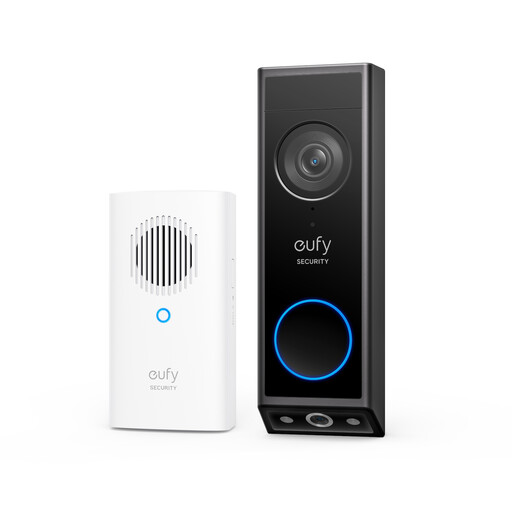
Relevant when comparing battery-or-wired flexibility, on-device or optional hub storage, and a parcel-focused dual-camera design. The stated specifications apply to the Video Doorbell E340 (T8214), not every eufy doorbell.
Relevant for comparing local microSD recording with optional cloud storage and for shoppers seeking a stated head-to-toe view. These claims apply specifically to Tapo D235.
Relevant for shoppers who prioritise app-based live response and cloud-recorded event history and are willing to assess the subscription arrangement for their exact device and household.
Joybuy video doorbell options for delivery monitoring, including parcel-viewing, local-storage and battery or wired-use considerations.
 No image available
The stated downward-facing second camera is intended to cover the floor area in front of the door, while the matching E340 specification lists 8GB on-doorbell storage.
Battery installation and wired operation are stated. Verify the manual and existing circuit before hardwiring, as wiring requirements for this supplied version need checking. Confirm clip retention, access method and any optional HomeBase arrangement for the recording setup you want.
For a street-facing, shared or neighbouring view, position and test the camera to minimise capture outside your property; signage and housing-provider permission may be required.
 No image available
The listing states a 160° head-to-toe view for checking parcels on the ground, with local microSD storage up to 512GB alongside optional Tapo Care cloud storage.
It has a rechargeable battery, 2K video, colour night vision and an included chime. Confirm whether a microSD card is included and which card is required; hardwired operation is not stated for this supplied version.
Battery endurance varies with alerts, recordings, Wi-Fi conditions and use. Position the camera carefully if the view could include shared, neighbouring or public space.
 No image available
The listing states a 4:3 view covering visitors and packages, plus a quick-release rechargeable battery and a hardwired route with continuous recording and pre-roll.
Check where recordings are stored, how retained events are accessed, and whether HomeBase hardware or another arrangement is needed. Confirm the exact hardwired voltage, transformer and chime conditions before installation.
The listing does not explicitly state a downward-facing parcel camera angle, so test the proposed mounting height and live view if parcels are often left immediately below the doorbell.
Yes, if the system captures people outside the boundary of your private domestic property, such as a neighbour's home or garden, a shared space or a public area. GOV.UK guidance includes video-equipped doorbells in this context. The Information Commissioner's Office says its home-CCTV guidance is under review following changes made by the Data (Use and Access) Act, so check its current guidance before installation when your planned view extends beyond your boundary.
A communal corridor is outside your private domestic boundary, so data-protection obligations apply if it is captured. The Information Commissioner's Office says signs are needed where a camera records outside the boundary, including shared spaces. Permission rules vary: Southampton City Council, for example, requires its council tenants to seek permission and not capture communal areas if permission is granted. Check your tenancy, lease and housing-provider rules before mounting equipment.
Ring states that you can view real-time video and answer alerts without a subscription, but reviewing recorded video on Ring cameras and doorbells requires a Ring subscription. If you need retrievable delivery footage without a recurring plan, compare models with clearly stated local storage.
No. Battery power is useful where no existing wiring is available and gives more freedom over placement, but it requires charging and battery life varies with use. Wired power can avoid routine recharging, but the circuit must be working and meet the exact doorbell's stated requirements; Tapo D235 lists 8–24V hardwired input, while eufy E340 lists 16–24V, 10VA or a specified DC adapter.