Start with a laptop whose Linux compatibility is documented for the configuration you intend to buy, whether that means Ubuntu certification, a vendor-supported Linux option or a Linux-first model. A conventional laptop can also work if you are prepared to check its hardware and install Linux yourself; allow more memory and storage if your learning plans include containers or virtual machines.
Who is this for?
First-time Linux home-office learners
If you would rather learn the terminal, packages and basic administration than troubleshoot an installation, look for a documented Linux configuration or check the exact laptop against Canonical’s Ubuntu Certified catalogue.
Learners planning containers or virtual machines
If your study plans extend to local development tools, containers or virtual machines, consider memory and storage beyond what a desktop Linux installation alone requires. Check capacity on the configuration you will actually order.
People studying at a compact home-office desk
If the laptop will usually stay at your desk, check the screen, connections for your peripherals, privacy features and available space. Ask about fan behaviour rather than assuming a compact laptop will be quiet.
What matters when choosing?
Certified or vendor-supported Linux laptop
Choose this when: You want a documented Linux path while getting started. Canonical tests Ubuntu Certified hardware for operating-system compatibility, and some manufacturers offer Linux configurations.
Bear in mind: Certification or a Linux option for one configuration does not establish support for every version of the same laptop family.
Linux-first specialist laptop
Choose this when: Linux-oriented firmware and a stated route for installing modern distributions matter to you; Star Labs describes these options for its Linux laptops.
Bear in mind: Check the selected configuration, keyboard layout and support terms before ordering.
Conventional laptop with self-installed Linux
Choose this when: You have a conventional model in mind and are willing to check its hardware and install your preferred distribution.
Bear in mind: You will need to prepare installation media and check features such as wireless networking, graphics and suspend behaviour for the exact configuration.
| Concern |
What to check |
Who this matters to |
| Linux compatibility |
Check the exact configuration against your distribution’s compatibility resources or an explicit manufacturer Linux listing. Confirm the hardware features you expect to use. |
I want to begin learning Linux without spending my first sessions resolving installation or driver problems. Around 42% of consumers put a documented compatibility path first. |
| Workload headroom |
Check installed RAM and SSD capacity against your plans for containers, virtual machines or dual booting. The Fedora Project recommends 4GB RAM and a 40GB SSD for Fedora Workstation itself. |
If I plan to run virtual machines or local development tools, I need room beyond a desktop installation’s baseline. Around 33% of consumers give workload capacity priority. |
| Desk comfort and connections |
Check screen size, ports for your existing peripherals and the laptop’s footprint; ask about fan behaviour if noise matters to you. |
At a fixed study desk, I need the screen and connections to fit how I work each day. For around 25% of consumers, desk comfort is the primary concern. |
Mistakes to avoid
-
Assuming every configuration in a laptop family has the same Linux support
Wireless hardware, graphics and operating-system options can vary within a product family. Canonical’s Ubuntu certification applies to tested hardware, not automatically to every configuration bearing a familiar model name.
Record the full model and selected configuration, then check them against your distribution’s compatibility resource or the manufacturer’s Linux listing.
-
Buying only to a desktop Linux baseline
The Fedora Project’s recommendation of 4GB RAM and a 40GB SSD is for Fedora Workstation. It does not account for the additional capacity you may want for virtual machines, containers or a second operating system.
Decide which tools you expect to learn, then check the RAM and storage in the configuration you are considering.
-
Replacing an operating system before backing up files
Installing Linux can change the internal drive, while Canonical notes that preparing an Ubuntu installer erases the USB drive used for it.
Back up files you need, use a spare USB drive for the installer and, where practical, try your intended distribution from live media before changing the internal drive.
-
Forgetting the old laptop when replacing it
An old laptop may still contain personal data. Oxfordshire County Council also advises that electrical equipment must not go in general waste.
Back up required files, remove personal data and check a retailer take-back or local recycling route before handing over the device.
Brands to consider for a Linux laptop
Lenovo
Lenovo UK presents Linux-preloaded laptops as an option for buyers who want a mainstream laptop with a stated Linux route.
- Lenovo says its Linux-preloaded devices offer an optimised and certified operating-system configuration.
- Check the operating system and Linux support for the exact model and configuration; Lenovo’s ThinkPad T14 family, for example, has multiple hardware options.
Dell
Dell UK lists an Ubuntu configuration for a workstation model relevant to learners planning substantial local workloads.
- Dell UK lists Ubuntu Linux 24.04 LTS as an operating-system option for the Dell Pro Precision 5 16S PW516260.
- That option applies to the selected configuration; a workstation’s capacity is not necessary for every Linux learning plan.
Star Labs
Star Labs focuses on Linux laptops for buyers interested in the firmware and installation options described by the manufacturer.
- Star Labs states that the StarBook Horizon supports standard installations of modern Linux distributions and describes the StarFighter as intended for workloads including containers and virtual machines.
- Compare the selected hardware, UK keyboard layout and support terms with your requirements rather than assuming the two models serve the same workload.
Joybuy laptops for self-installing Linux
These conventional laptops are choices to assess if you plan to install Linux yourself. Their listed memory and storage may be relevant to more demanding study plans, but check compatibility with your intended distribution for the exact configuration before buying.
 No image available
Lenovo LOQ Essential 15ARP11, Ryzen 7 170, 16GB RAM, 1TB SSD, RTX 5050
Consider this configuration if your Linux study plans include applications that need more memory and storage than a basic desktop installation.
The product name specifies 16GB RAM, a 1TB SSD and a 15.6-inch 144Hz FHD display.
Windows 11 Home is pre-installed. Before choosing it for Linux, check wireless, graphics, suspend and firmware support for your intended distribution.
View on Joybuy
 No image available
Lenovo Legion Pro 7 16IAX10H, 83F5000UUK, 64GB RAM, 2TB SSD, RTX 5090
This configuration is worth assessing if your planned Linux experiments include several virtual machines or other memory-intensive tools.
The product name specifies 64GB RAM, a 2TB SSD and a 16-inch display.
Windows 11 Home is pre-installed. Check Linux support for its graphics, wireless hardware, suspend behaviour and firmware, and ask whether its size and fan behaviour suit your desk.
View on Joybuy
 No image available
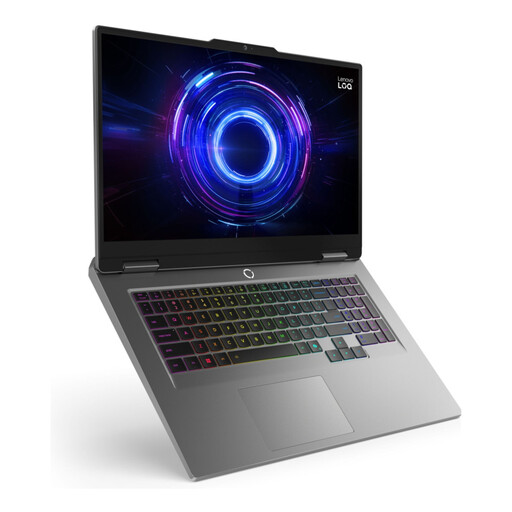
LOQ 17IRX10, 24GB RAM, 1TB SSD, W11H
Consider this model if you want memory and storage headroom for Linux study at a desk and have room for its larger screen.
The listing describes 24GB RAM, a 1TB SSD and a 17.3-inch Full HD display.
Windows 11 Home is pre-installed. Confirm the supplied processor configuration and check graphics, wireless, suspend and firmware support for your intended Linux distribution.
View on Joybuy
Frequently asked questions
Do I need a laptop with Linux already installed?
No. Canonical documents installing Ubuntu from a bootable USB drive on a laptop or PC. If you choose a laptop without Linux pre-installed, check the exact hardware against compatibility resources and back up existing data before installation.
How much RAM and storage do I need to start learning Linux?
For Fedora Workstation itself, the Fedora Project recommends 4GB RAM and a 40GB SSD for a good experience. Plan additional capacity if your learning will include virtual machines, containers, dual booting or large project files.
What should I do before replacing Windows with Ubuntu?
Back up the files you need before changing the internal drive. Canonical notes that making an Ubuntu installer erases the USB drive used for it; you can also try Ubuntu from live media before installing it.
Can I put an old laptop in household rubbish?
No. Oxfordshire County Council advises that electrical equipment must not go in general waste. Remove personal data before handing over the laptop, and check a retailer take-back service or your local recycling arrangements.


