Buying priorities
Work from your course requirements first, then compare capacity, portability and the practical support offered by the seller.
| Priority |
What to check |
Your needs |
| Course compatibility |
Confirm each named application, assessment platform, operating system, processor architecture, graphics requirement, port and external-device requirement. Check whether specialist tools need standard Intel or AMD Windows hardware rather than Windows on ARM. |
I need every compulsory application and peripheral to work on my own laptop, not only in a browser or on a campus machine. |
| Performance and storage |
Use your course minimum as the starting point. For general study, check for at least 8GB RAM and SSD storage; 16GB RAM and 512GB storage can offer more room for demanding applications, larger files and longer ownership. |
I want to work across documents, research tabs, video calls and course applications without running out of capacity early in the degree. |
| Campus portability |
Compare weight, screen size, charging access, stated battery information, webcam, microphone, wireless connection and ports. A 14-inch-class laptop may be easier to carry, while a larger display can help with detailed editing or design work. |
I will move between lectures, the library, group sessions and home, so the device needs to suit my daily bag and study routine. |
| Refurbished condition and support |
Check the exact model, battery condition, storage, operating-system support, faults, included charger, warranty and return process. Retain the product listing and order confirmation. |
I am happy to consider a refurbished laptop if its condition and remaining useful life fit the course requirements. |
Relevant brand references
No brand references are available to display.
Joybuy laptop options
These Joybuy options are Windows laptops for general campus study and workloads that may benefit from additional memory or storage. Check each model against your course's exact software, graphics and peripheral requirements before choosing.
 No image available
ASUS Vivobook 15 X1504VA, Core 5 120U, 24GB RAM, 1TB SSD
A Windows option to consider for general study and multi-year workloads where the course requirements match.
15.6-inch anti-glare FHD IPS display, Intel Core 5 120U, 24GB DDR5 RAM, 1TB SSD, Windows 11 Home, Wi-Fi 6 and stated 1.70kg weight. The stated battery figure is up to 8 hours of standby time, so check active-use battery expectations for your timetable.
Joybuy
 No image available
Lenovo IdeaPad Slim 3 83K7009MUK, Ryzen 5, 24GB RAM, 512GB SSD
A portable Windows laptop for students who need capacity for multitasking and locally stored course files.
AMD Ryzen 5 7535HS, 24GB DDR5 RAM, 512GB PCIe SSD, 15.3-inch anti-glare WUXGA display, Windows 11 Home, Wi-Fi 6, privacy-shutter webcam and stated 1.59kg weight. Check the manufacturer's tested-use battery figure and specialist software requirements.
Joybuy
 No image available
HP OmniBook X Flip 16-as0004na, Core Ultra 5, 16GB RAM, 512GB SSD
Its convertible format may suit note-taking, presentations and flexible desk use alongside general study.
16-inch 2K touchscreen, 360-degree hinge, Intel Core Ultra 5 226V, Intel Arc graphics, 16GB RAM, 512GB SSD, Windows 11 Home and 5MP IR camera with privacy shutter. Check the weight, battery runtime and compatibility with course software and specialist peripherals.
Joybuy
 No image available
ASUS Vivobook 14 X1407QA-LY003W, Snapdragon X, 16GB RAM, 512GB SSD
A lighter Windows option for mobile study, documents, research and online teaching where Windows on ARM is supported by the course.
14-inch WUXGA anti-glare display, Snapdragon X platform, 16GB RAM, 512GB PCIe SSD, Windows 11 Home, two USB4 Type-C ports, HDMI 2.1, Wi-Fi 6E, FHD IR camera and stated 1.49kg weight. Confirm that every required application, driver and external device supports Windows on ARM.
Joybuy
 No image available
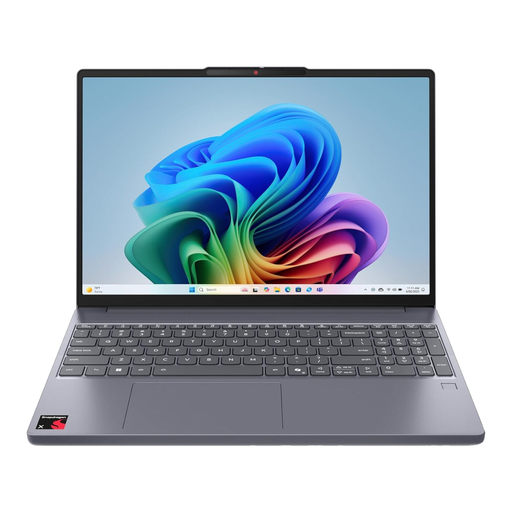
Lenovo IdeaPad Slim 3 15Q8X10, Snapdragon, 16GB RAM, 256GB SSD
A Windows on ARM option for everyday study and online sessions when your course software is confirmed compatible.
15.3-inch WUXGA OLED display, Qualcomm Snapdragon platform, 16GB LPDDR5X RAM, 256GB PCIe Gen4 SSD, Windows 11 Home, FHD webcam, Wi-Fi 7 and stated 1.79kg weight. Some professional software may require native ARM support, and 256GB storage may be limiting for large media, datasets or design projects.
Joybuy
Frequently asked questions
Should I check course requirements before choosing Windows, macOS or ChromeOS?
Yes. Check the named software, assessment platform, external hardware and department guidance before purchase. Loughborough University, the University of Nottingham and the University of Bath identify engineering applications that are Windows-only, while other courses may support either Windows or macOS.
Can a Chromebook be my main university computer?
Only if your university confirms that your course software and assessment workflow are fully supported on ChromeOS. The University of Bristol and the University of Edinburgh advise that Chromebooks may not run required software or provide full primary-device functionality, so browser access alone is not enough.
Is 8GB or 16GB RAM better for a university laptop?
Treat 8GB RAM as a practical minimum for ordinary study where course guidance permits it. Choose 16GB when buying for a multi-year degree, regular multitasking, programming, design, engineering, large files or more demanding applications.
Can a university remote desktop let me buy a lower-spec laptop?
Possibly, but only when your university provides remote access for your course and your connection is stable enough. The University of Nottingham notes that virtual desktop access can cover much software but needs a stable, reasonably fast connection and is not suitable for every hardware-based activity.
What rights apply when buying a refurbished laptop online from a UK trader?
For an online distance sale, GOV.UK states that the general cancellation period is up to 14 days after delivery, with the trader required to provide relevant pre-contract information. Under the Consumer Rights Act 2015, goods must be of satisfactory quality in light of their description, price and other relevant circumstances; check the stated condition, warranty and return process as well.


