For interrupted client calls, online teaching or virtual meetings, check whether the broadband connection itself is unreliable before buying Wi-Fi equipment. If a fixed work device connects reliably by Ethernet near the router but struggles in the work room, consider a cable to the desk, a wired access point for Wi-Fi in that room, or mesh for coverage across several rooms. A replacement router makes more sense when the existing router is the identified limitation; check workplace VPN requirements before changing network settings.
Who is this for?
Home workers at a fixed desk
If calls break up while you work in one place, a direct cable is a useful comparison with Wi-Fi. Ofcom advises that connecting a computer to the router by Ethernet should give a faster, more reliable connection than Wi-Fi; Microsoft notes that a USB-to-Ethernet adapter is an option when a PC lacks an Ethernet port.
People working in a weak-coverage room
If Wi-Fi is noticeably worse where you take calls than near the router, look at the route to that room. Ofcom notes that objects and building materials can weaken Wi-Fi; an Ethernet-fed access point or suitably placed mesh nodes may address a local coverage problem without assuming the broadband service needs replacing.
Employees who use a work VPN
A Windows VPN requires a profile on the work device, according to Microsoft. Ethernet or Wi-Fi can provide that device’s local connection, but confirm your employer’s requirements before replacing a router or changing network settings.
What should you check first?
Locate the weak link before choosing equipment: compare the work room with a connection near the router, then match any hardware to the rooms and devices that need it.
| Priority | What to check | Your needs |
|---|
| Broadband or local Wi-Fi? |
Check the provider’s outage information. Compare devices near the router and, if practical, test a computer connected by Ethernet. Ofcom advises reporting an unlisted service fault to the provider. |
If calls fail across the home, I want to rule out a service problem before buying coverage equipment. |
| A fixed wired connection |
Check the cable route, available Ethernet port and work-device connector. Microsoft suggests a USB-to-Ethernet adapter as an option for a PC without an Ethernet port. |
My computer stays at one desk, and I can run a cable rather than rely on Wi-Fi for calls. |
| Wi-Fi in the work room |
Check whether Ethernet reaches the room and whether an access point can use it. For a PoE-powered model, confirm compatible power equipment and a suitable mounting position. |
I need Wi-Fi for a laptop, phone or teaching equipment in a room with a weak signal, while keeping the existing main router. |
| Coverage across rooms |
Plan mesh-node positions and check the exact model’s operating modes and Ethernet-backhaul support. TP-Link describes wired backhaul between its Deco units as faster and more stable than a wireless link between nodes. |
I move between rooms or need Wi-Fi beyond one work room; I can assess where each node would connect. |
| Wired ports and power |
Count the ports needed for fixed devices. If an access point needs Power over Ethernet (PoE), check the switch’s PoE standard and power capacity; an ordinary switch only adds wired ports. |
There is an Ethernet route, but I need connections for several devices or power for a compatible access point. |
| Router and VPN settings |
Check whether the current router, rather than room-specific coverage or the broadband service, is limiting the setup. Confirm employer VPN and network-policy requirements before changing routing settings. |
I am considering a replacement router and need my work connection to remain compatible with my organisation’s setup. |
Purchasing pitfalls
-
Buying coverage equipment before checking the service
Ofcom notes that Wi-Fi cannot outperform the underlying broadband service. A new mesh system will not resolve a provider-side outage or fault.
Check outage information and compare connections near the router. If the service remains unreliable and no fault is listed, report it to the provider.
-
Assuming every mesh-node connection works alike
A wireless mesh node depends on its link to another node. TP-Link’s Deco guidance describes Ethernet backhaul as faster and more stable than a wireless connection between nodes.
Check whether the exact mesh model supports Ethernet backhaul and whether cables can reach the proposed node positions.
Using wired backhaul may also require Ethernet cabling and installation work.
-
Overlooking access-point power
The Ubiquiti U6 Plus, for example, specifies a PoE Ethernet connection; its UK listing shows a PoE adapter as an accessory. An Ethernet cable alone may not complete that installation.
Check the chosen access point’s power standard, supplied equipment, cable route and mounting location.
A compatible PoE injector or switch and suitable mounting hardware may be needed.
-
Replacing the router for a problem in one room
Ofcom explains that objects and materials weaken Wi-Fi signals. A different router in the same unsuitable position may leave the work room with poor coverage.
Test router placement first. If the weakness remains local to one room, compare a wired access point or mesh placement before replacing the main router.
Relevant brand references
These brands illustrate different equipment routes; a brand’s published specifications do not establish how a particular home network will perform.
TP-Link
TP-Link documents Deco mesh, access-point mode and small Ethernet switches relevant to home-office layouts.
- TP-Link lists optional Ethernet backhaul for the Deco S7 and five Gigabit ports for the TL-SG105 switch.
- Check the exact model’s operating mode, cable route and PoE requirements; neither specification establishes that it will resolve a particular call problem.
Ubiquiti
The U6 Plus is an example of an Ethernet-fed access point for a deliberately wired Wi-Fi installation.
- Ubiquiti’s UK listing specifies dual-band Wi-Fi 6, Gigabit Ethernet and PoE for the U6 Plus.
- Plan cabling, mounting and compatible PoE power. Its stated coverage figure is a manufacturer estimate, not a guarantee for an individual room.
NETGEAR
NETGEAR publishes mesh-system guidance and specifications for standalone Nighthawk routers.
- Its UK RAX9 page lists Wi-Fi 6 and four Gigabit LAN ports.
- A router replacement cannot increase the capacity of the incoming broadband service; first check whether the issue is confined to a room or device.
Joybuy product options
These options cover mesh Wi-Fi for several rooms, an adapter for a wired computer connection, and switches for adding Ethernet ports. Choose the connection route before comparing individual products.
 No image available
TP-Link Deco BE22 (3-Pack) BE3600 Wi-Fi 7 Mesh System
A three-unit mesh option to consider when Wi-Fi is weak across several rooms. Check where the units can sit, whether the exact setup supports your intended wired connections, and workplace requirements before changing network settings.
View on Joybuy
 No image available
TP-Link Deco BE25 Wi-Fi 7 Mesh System (3-Pack)
Another three-unit mesh option for Wi-Fi across multiple rooms. Check node positions and the exact operating modes for your existing network; a mesh system will not correct a broadband-service fault.
View on Joybuy
 No image available
HOCO HB42 USB Gigabit Ethernet Adapter, 0.2 m, Black
For a fixed-desk computer that needs an RJ45 connection rather than Wi-Fi, this 4-in-1 hub is listed with three USB 3.0 ports. Check the computer’s USB connection and whether you have an Ethernet cable for the route to the router.
View on Joybuy
 No image available
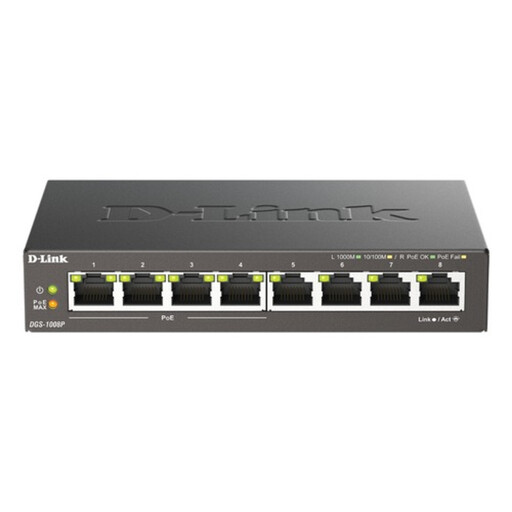
D-Link 8-Port Gigabit PoE Desktop Switch
For an existing Ethernet route that needs more wired ports, including a connection for a compatible PoE device. Check the access point’s PoE requirements against the switch before purchase; the switch does not itself provide Wi-Fi coverage.
View on Joybuy
 No image available
D-Link DGS-108GL 8-Port Gigabit Desktop Switch
For adding wired connections where an Ethernet uplink is already available. If you plan to connect a PoE-powered access point, confirm its power arrangement separately; adding ports does not extend Wi-Fi coverage.
View on Joybuy
Common questions
How do I know whether to buy Wi-Fi hardware or contact my broadband provider?
Check for a reported outage and whether the problem affects several devices or the whole home. Ofcom advises reporting an unlisted service fault to the provider. Local hardware becomes more plausible if a computer connected by Ethernet near the router is reliable but Wi-Fi in the usual work room is not.
Will switching my work computer to Ethernet stop its VPN working?
Ethernet does not inherently prevent a device-managed VPN connection: Microsoft describes the Windows VPN as using a profile on the device. Confirm your employer’s profile, authentication and network-policy requirements before changing router settings.
When should I use a wired access point rather than mesh?
A wired access point suits a weak room that Ethernet can reach when devices still need Wi-Fi there. Mesh is an option for coverage across several rooms; if its nodes can be cabled together, TP-Link’s Deco guidance describes Ethernet backhaul as faster and more stable than a wireless link between nodes.
What else might a wired access point need?
Check its power method, cable route and mounting position. Ubiquiti’s UK listing specifies PoE for the U6 Plus and lists a PoE adapter as an accessory, so an installation may need a compatible injector or PoE switch as well as Ethernet cabling.


