Choose a controller for the platform and games you play most, then check whether those games and your connection method support the features you want. DualSense is a route for PS5 players seeking supported tactile effects, while Xbox Wireless Controller serves Xbox, Windows and mobile use; Switch and Windows or Android players have different platform-specific options. A controller will not resolve glare or make a screen easier to see in a bright room, so assess the viewing setup separately.
Who should consider each route?
PS5 players who value supported tactile effects
If PS5 is where you play most of your cinematic adventures, DualSense haptics and adaptive triggers may influence your choice. PlayStation says their availability depends on the game and, in some cases, the connection; check the titles you intend to play.
Players moving between Xbox, Windows and mobile
If you use several devices, start with documented compatibility rather than a game-specific effect. Microsoft lists Xbox Wireless Controller use across Xbox consoles, Windows PCs and mobile devices, though you should still check each game and connection method.
Players dealing with a bright viewing space
If room lighting makes darker scenes difficult to see, assess your display, reflections and screen position as a separate decision. Controller features govern input and supported feedback, not the light falling on the screen.
What matters when choosing?
Start with the device and games you will use, then weigh supported feedback and connection options. Check screen visibility on its own: changing controllers does not address reflections.
| Concern |
What to check |
Who this matters to |
| Platform and game compatibility |
Confirm support for your main device and intended games; check the required connection. |
If my controller cannot work with the games on my main platform, its extra features are beside the point. Around 36% of consumers put platform and game compatibility first. |
| Supported tactile and motion features |
Check each game’s feature support and whether your chosen device requires a wired connection. |
For story-driven games, I want to know whether the effects that interest me will actually work. Around 29% of consumers prioritise supported feedback or motion features. |
| Windows or Android control options |
Match the controller’s connection mode to your device; consider whether remapping or extra buttons suit your games. |
When I switch between Windows and Android, connection choices and configurable controls matter more to me than console-specific effects. Roughly 21% of consumers make those options their primary concern. |
| Bright-room visibility |
Assess display brightness, reflections and screen placement separately from controller choice. |
If daylight obscures a dark scene, I need to address what I can see before changing how I control the game. Around 14% of consumers put the viewing setup first. |
Mistakes to avoid
-
Expecting tactile effects in every game
PlayStation says DualSense haptics and adaptive triggers depend on game support. On PC, haptic feedback requires USB; PlayStation says haptics are not compatible with Mac or mobile devices.
Check the support notes for your specific games and device before choosing DualSense for those effects.
PC haptics may require a suitable USB cable; PlayStation states that a cable is not included with the DualSense controller itself.
-
Assuming every wireless connection works alike
Microsoft documents Xbox Wireless and Bluetooth for the Xbox Wireless Controller. For the Ultimate 2C Wireless, 8BitDo specifies 2.4G or wired use on Windows and Bluetooth on Android.
Match the stated connection mode to your device and check whether any accessory needed for that mode is included.
-
Changing controllers to solve screen glare
A controller can change input or provide supported feedback, but those features do not establish how well a display handles reflections or bright ambient light.
Check the screen in the room where you play, including its position relative to windows and lights, before treating visibility as a controller issue.
-
Putting an old rechargeable controller in household rubbish
GOV.UK advises against putting unwanted electrical products and batteries in household rubbish.
Use an appropriate electrical-waste or battery collection route when the controller reaches the end of its life.
Relevant brands to consider
PlayStation
PlayStation’s DualSense is a PS5-focused choice that can also connect to supported PCs, Macs and mobile devices.
- PlayStation describes haptic feedback and adaptive triggers for games that support them.
- Feature availability varies by game and device. PC haptics require USB, and PlayStation says haptics are not compatible with Mac or mobile devices.
Xbox
Microsoft positions the Xbox Wireless Controller for Xbox consoles, Windows PCs and supported mobile devices.
- Microsoft lists Xbox Wireless and Bluetooth, button mapping, a hybrid D-pad and a 3.5 mm headset jack.
- Check gamepad support and the connection available on each device rather than assuming the same setup works everywhere.
Nintendo
Nintendo’s Switch Pro Controller is an official full-size option for Nintendo Switch play.
- Nintendo lists motion controls, HD Rumble and amiibo NFC support for the Switch Pro Controller.
- Nintendo’s approximately 40-hour battery figure varies with use. Confirm the exact controller model for your console; the Switch Pro Controller and Switch 2 Pro Controller are distinct products.
8BitDo
The 8BitDo Ultimate 2C Wireless offers a Windows and Android-focused route for players interested in connection and control options.
- 8BitDo lists 2.4G and wired connections for Windows, Bluetooth for Android, Hall Effect sticks and triggers, and configurable extra buttons.
- Those stated compatibility routes do not make this model a PS5, Xbox or Switch controller. Battery figures from 8BitDo’s laboratory conditions are not a promise of runtime in every setup.
Controllers for different platforms
These Joybuy controllers cover Xbox and Windows, PS5, Nintendo Switch 2 and Nintendo Switch use. Choose by your actual console or PC first; the Switch and Switch 2 products below are different models, and none should be chosen as a remedy for screen glare.
 No image available
Xbox Wireless Controller – Robot White
Consider this for Xbox or Windows play if you also want a controller with Microsoft-documented mobile compatibility. Microsoft lists Xbox Wireless and Bluetooth connections, button mapping, a hybrid D-pad and a 3.5 mm headset jack; confirm gamepad support in the games you plan to play.
View on Joybuy
 No image available
Nintendo Switch 2 Pro Controller – Black
Consider this model for Nintendo Switch 2 play. Check whether your intended games support the control and feedback features you want; do not confuse it with the Nintendo Switch Pro Controller for the original Switch.
View on Joybuy
 No image available
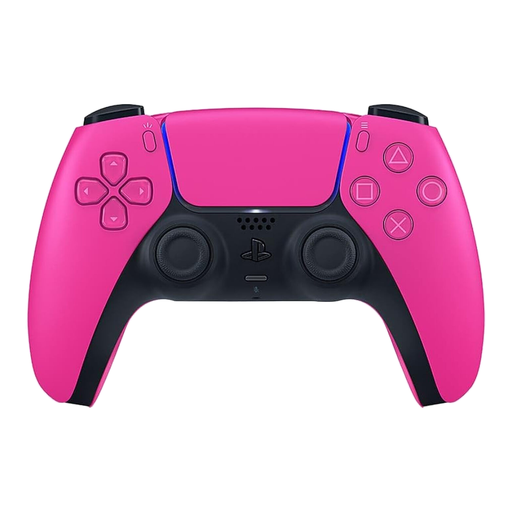
Sony PlayStation DualSense Wireless Controller V3 – Nova Pink
Consider this DualSense variant for PS5 games that support the tactile features you want. PlayStation says haptics and adaptive triggers depend on game support; PC haptic feedback requires USB, and haptics are not compatible with Mac or mobile devices.
View on Joybuy
 No image available
Lexip SteelPlay Twin Pads Controllers
Consider the twin-pad format for Nintendo Switch play if it suits how you prefer to hold and share controls. Check that your particular games support the controls and feedback you expect.
View on Joybuy
 No image available
Turtle Beach PDP Victrix Pro BFG Wireless Controller for Xbox Series X|S, Xbox One and Windows 10/11 PC – Black
Consider this model if you play on one of the Xbox or Windows platforms named in its title. Check gamepad support in your intended titles and confirm which connection method you will use with your device.
View on Joybuy
Common questions
Do I need a special controller for a bright room?
No controller feature described here addresses light or reflections on your screen. Choose for platform and game compatibility, then assess the display and its position in the room to tackle visibility.
Will DualSense haptics and adaptive triggers work on PC?
They depend on support in the game, and PlayStation states that PC haptic feedback requires a USB connection. Do not assume that pairing through Bluetooth enables every DualSense effect.
Do wireless controllers include a charging cable?
Check the exact bundle rather than assuming they all contain the same accessories. PlayStation says a cable is not included with the DualSense controller itself, while Nintendo lists a USB Type-C cable with its original Switch Pro Controller.
How should I dispose of an old controller or battery in the UK?
Use an appropriate electrical-waste or battery recycling route rather than household rubbish. GOV.UK advises against putting unwanted electrical products and batteries in household rubbish, particularly where lithium-ion batteries may be wet or damaged.


