For one narrator who can stay at a desk, start with a microphone positioned close to the speaker; choose a wireless clip-on system if the commentary requires movement between displays. A USB condenser microphone is another fixed-position option when the room is comparatively quiet, but none of these formats removes nearby voices or room sound by itself. Check the recording device, monitoring method and microphone position before choosing.
Who each setup suits
Close-miked classroom narrator
If one person speaks from a desk or fixed display position, a front-facing microphone kept close to the voice is a relevant way to manage ordinary classroom sound. Shure’s placement guidance still recommends a quieter recording window where possible.
Moving demonstrator
If the speaker walks between displays or records video while handling objects, a compact wireless system avoids keeping them beside a desk microphone. Check its connection to the intended recording device.
Controlled desktop recorder
If the narrator can stay in place in a comparatively quiet room, a USB desk microphone with headphone monitoring offers a direct recording route without planning an XLR interface.
What matters when choosing
Choose the microphone format around the narrator’s movement and the room first; then check how the chosen model connects and how you will listen to a test recording.
Close-positioned USB dynamic microphone
Choose when: One narrator can stay close to a desk-mounted or boom-mounted microphone.
Trade-off: The speaker must maintain that position; Shure cautions that even a directional microphone cannot separate every wanted sound from unwanted sound.
Wireless clip-on system
Choose when: The commentator needs to move between objects or record video away from the recording device.
Trade-off: Charging, attachment and the connection to the recording device become part of the recording workflow.
USB cardioid condenser microphone
Choose when: The narrator can record at a fixed desk position in a comparatively quiet classroom.
Trade-off: This route still relies on controlled placement and a suitable recording time when other people may be speaking nearby.
| Concern | What to check | Who this matters to |
|---|
| Voice clarity in the room |
Check whether the narrator can speak close to the microphone’s front and make a short recording in the classroom. |
If other activity is audible, I need the narrator’s voice to stand out without assuming noise processing will erase nearby speech; roughly 40% of consumers put this need first. |
| Presenter movement |
Check the wireless system’s connection to the recording device, attachment and charging routine. |
When I move between displays, I need the microphone to follow the speaker rather than remain on a desk; for about 30% of consumers, that mobility is the primary concern. |
| Direct recording and monitoring |
Check the computer connection, headphone output and any software compatibility needed for the intended features. |
If I record at a computer, I want to hear the microphone signal while working without arranging a separate interface; around 20% of consumers chiefly need this workflow. |
| More than one contributor |
Check the number of supported transmitters or inputs and whether the required voices can be recorded as intended. |
When another person joins the commentary, I need a way to capture both voices; that is the leading concern for roughly 10% of consumers. |
Buying pitfalls
-
Expecting voice isolation to erase classroom chatter
Shure says microphones cannot distinguish every wanted sound from unwanted sound; its denoiser does not remove background voices.
Make a short test recording at the narrator’s normal speaking distance. Reposition the microphone and arrange a quieter period if other voices remain prominent.
-
Choosing wireless without checking the recording device
Movement is easier without a desk cable, but a wireless system adds a receiver connection and a charging routine.
Identify the exact phone, camera or computer and its connector before ordering. Charge the system and test the complete connection before the commentary session.
-
Assuming every USB microphone has the same setup
Monitoring, stands and software features vary by model. A USB connection alone does not establish what else is needed at the recording desk.
Check the exact box contents, mounting arrangement, headphone output and compatibility of any software features you intend to use.
-
Treating an XLR condenser as a direct computer microphone
Audio-Technica specifies that the XLR AT2020 requires 48 V phantom power through its XLR connection; the AT2020USB-X is a separate USB model.
If you plan to use the XLR AT2020, confirm that your interface or mixer provides the required power and connection. Otherwise, consider a suitable USB model for direct recording.
Brands to consider
Shure
The MV7+ is a reference point for close-positioned narration using a dynamic microphone.
- Shure specifies USB-C and XLR outputs, headphone monitoring and automatic level adjustment for the MV7+.
- Shure’s support guidance stresses close placement: microphone directionality and processing do not remove every unwanted classroom sound.
RØDE
Wireless ME is a reference point when a presenter needs to move while recording to a compatible device.
- RØDE specifies built-in microphones in the transmitter and receiver and compatibility with cameras, computers and smartphones.
- Check the intended device connection and test the wireless recording in the classroom before relying on it for a session.
Audio-Technica
The AT2020USB-X is relevant to fixed USB desk recording; the XLR AT2020 is a different equipment route.
- Audio-Technica specifies USB-C operation and direct headphone monitoring for the AT2020USB-X.
- Audio-Technica specifies 48 V phantom power for the XLR AT2020, so it needs suitable powered recording equipment rather than a direct computer connection.
Microphones for fixed and moving presenters
These Joybuy options cover close-positioned desk narration and wireless recording for a presenter who moves. Choose between those setups according to where the speaker will be, then check the particular recording device and room.
 No image available
FIFINE K688CT USB/XLR dynamic microphone kit with boom arm
Consider this kit if the narrator can stay close to a microphone mounted at a fixed position. The product name specifies a boom arm, mute button, headphone jack and gain knob; check the mounting position and the connections needed for your recording setup.
View on Joybuy
 No image available
FIFINE AM8 USB/XLR dynamic microphone with desktop stand
Consider this model for a narrator recording from a desk rather than walking between displays. Its product name specifies a desktop stand, mute button and headphone jack; make a room test with the microphone close to the speaker.
View on Joybuy
 No image available
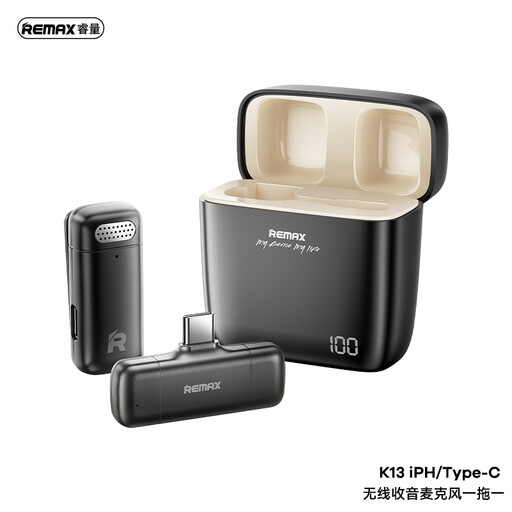
REMAX K13 1-to-1 USB-C wireless microphone, black
This wireless option is relevant when the presenter moves between displays. Check that the intended recording device accepts the USB-C receiver, that the charged system can cover the session and that a room test captures the voice as needed.
View on Joybuy
 No image available
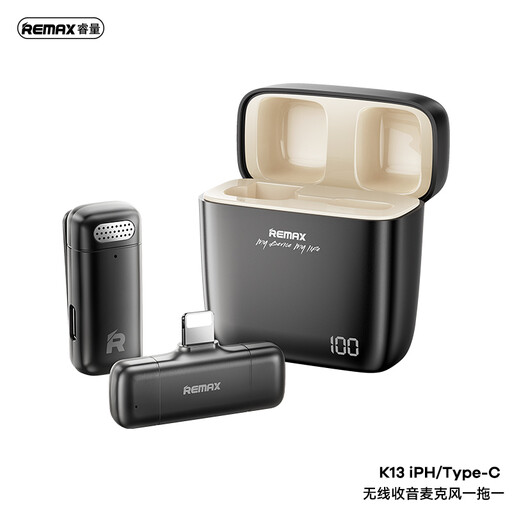
REMAX K13 1-to-1 Lightning wireless microphone, black
This wireless variant is relevant to a moving presenter recording with a compatible Lightning-connected iPhone. Confirm the exact device connection, charging plan and classroom recording sound before the session.
View on Joybuy
Common questions
Will a cardioid microphone remove classroom chatter?
No. Cardioid pickup favours sound from the front, but it does not erase voices near the narrator. Shure advises speaking close to the microphone and notes that its denoiser cannot remove background voices; plan a quieter recording period if possible.
Should I use USB or XLR for classroom commentary?
Choose USB for a direct connection to a compatible recording device; choose XLR if you have, or intend to arrange, suitable recording hardware. Audio-Technica specifies that the XLR AT2020 needs 48 V phantom power, whereas the AT2020USB-X is a USB model. Shure’s MV7+ offers both USB-C and XLR outputs.
Do I need headphones while recording?
Headphones let you check the microphone signal during a test rather than discovering unwanted sound after the commentary is complete. Shure specifies headphone monitoring on the MV7+, and Audio-Technica specifies direct monitoring on the AT2020USB-X; check the feature on the exact model you choose.


