What matters when choosing
Decide where each speaker will stand or sit, then match the microphone connection to the device that will record the introduction. Check monitoring and backup needs before adding a more involved wireless workflow.
| Concern |
What to check |
Who this matters to |
| Clear speech in the classroom |
Check the pickup pattern and whether the microphone can stay close to, or aimed at, the active speaker. |
If surrounding conversation or room sound could obscure the introduction, I would put intelligible speech ahead of freedom to move. Around 33% of consumers put that need first. |
| Recorder connection |
Match the output and supplied cables to your laptop, phone, camera or audio equipment; check device compatibility where required. |
When I already have a recording device, I want a connection I can use without changing my setup. For around 27% of consumers, straightforward connection is the primary concern. |
| Hands-free coverage for two |
Check how many transmitters are supplied, how both voices reach the recorder and whether the wireless setup works in the room. |
If the interviewer and guest will move or remain on camera, I need each voice captured without passing a microphone back and forth. Around 27% of consumers prioritise that hands-free arrangement. |
| Monitoring and take protection |
Check for headphone monitoring or, if a repeat take would be difficult, an onboard recording option and a workable file-retrieval process. |
When the introduction would be hard to repeat, I want a way to notice a problem during recording or retain a separate take. That is the leading need for around 13% of consumers. |
Joybuy microphone options
These options cover fixed-position USB/XLR microphones for a seated speaker and two-transmitter wireless kits for speakers who need to move. For either approach, check the connection to your recorder and how you will capture both voices.
 No image available
FIFINE K688CTW White USB/XLR Microphone Kit with Boom Arm
Consider this kit for a seated speaker when a boom arm can hold the microphone near their speaking position.
The named kit has USB and XLR connections and a headphone jack. If you plan to use XLR, check the cable and audio hardware you will need; also check that the clamp fits your desk.
View on Joybuy
 No image available
FIFINE AM8 USB/XLR Dynamic Microphone with Desktop Stand
The desktop stand makes this a fixed-position option for a seated introduction; plan where each speaker will sit in relation to the microphone.
The named model offers USB and XLR connections, a headphone jack and a mute button. Check which monitoring and control functions work with your intended connection, and what you need if you want to mount it on a boom.
View on Joybuy
 No image available
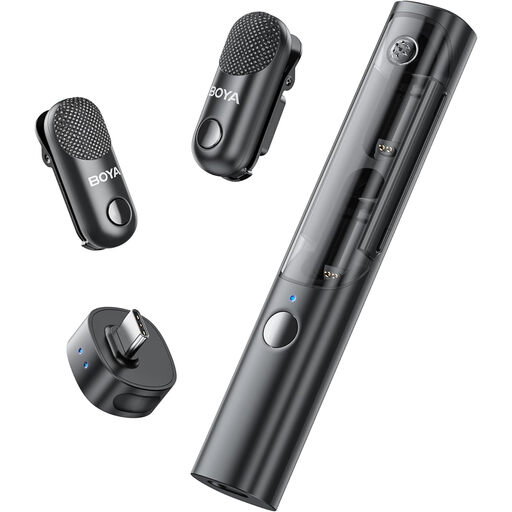
BOYA Magic-05 USB-C Transformable Wireless Microphone (2 TX + 1 RX + Charging Case)
Two transmitters make this kit worth checking when the interviewer and guest each need a hands-free microphone position.
The named bundle includes a receiver and charging case. Confirm how its USB-C connection works with your specific recorder, check the wireless operating band and test both voices in the classroom.
View on Joybuy
 No image available
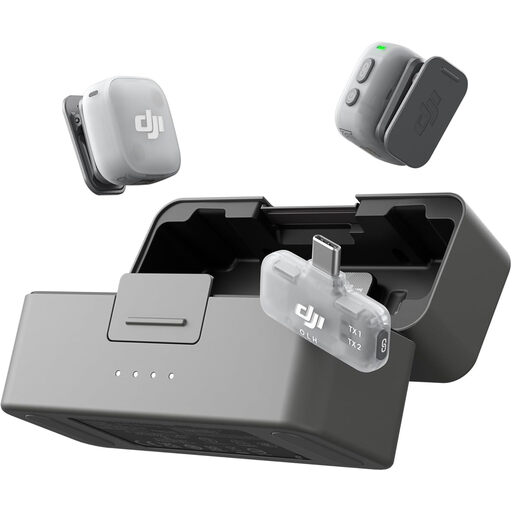
DJI Mic Mini 2 (2 TX + 1 Mobile RX + Charging Case)
This two-transmitter bundle is an option to investigate for an interviewer and guest who need to move while speaking.
The named bundle has a mobile receiver and charging case. Before choosing it, confirm that the receiver works with your recording device, how both transmitters are captured, and whether the wireless setup works in the classroom.
View on Joybuy
Questions about classroom recording
Can I use a 2.4 GHz wireless microphone in a UK classroom?
Ofcom lists 2400–2483.5 MHz among the UK licence-exempt ranges for wireless microphones, subject to the applicable exemption requirements. Check the particular microphone’s operating band and requirements before use, then test it in the classroom: Ofcom also identifies Wi-Fi, Bluetooth and other equipment in that shared range.
Do the interviewer and guest each need a microphone?
Separate microphone positions are worth considering when both people need to move or cannot comfortably share a fixed microphone. A two-transmitter kit such as RØDE Wireless ME Dual is designed for that arrangement; if both speakers remain seated, check whether a close-positioned wired microphone can serve the planned exchange.
Will a shotgun microphone work from the back of the classroom?
Do not rely on its directional pattern alone to overcome a distant position. Sennheiser specifies side and rear attenuation for the MKE 600, but you still need to aim and position a shotgun microphone for the speaker; consider a closer microphone position if the camera must remain far away.
What should I check when recording straight to a laptop?
Check that the microphone connects to the laptop and can be positioned for the person speaking. Audio-Technica’s ATR2100x-USB has a USB output for computer recording, an XLR output for a compatible conventional microphone input, and a headphone jack if you intend to monitor the take.
When is onboard wireless recording useful?
It is worth considering when an introduction would be difficult to record again and you can manage a separate recording after the session. RØDE specifies onboard 32-bit float recording and internal storage for Wireless PRO; check how you would retrieve its files and monitor the live recording as well.


