For a team meeting from a classroom computer, start with a wired headset whose boom microphone is intended for calls if being heard clearly is your main concern. Consider passive isolation or active noise cancellation (ANC) if room chatter also makes remote colleagues hard to hear, but keep enough awareness of nearby instructions and warning sounds. Check the exact device connector and meeting-platform variant before buying.
Who needs which features?
Participants who need to be heard over room noise
If nearby conversation, typing or ventilation could reach your microphone, look for a boom mic designed for calls and check how it should be positioned. Logitech describes noise reduction for nearby sounds on its Zone Wired headset; Jabra advises placing the Evolve2 40 SE microphone close to the mouth.
Participants distracted by a busy classroom
If you struggle to follow remote colleagues, ear cushions that provide passive isolation or a headset with ANC may be relevant. These features address what you hear, not necessarily what others hear from your microphone. Keep the room audible when you need to notice instructions or warning sounds.
Participants moving between devices
If you alternate between a classroom computer, tablet and phone, match the headset to each device’s actual audio connection. HP lists USB-C, a USB-A adapter and 3.5 mm connectivity for the Poly Blackwire 5220; other models and variants offer different combinations.
What should you check?
For a classroom meeting, decide whether your primary difficulty is being heard, hearing the call, connecting to the device or staying comfortable through repeated meetings. Then check the feature that addresses that difficulty rather than relying on a general “noise-cancelling” description.
| Concern |
What to check |
Who this matters to |
| Clear voice pickup |
Look for a boom microphone specified for noise reduction; check whether you can position it close to your mouth. |
If nearby talk or typing could obscure my contributions, I want remote colleagues to understand me without repeated explanations. Around 36% of consumers would put clear voice pickup first. |
| Hearing the meeting |
Compare passive ear-cushion isolation with ANC, and consider whether you must hear people or signals in the room. |
When classroom chatter makes remote speech difficult to follow, I need less distraction without losing awareness that matters locally. Hearing the meeting would be the primary concern for around 29% of consumers. |
| Device and platform fit |
Confirm the device’s USB-A, USB-C or 3.5 mm support, adapter inclusion and any required Teams or UC variant. |
If I may use a different classroom device, a headset that cannot connect would interrupt the meeting regardless of its other features. Around 21% of consumers would prioritise compatibility. |
| Comfort and controls |
Consider on-ear or over-ear fit and access to mute and volume controls during a call. |
For repeated or longer meetings, I need a fit I can tolerate and a way to mute promptly. Comfort and controls would come first for around 14% of consumers. |
Common buying mistakes
-
Assuming all noise cancellation does the same job
Microphone noise reduction concerns the sound sent to remote colleagues. Passive isolation and ANC mainly affect what you hear, so ANC alone does not answer a complaint about your transmitted voice.
Check the microphone and wearer-isolation features separately against the problem you actually face.
-
Choosing a connector or platform version by name alone
USB-A, USB-C, 3.5 mm and wireless options differ across models and variants. A Teams-specific control should not be assumed on every version of a headset range.
Identify the classroom device’s port, check whether the required adapter is included and confirm the exact platform variant before ordering.
-
Using strong isolation when room awareness is necessary
Greater isolation can make nearby communication and warning signals harder to notice. The Health and Safety Executive cautions against hearing protection that causes this kind of over-protection; that guidance is a reason to consider the room’s safety needs, not a headset performance rating.
Use ANC or strong passive isolation only when you can still notice the local instructions and safety-relevant sounds you need to hear.
-
Treating a comfort description as a fit guarantee
Padding and ear-cup style describe a headset’s construction, but they cannot establish how its pressure or cable arrangement will feel during your meetings.
Consider the wearing style, try the fit where possible and check the applicable return terms before committing to a headset for frequent use.
Brands to consider for classroom meetings
Jabra
Jabra’s Evolve range includes wired meeting headsets with different isolation, connection and platform options.
- Jabra specifies isolating ear cushions and a three-microphone call system for the Evolve2 40 SE; the Evolve2 50 range includes ANC and multiple connection options.
- Check the exact USB connector and Teams or UC version. Features listed across the range do not necessarily belong to the same variant.
Logitech
The Zone Wired range is relevant to buyers looking for a USB boom-mic headset with accessible call controls.
- Logitech specifies dual noise-cancelling microphones and inline controls for Zone Wired and offers a Teams-certified version.
- Logitech’s description of reduced background sounds is a manufacturer claim, not a guarantee of the same result in every classroom or conferencing application.
Poly
Poly’s Blackwire wired headsets are worth examining when the intended device may use different physical audio connections.
- HP specifies a noise-cancelling microphone, inline controls, USB-C, a USB-A adapter and 3.5 mm connectivity for the Blackwire 5220.
- Its on-ear stereo fit and cable arrangement may not suit every wearer or classroom layout; confirm compatibility with the devices you will use.
Joybuy headset choices
These choices include wired USB meeting headsets and wired 3.5 mm alternatives. For a room with nearby conversation, distinguish models described with a noise-cancelling boom microphone from those with an integrated microphone, and check the connection on your classroom device.
 No image available
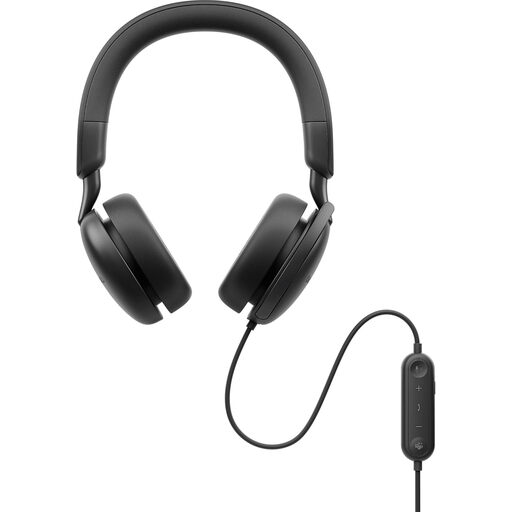
DELL Pro Plus Wired ANC Headset WH5024
Consider this wired model if you want separate features for your microphone and for hearing the meeting in a distracting room. Its listing describes a boom microphone with noise reduction, ANC, transparency mode, inline controls, USB-C connectivity and an included USB-A adapter. Check the required conferencing functions for your setup, and do not rely on ANC when you need to hear the room.
View on Joybuy
 No image available
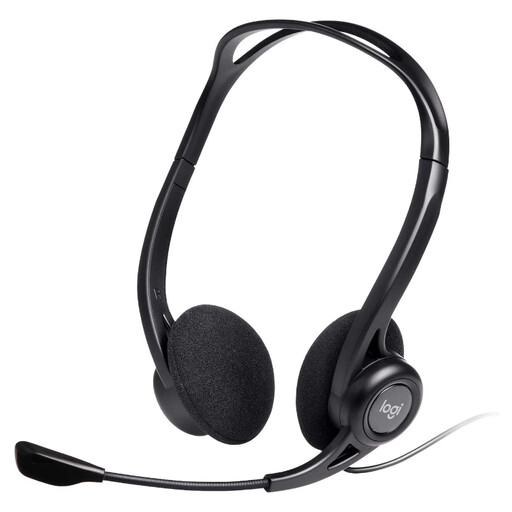
Logitech 960 Wired USB Headset
This is a wired option for attending meetings from a computer with a suitable USB-A port. The listing describes an adjustable noise-cancelling boom microphone, inline mute and volume controls, and a 2.4 m cable. Confirm that the classroom computer has USB-A; the cable also sets the limit on movement away from it.
View on Joybuy
 No image available
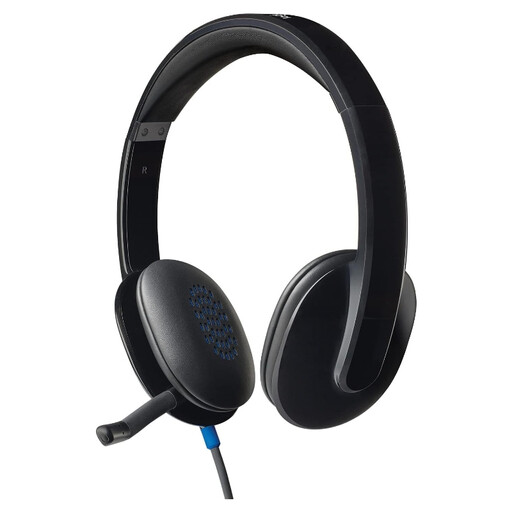
Logitech H540 Wired Headset
Consider the H540 for a seated call when you want a USB-A boom-mic headset with direct call controls. Its listing specifies a noise-cancelling microphone, inline mute and volume controls, and a padded headband. Check the computer’s USB-A support and judge the fit for yourself if meetings will be long.
View on Joybuy
 No image available
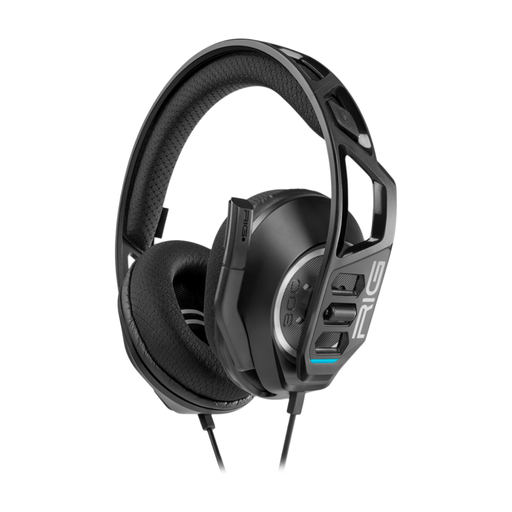
Nacon RIG 300 PRO HN Wired Headset
This 3.5 mm boom-mic headset is an option if your device supports a compatible headset connection and you want a physical mute control. The listing specifies flip-to-mute, inline controls and a 1.2 m cable, which may restrict where you sit. If classmates will be talking nearby, check whether its microphone suits that environment rather than assuming it provides noise reduction.
View on Joybuy
 No image available
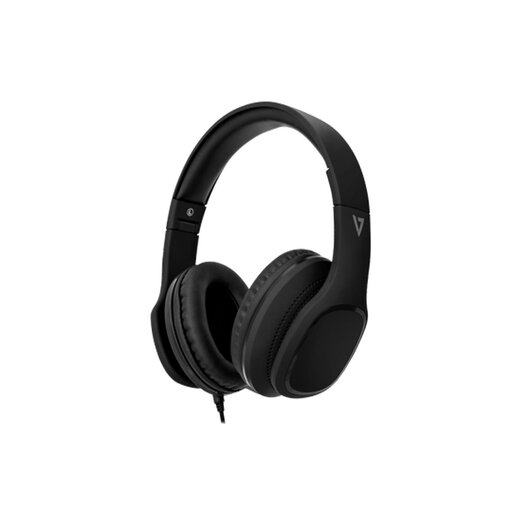
V7 HA701-3EP Over-Ear Headphones with Inline MEMS Microphone
These wired headphones may suit a meeting on a device with a compatible 3.5 mm headset jack when simple call controls matter. The listing specifies an integrated MEMS microphone, inline controls, 40 mm drivers and passive ear-cup isolation. Check that the device’s jack accepts microphone input and that an integrated mic is suitable for the noise in your classroom.
View on Joybuy
Frequently asked questions
Should I prioritise microphone noise reduction or ANC?
Prioritise a noise-cancelling boom microphone if your main concern is helping remote colleagues hear you over classroom noise. Add passive isolation or ANC if you also struggle to hear them; those features chiefly address sound reaching your ears, and room awareness may still be necessary.
Where should I position a boom microphone?
Position it close to your mouth, following the instructions for the headset you buy. Jabra gives this guidance for the Evolve2 40 SE; adjust the headset for a stable fit before the meeting.
Do I need a Microsoft Teams-certified headset?
Choose a Teams-specific variant if your meetings use Teams and you want the functions offered by that particular version. Logitech says its Teams-certified Zone Wired version can launch Teams with one click, while Jabra lists Teams support for the Evolve2 40 SE as variant dependent; check the exact product before buying.
Can I use strong noise isolation throughout a classroom meeting?
Use it only when you can still hear any local instructions or warning sounds that matter. The Health and Safety Executive cautions that excessive attenuation can make communication and warning signals harder to hear.


