For a shared classroom set, start with a wired boom-mic headset whose connector matches the devices in use: it avoids charging and pairing, and the microphone can sit close to the speaker’s mouth. Consider replaceable cables and ear pads for repeated sharing, or a wired USB call headset for remote discussions; check room awareness and compatibility for the exact model before choosing.
Who is choosing?
Shared-class-set coordinators
If several pupils use the same headsets, cleaning arrangements and access to replacement cables or ear pads matter alongside the connection. Logitech describes replaceable parts for Zone Learn, while the University of Reading identifies cleanliness as a consideration for shared headphone use.
Remote design-review participants
If feedback must reach people on a call while others are talking nearby, prioritise a microphone that works with the conferencing setup. Logitech and Jabra describe noise-reducing microphones on their cited call headsets, but those features do not guarantee clear speech in every classroom.
Mixed-device classroom users
If headsets move between laptops, tablets and other classroom equipment, establish which ports each device has before choosing a connector. Logitech lists interchangeable 3.5 mm, USB-A and USB-C cables for Zone Learn; confirm which cable comes with the configuration being purchased.
What matters when buying?
Match the headset to the classroom devices first, then decide how much voice capture, shared-set maintenance and room awareness matter for its intended user.
| Concern |
What to check |
Who this matters to |
| Clear voice capture |
Check boom-mic positioning and whether the headset microphone is recognised by the intended calling app. |
When nearby conversations could obscure feedback to remote reviewers, I want my contribution to be understandable without repeating it. Around 36% of consumers put clear voice capture first. |
| Device compatibility |
Match the actual 3.5 mm, USB-A or USB-C port; confirm any required adapter or interchangeable cable for the chosen variant. |
If the headset will move between classroom devices, I need it to connect to the equipment already in use. For around 29% of consumers, compatibility is the primary concern. |
| Shared-set upkeep |
Check cleaning instructions and whether replacement cables and ear pads are available for the exact model. |
With repeated shared use, I need a cleaning routine and a way to deal with worn parts. Maintaining the class set comes first for around 21% of consumers. |
| Movement and room awareness |
Decide whether movement warrants wireless charging and pairing, and whether mono or stereo suits the wearer’s need to hear the room. |
If I need to move during a critique or respond to people nearby, I cannot choose solely for isolation from the room. Around 14% of consumers prioritise movement or room awareness. |
Buying pitfalls
-
Choosing a connector before checking the devices
A 3.5 mm plug, USB-A plug and USB-C plug cannot be treated as interchangeable. Even a headset with a suitable microphone is of little use if it cannot connect to the classroom device.
Check the ports on the devices that will be used, then confirm the connector, supplied adapter or interchangeable-cable configuration of the exact headset.
A mismatch can mean arranging an adapter or replacing the headset.
-
Assuming stereo is always the right classroom choice
Concentrating on computer audio is not the only requirement when the wearer also needs to respond to classmates or hear alerts. The University of Reading highlights emergency-alert audibility as a headphone-use consideration.
Choose the wearing style for the user’s role and include alert audibility in the school’s classroom assessment.
-
Treating a shared set like an individual work headset
Repeated sharing brings cleaning and wear into the day-to-day use of a headset. Replaceable parts described for one education model should not be assumed to be available for every headset from the same brand.
Check the exact model’s cleaning instructions and whether its cables or ear pads can be replaced.
Where a worn part cannot be replaced, keeping that headset in use may require whole-unit replacement.
-
Choosing wireless solely to remove a cable
Wireless use also requires a workable charging and pairing routine. For radio equipment placed on the Great Britain market, GOV.UK identifies the Radio Equipment Regulations 2017 as applicable; Northern Ireland has different processes.
Choose wireless when movement is important to the discussion, and check device compatibility, charging arrangements and the product documentation for the destination market.
Charging and pairing add tasks for whoever manages the headsets between sessions.
Brands to consider
Logitech
Logitech offers the education-focused Zone Learn and the wired call-focused Zone Wired, which address different classroom purchasing needs.
- Logitech lists interchangeable 3.5 mm, USB-A and USB-C cables and replaceable pad options for Zone Learn.
- Confirm the cable and pad configuration of the exact Zone Learn variant; Zone Wired’s stated dual-microphone feature does not apply to the whole range.
Poly
The Blackwire 3200 family is a wired call-headset option with mono and stereo wearing styles, as described by HP.
- The mono option leaves one ear available for activity in the room.
- Check the connector and wearing style of the particular Blackwire model rather than assuming every variant has the same configuration.
Jabra
Jabra positions Evolve2 30 SE for wired professional calls, making it relevant when a teacher or older student joins a remote design review.
- Jabra says its Evolve2 30 SE two-microphone system analyses surrounding noise during calls.
- That manufacturer description does not establish cleaning arrangements, repairability or suitability as a shared set for younger pupils.
EPOS
EPOS presents IMPACT 1000 as a wireless Bluetooth work headset, a route to consider when a presenter needs to move.
- EPOS describes Bluetooth connectivity and wireless charging for the IMPACT 1000 range.
- Confirm the exact device compatibility, charging routine and applicable product documentation before adopting it for classroom use.
Joybuy headset choices
These wired headsets offer 3.5 mm or USB options for classroom devices and remote design discussions. Choose by the connection your equipment accepts, then check whether each model suits shared use and the wearer’s need to hear the room.
 No image available
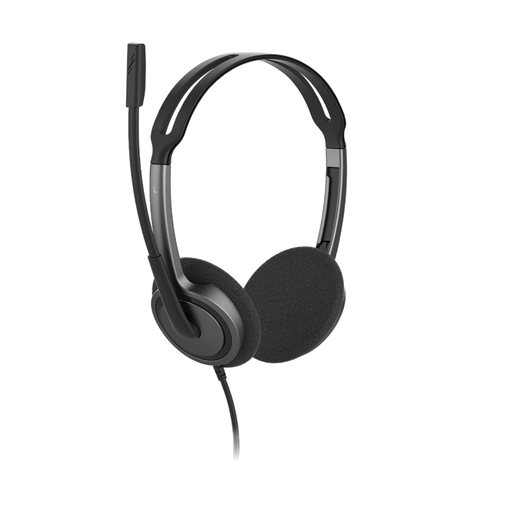
V7 HA212-2EP On-Ear Stereo Headset, 3.5 mm
Consider this wired option for a classroom device with an appropriate 3.5 mm headset socket. Its title specifies an adjustable headband and a 270° rotating, noise-cancelling microphone; confirm microphone recognition on the intended device and app. The stereo design also warrants a check of how the wearer will hear classmates and alerts.
View on Joybuy
 No image available
Poly Blackwire 3220 Stereo USB-C Headset with USB-C/A Adapter
Consider this wired headset when a design discussion includes remote participants and the classroom equipment uses USB-C or USB-A. The product title identifies a USB-C headset with an adapter, and Joybuy describes the adapter as included. Confirm that the school’s devices and calling app recognise the headset, and consider whether stereo listening allows enough awareness of the room.
View on Joybuy
 No image available
Logitech 960 Wired USB Headset with Inline Remote
Consider this wired call headset for a remote design discussion if its USB connection matches the classroom device. Its title identifies an inline remote and noise-cancelling microphone. Confirm the required USB connector and calling-app compatibility for the exact model, as well as cleaning arrangements if several people will share it.
View on Joybuy
Common questions
Should I choose mono or stereo for a classroom design discussion?
Choose mono when the wearer needs to keep one ear available for classmates or room activity; stereo may suit a session centred on computer audio or remote participants. The University of Reading also highlights the need to consider whether headphone users can hear emergency alerts.
Which headset connector should I buy?
Choose the connector supported by the devices that will actually be used. Check for an appropriate 3.5 mm headset socket or the required USB port, and confirm any adapter or interchangeable cable is included with the chosen variant.
How should a shared classroom headset set be maintained?
Follow the exact model’s cleaning instructions and establish a routine between users. If the set will be shared repeatedly, check whether replacement pads and cables are available; Logitech describes these options for Zone Learn, while the University of Reading identifies cleanliness as a headphone-use consideration.
What should I check before buying wireless headsets for a classroom?
Check whether movement justifies managing charging and pairing, and confirm compatibility with the intended devices. For products placed on the Great Britain market, GOV.UK identifies the Radio Equipment Regulations 2017 as governing radio equipment; its guidance says CE marking continues to be recognised for many relevant products alongside or instead of UKCA. Northern Ireland has different processes, so check the product documentation against the destination market.


