Choose a close-positioned microphone for narration at a desk or lectern, an aimed shotgun microphone when a presenter is on camera but the microphone must stay out of frame, or a wearable wireless microphone when the presenter moves around the classroom. In each case, microphone distance and placement matter alongside the recording device’s connections; wireless recording also calls for a check of the operating band and conditions of use.
Who each setup suits
Stationary close-mic narrators
If you record voiceover at a desk, editing station or lectern, you can keep a microphone near your mouth and connect it to a computer. Check that the stand or arm will hold it in a position you can maintain throughout the take.
On-camera classroom presenters
If you need the microphone outside the shot, a boom or camera-mounted setup can be aimed towards you. Plan how it will stay aimed as you present, rather than relying on directionality from across the room.
Mobile classroom narrators
If you walk between students, a board or demonstration areas, a microphone worn close to you can maintain a more consistent position. University of the West of England Digital Learning advises keeping a lapel microphone close to the speaker.
What to check when choosing
Close microphone at a desk or lectern
Choose when: You can stay close to the microphone and record to a computer or suitable XLR setup.
Trade-off: Moving away changes the microphone-to-mouth distance; Shure says its MV7+ also needs an audio interface for XLR recording to a PC, and its USB-side processing does not apply through XLR.
Shotgun microphone on a boom or camera rig
Choose when: A visible presenter can be followed by a microphone kept outside the frame.
Trade-off: The microphone needs suitable mounting, a compatible recording input and deliberate aiming; its directional pickup is not a substitute for positioning it near the speaker.
Wearable wireless microphone
Choose when: The narrator needs to move around the classroom while keeping the microphone close.
Trade-off: Attachment, charging and pairing need attention, and Ofcom notes that shared wireless ranges can experience interference.
| Concern | What to check | Who this matters to |
|---|
| Stationary voice capture | Can you stay close to the microphone, and will its mount and USB or XLR connection suit your recording setup? | I can record at a desk, so I want to keep my voice close to the microphone rather than rely on a room pickup; around 42% of consumers put stationary close-mic narration first. |
| Microphone outside the frame | Can a boom or camera rig keep the microphone aimed towards the speaker? Check the recorder input and the microphone’s power requirements. | When I appear in the documentary, I need the microphone out of shot while it remains aimed at me; roughly 33% of consumers prioritise off-camera capture. |
| Narration while moving | Check wearable placement, receiver compatibility, recording backup and the actual wireless operating band. | I move between parts of the classroom, so I need a microphone that moves with me; about 25% of consumers place mobile narration first. |
Avoid these setup mistakes
Putting a directional microphone too far away
A shotgun microphone focuses on the direction it faces, but distance still matters. University of the West of England Digital Learning notes that the quality of a directional lectern microphone falls rapidly as a speaker moves away.
Plan where the narrator will stand or move, then position and aim the microphone for that arrangement before recording a test take.
Keeping a boom correctly positioned may call for a stand, boom pole or operator.
Assuming XLR plugs straight into a computer
Shure says the MV7+ requires an analogue-to-digital audio interface when connected to a PC through XLR. Its USB-side processing is not applied to the XLR signal.
Check the inputs on the computer, camera or recorder and choose the connection path before selecting the microphone.
Treating wireless audio as interference-free
Ofcom notes that ranges used by wireless microphones can also be used by other low-power equipment, creating a risk of interference.
Test the link in the classroom, check the system’s actual operating band and conditions of use, and consider a suitable on-board recording option when a take cannot easily be repeated.
Choosing a wearable microphone without testing its attachment
A microphone worn by the narrator can keep its position more consistent during movement, but placement and clothing contact still affect the recording.
Attach it to the clothing that will be worn on camera and monitor a short test take before filming.
Poor attachment or clothing noise may mean repositioning the microphone and repeating a take.
Relevant brands for reference
Shure
The MV7+ is a reference point for close, stationary narration.
- Shure lists USB-C and XLR outputs and a 3.5 mm headphone output for the MV7+.
- For PC recording through XLR, Shure specifies an audio interface; the MV7+ USB-side processing does not carry over to that path.
Sennheiser
The MKE 600 illustrates the wired shotgun route for a presenter filmed on camera.
- Sennheiser specifies directional pickup, a switchable low-cut filter and P48 phantom-power or AA-battery operation for the MKE 600.
- Check how it will be mounted and aimed, and whether the camera or recorder has a suitable input.
RØDE
The Wireless PRO illustrates a wearable wireless setup for a moving narrator.
- RØDE lists two transmitters, two Lavalier II microphones and on-board 32-bit-float recording for the Wireless PRO.
- Wireless use still involves attachment, charging, pairing and a check for interference in the recording space.
Audio-Technica
The AT2040USB is a direct-to-computer option for stationary narration.
- Audio-Technica specifies USB connectivity, a hypercardioid pickup pattern, integrated shock mounting, an internal pop filter and headphone monitoring for the AT2040USB.
- Its USB connection serves a different recording setup from an XLR shotgun microphone connected to a camera or recorder.
Joybuy microphone choices
For narration at a desk or lectern, these choices include close-positioned microphones with USB and XLR connections. The wireless systems are relevant when the narrator needs to move; check each package and its connection to your recording device before choosing.
 No image available
FIFINE K688CTW White microphone kit with boom arm
For stationary narration where a boom arm can position the microphone close to the speaker.
The product name specifies a dynamic microphone, USB and XLR ports, and a headphone jack. Check that the clamp fits your recording position and that the chosen connection suits your device.
 No image available
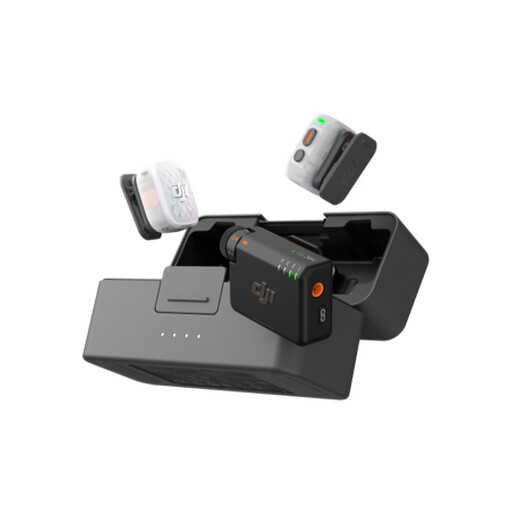
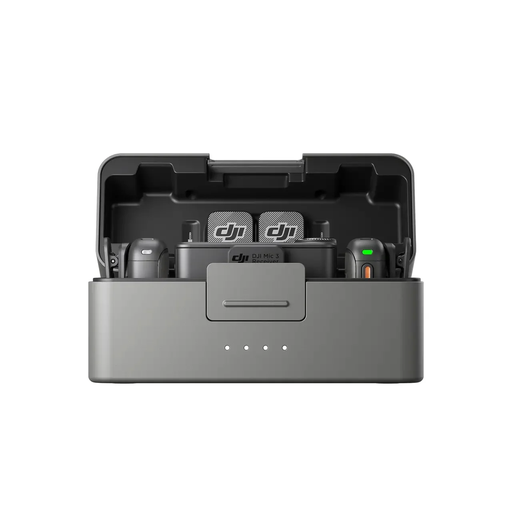
DJI Mic Mini 2S, 2 TX + 1 RX + Charging Case
A wireless option to consider when a narrator needs to move during recording.
This variant is named with two transmitters, one receiver and a charging case. Before choosing it, confirm the wearable microphone contents, receiver connection and operating band for your setup.
 No image available
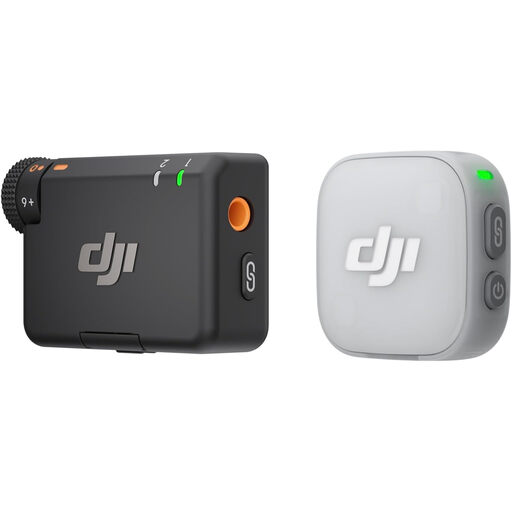
DJI Mic 3, 2 TX + 1 RX + Charging Case
For a moving presenter who needs a two-transmitter wireless configuration.
The named bundle contains two transmitters, one receiver and a charging case. Check wearable microphone contents, the receiver’s connection to your recorder and the actual operating band.
 No image available
FIFINE AM8 USB/XLR dynamic microphone with desktop stand
For stationary narration where a desktop stand can keep the microphone near the speaker.
The product name specifies USB and XLR connections, a headphone jack and a desktop stand. Confirm which connection your recording device accepts and whether the stand suits your position.
 No image available
DJI Mic Mini 2, 1 TX + 1 RX
A single-transmitter wireless configuration to consider for one narrator moving around the classroom.
The named variant has one transmitter and one receiver. Check how the microphone attaches, whether the receiver connects to your recording device and which operating band the system uses.
Questions about classroom recording
Should I use USB or XLR to record narration on a computer?
USB is the more direct connection when the microphone and computer have compatible ports. If you choose the Shure MV7+ through XLR instead, Shure says a PC needs an analogue-to-digital audio interface, and the microphone’s USB-side processing will not apply through that connection.
Can the Sennheiser MKE 600 work without phantom power?
Yes, Sennheiser specifies AA-battery operation as an alternative to P48 phantom power for the MKE 600. You still need to check the connection to your camera or recorder and plan how the microphone will be mounted and aimed.
Can I use a wireless microphone in a UK classroom without a licence?
That depends on the system’s actual operating band and the applicable conditions. Check the specific model against Ofcom’s wireless-microphone guidance before use; Ofcom also notes that shared ranges can be subject to interference from other low-power equipment.
Where should I put the microphone when recording in a classroom?
Keep the microphone close enough to the narrator for the chosen setup and, for a shotgun, keep it aimed towards the speaker. University of the West of England Digital Learning advises close placement for lapel microphones and warns that a directional lectern microphone loses quality rapidly as a speaker moves away.


