What to check before choosing storage
Start with the files that must be recoverable, then check how each copy will be stored, accessed and restored when the original device is unavailable.
| Priority |
What to check |
Your needs |
| Recoverable separate copy |
Check that the backup is separate from the original device, that it can be restored, and that at least one copy is kept in another safe location. |
I want photos, videos and documents to remain available after a phone, computer or drive is lost, damaged, replaced or fails. |
| Capacity for the full archive |
Compare cloud quota with current usage across photos, files, email and device backups. For removable storage, check capacity in TB and leave room for future photo and video growth. |
I need to know whether the whole household archive fits, rather than discovering that only selected folders were copied. |
| Protection from deletion and malware |
Keep a removable copy offline when it is not being updated. Check any file-version or account-level restore feature and its stated retention conditions. |
I want one copy that is not continually exposed to changes on the main computer or a compromised connected device. |
| Account and restore access |
Confirm account ownership, trusted recovery methods, available recovery contacts and the steps needed to restore files on replacement devices. |
My household needs to be able to sign in and find the backup when the usual phone or computer is unavailable. |
Joybuy storage options
Joybuy options for building a removable backup copy for household photos, videos and computer files, with portable SSD and external hard-drive routes represented.
 No image available
Western Digital My Passport 4TB Portable Hard Drive
Consider this for a computer-based removable copy of a growing household media archive.
Stated 4 TB capacity, USB 3.2 Gen 1, Acronis scheduled-backup software and Windows/macOS support. It is pre-formatted for Windows; check the required macOS setup before buying. Disconnect and store it separately between backups.
Joybuy
 No image available
Western Digital My Passport 2TB Portable Hard Drive
A removable option for household documents and moderate photo or video libraries backed up from a computer.
Stated 2 TB capacity, USB 3.2 Gen 1, Acronis backup software and Windows/macOS support. Compare 2 TB with the current archive and expected video growth, and check the macOS setup requirements.
Joybuy
 No image available
Samsung T7 Shield Portable SSD 1 TB
Consider this compact removable copy when moving or restoring media between compatible Macs, PCs and Android devices matters.
Stated 1 TB capacity, USB 3.2 Gen 2 and up to 1,050 MB/s read and 1,000 MB/s write speeds. Check that 1 TB accommodates the archive and confirm the intended backup-software workflow before buying.
Joybuy
 No image available
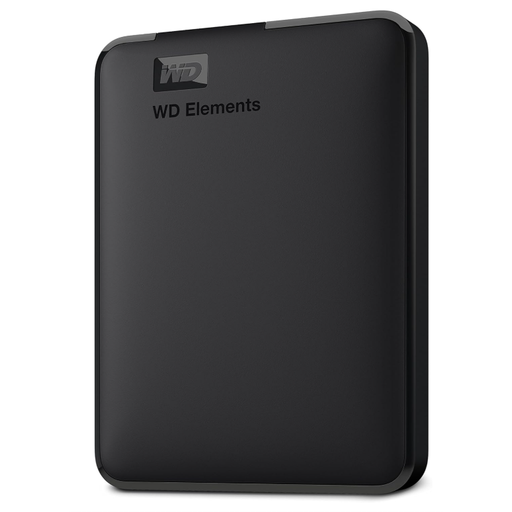
Western Digital Elements Portable Hard Drive 6TB
This higher-capacity removable drive suits a mainly at-home archive that needs space for a fuller photo, video and document library.
Stated 6 TB capacity, USB 3.2 Gen 1/USB 3.0 connectivity and USB bus power. It is formatted for Windows and macOS requires reformatting; confirm the backup method and file-system setup first.
Joybuy
 No image available
Western Digital Elements 4TB Portable Hard Drive
A removable archive option for a mainly Windows-based household that can maintain a manual or compatible software backup routine.
Stated 4 TB capacity, USB 3.2 Gen 1/USB 3.0 and an included USB-A cable. Check whether reformatting is needed for Mac or other operating systems, then disconnect and store the drive separately after backup.
Joybuy
Frequently asked questions
Is cloud storage alone enough for irreplaceable family photos?
Cloud storage can provide a separate and convenient copy, but it should not be assumed to protect against every failure. National Cyber Security Centre guidance notes that cloud backup accounts can also be compromised, so keep another separately managed copy and test that it can be restored.
Should I leave an external backup drive connected all the time?
Not if that drive is intended to protect against malware or ransomware. UK cyber-security guidance advises disconnecting an external drive when backup is not taking place because connected USB and network storage can be affected alongside the computer.
What should mixed Apple, Android and Windows households check before paying for storage?
List which account owns each person’s files, which devices are included in backup and whether the service backs up device settings or only synchronises files. Also check storage shared by mail, photos, files and device backups, then confirm recovery details for every account holding the only recoverable copy.
Can deleted or malware-affected OneDrive files be restored?
Microsoft states that individual deleted files may be restored from the Recycle Bin, and eligible Microsoft 365 subscribers can restore an entire OneDrive to a previous point within the stated 30-day window. Permanently deleted Recycle Bin files cannot be recovered, so keep another backup copy.
What UK cancellation protection applies to a cloud-storage subscription?
For a service contract or digital content not supplied on a tangible medium, the Consumer Contracts Regulations 2013 generally provide a 14-day cancellation period from the day the contract is entered into, subject to the Regulations’ conditions and exceptions. Check the provider’s terms before asking for paid service to begin immediately, as this can affect cancellation rights in some circumstances.


