What matters when choosing a backup route?
Decide what must be recoverable after a device is lost or replaced, then choose where the copy will live. A USB drive used only for selected transfers does not take the place of a phone or computer backup.
Cloud backup
Consider it when: You want a supported phone backup or selected computer files accessible through your account.
Trade-off: Recovery depends on account access and available storage; syncing and device backup do not cover identical content.
External drive
Consider it when: You want a separately controlled copy of computer files or a destination for Mac Time Machine.
Trade-off: You need to connect the drive and maintain the backup routine.
Computer-based phone backup
Consider it when: You have space on a Mac or PC and want a local iPhone or iPad backup.
Trade-off: Apple says local encryption is off by default, and a computer backup has content exclusions of its own.
Selected-file USB copies
Consider it when: You need to move or keep copies of particular documents or media files.
Trade-off: Manual copying will not automatically protect everything on the device.
| Concern |
What to check |
Who this matters to |
| Recovery and access |
Check what your phone backs up, which computer folders are selected and what can be restored on a replacement device. |
If I lose my phone, I want my photos and important settings back without relying on remembered manual copies. Roughly 29% of consumers put recovery and access first. |
| Local capacity and control |
Allow room for the files you intend to retain; for Time Machine, Apple Support advises a disk with at least twice the Mac’s storage capacity. |
I want an archive I control outside my cloud account, with enough room to keep it useful. For around 29% of consumers, a local copy and control over it are the main priority. |
| Portable large-file copies |
Match the drive’s capacity and connection to your files and devices; check the conditions attached to quoted speeds and protection ratings. |
When I regularly move large photo or video folders, I need storage that fits how I carry and connect it. Approximately 21% of consumers prioritise that portable-file need. |
| Cloud storage limits |
Review current account use, which services share the allowance and whether the files you need are backed up or merely synced. |
I do not want a full account to interrupt new backups while other services use the same allowance. That storage-limit concern comes first for roughly 21% of consumers. |
Joybuy products for local copies and transfers
These external drives offer ways to keep local copies, while the USB-C phone drive suits selected-file transfers. Check the backup method supported by your own phone or computer before choosing a storage device.
 No image available
Lexar ES4 Portable SSD with Magnetic Set 2TB
Consider this for a portable local copy when you want storage to use with a compatible phone or computer; confirm your intended backup workflow before relying on it.
The product name specifies USB 3.2 Gen 2 and quoted speeds of up to 1,050MB/s read and 1,000MB/s write. Check your device connection before expecting those speeds, and check the fit of the magnetic set with your phone and case.
View on Joybuy
 No image available
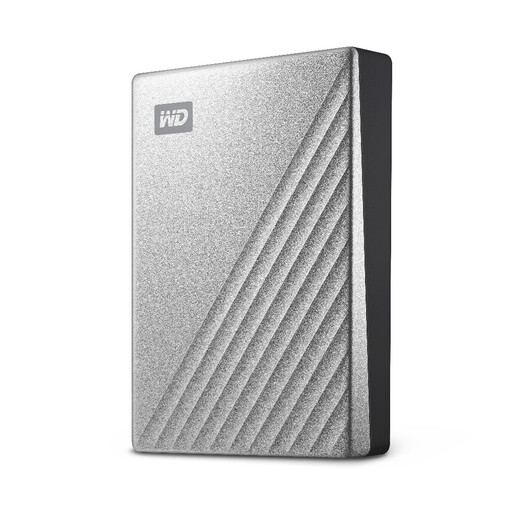
Western Digital My Passport Ultra Portable Hard Drive 4TB Silver
Consider this computer-connected drive for a larger local archive of photos and documents. If you want scheduled copies, check the software setup and which folders it will cover.
For macOS use, check the applicable driver and file-system requirements before putting existing files on the drive; also confirm how you would back up a phone if that is part of your plan.
View on Joybuy
 No image available
Samsung MU-PE1T0S 1TB Black Portable SSD
Consider this for a portable local copy of personal files, provided your computer or other intended device supports the connection and backup method you need.
The product name specifies USB Type-C 3.2 Gen 2 (3.1 Gen 2). Confirm file-system requirements before sharing the drive between devices, and do not treat the T7 Shield line’s water-resistance claim as protection against immersion.
View on Joybuy
 No image available
SanDisk Phone Drive with USB-C 256GB Arctic White
Consider this for copies of selected phone photos and videos rather than assuming it will back up an entire device.
Check your phone’s USB-C compatibility and the app requirements. Compare its 256GB capacity with the files you intend to keep on it.
View on Joybuy
 No image available
Western Digital Elements Portable 4TB Black USB 3.0
Consider this for a computer-connected local archive when 4TB of storage fits the files you intend to copy.
Check the connection and file-system requirements for each computer you will use, particularly before reformatting the drive. Confirm a separate phone-backup method if you need to protect device settings as well as files.
View on Joybuy
Questions about backing up personal files
Is an external drive useful if I already use cloud backup?
Yes, an external drive can hold a separately controlled copy of computer files or serve as a Mac Time Machine destination. Check both copies independently: Apple Support says data already synced to iCloud is excluded from an iCloud device backup, while computer backups have different exclusions.
Do iPhone, iPad and Android devices back up in the same way?
No. Apple Support describes iCloud and Mac or PC backup routes for iPhone and iPad; computer-backup encryption must be enabled separately. Google Android Help describes backup to a Google Account and says restoration can vary by phone and Android version, so check the content and restore steps for your device.
What size drive should I use for Mac Time Machine?
Apple Support advises a storage device with at least twice the Mac’s storage capacity for Time Machine. That guidance is specific to Time Machine, not a capacity rule for a drive used only to copy selected files.
Why might my Google Photos backups stop when I still have photos to upload?
A full Google account can affect new Google Photos backups. Google Drive Help says the storage allowance is shared with Drive, Gmail and WhatsApp backups, so review usage across the account rather than checking the photo library alone.


