Choose cloud storage if you want account-based backup and access across compatible devices and have a reliable connection. Choose a removable drive for a local copy or direct file transfers; for photos and documents you cannot replace, consider both so the copies are kept separately. Before moving devices, check what each backup includes, whether the new device can use it, and whether your storage capacity is sufficient.
Who needs which kind of backup?
People replacing a phone or computer
Check that the files you need are in the backup and that the destination device can use it before retiring the old one. Google notes that Android backups can restore to the original phone or some other Android phones, but not every app restores all its data and settings.
People keeping irreplaceable photos and documents
A copy kept separately from the device holding the originals matters if those files would be difficult to recreate. The UK National Cyber Security Centre advises considering both cloud and removable media for irreplaceable data; disconnect the removable copy when it is not in use.
People short of space or working with an unreliable connection
Decide whether the immediate task is to move files, free space or maintain a recoverable copy. A local drive offers a direct transfer route when connectivity is unreliable; cloud backup needs enough account capacity and a connection for uploads and recovery.
What should you check before choosing?
Start with the files you must recover on the new device, then check capacity, connection requirements and how you will keep a separate copy.
| Priority | What to check | Your needs |
|---|
| Backup and restore scope |
Check whether photos, documents, apps and settings are included. Open recent files from the backup and confirm the new device can restore the data you need. |
Before I reset my old device, I want to know that my important files are accessible on the new one. Google cautions that not all Android apps back up or restore all data and settings. |
| Capacity |
Compare your current library and expected growth with the drive or account allowance. Check whether email, photos and other files share cloud capacity, and review subscription and cancellation terms. |
My photos and videos need room alongside the other files in my account. Google says its free allowance of up to 15 GB is shared across Drive, Gmail and Photos; the allowance for another service may work differently. |
| Device connections |
Match the drive connector and cable to both devices. For direct phone or tablet use, check that device’s support, power requirements and the drive’s file format. |
If I am transferring files without cloud access, I need the removable storage to work with the devices at both ends—not just fit one port. |
| Separate copies |
Check when each backup last included new files. Keep a removable backup in a separate place and disconnect it after use; check account access for a cloud copy. |
For files I cannot recreate, I do not want the original device and its only backup exposed to the same loss. The National Cyber Security Centre warns that malware can spread to attached media. |
| Old-device privacy |
Verify the backup and destination files before erasing the old device. Then follow the device’s settings procedure for removing personal information. |
If I sell, recycle or give away my old phone, I need my files on the new device before wiping the old one. The Information Commissioner’s Office says a factory reset through settings can adequately erase personal information from most mobile phones. |
What can go wrong during a move?
-
Assuming a photo sync is a complete backup
A photo copy may not include documents, app data or settings. Google says not all Android apps can back up or restore all their settings and data.
Before resetting the old device, open recent photos and important documents from the backup and check how the other data you need will move.
-
Choosing cloud capacity based on photos alone
Google storage is shared across Drive, Gmail and Photos. Microsoft says its free storage is shared across OneDrive files and photos, Outlook.com attachments and Microsoft 365 apps.
Review total account use and the provider’s cancellation terms before choosing a plan. Microsoft says that use above its free allowance after cancellation prevents new uploads, edits and syncing.
-
Assuming any USB drive will work with a phone
The connector alone does not establish that a phone or tablet can use a drive; device support, power and file format also matter.
Check the exact old and new device models, ports and the drive’s connection and formatting requirements. Consider an adapter or dual-connector model only if its other specifications fit the transfer.
-
Leaving the only removable backup connected
The National Cyber Security Centre warns that malware can spread to attached media, putting a connected backup at risk alongside the original files.
After checking a completed backup, safely eject the drive and store it separately. Reconnect it when you are ready to refresh the copy.
Relevant brand and service options
Samsung
The T7 Shield is a portable SSD line to consider for carrying a local photo or video copy.
- Samsung claims USB 3.2 Gen 2 read and write speeds up to 1,050 and 1,000 MB/s, IP65 dust and water resistance, and resistance to drops of up to 3 m for the T7 Shield.
- Those claims apply to the T7 Shield, not every Samsung drive. Check the exact capacity, included cables, host connection and encryption setup.
Western Digital
My Passport portable HDDs are relevant when you want a local secondary copy of a sizeable file library.
- Western Digital says its My Passport USB-C model comes formatted in exFAT for Windows and Mac computers and compatible Android and iOS devices.
- That model-specific description does not confirm direct use with a particular phone or tablet. Check its port, power and file support, as well as the formatting of the exact drive.
Kingston
DataTraveler flash drives offer compact storage for selected files and transfers between compatible devices.
- Kingston lists different connectors and capacities across the range; its DataTraveler Duo has both USB-A and USB-C connectors and is listed in capacities up to 256 GB.
- Do not assume every DataTraveler has encryption, both connectors or room for an entire device backup. Check the particular model.
Apple
iCloud is an account-based option for people using compatible Apple devices or a PC.
- Apple lists 5 GB of free iCloud storage and monthly billed iCloud+ plans with greater capacity.
- Check the space your backups and files need. An iCloud copy is not itself a disconnected local copy.
Google
Google’s cloud storage is relevant to people using Drive, Gmail, Photos or Android backup.
- Google says a standard account has up to 15 GB shared across Drive, Gmail and Photos, with additional capacity available through Google One.
- Google says Android backups can restore to the original phone or some other Android phones, but not every app restores all data and settings. Check the destination device and migration method.
Portable drives on Joybuy
These portable SSDs and hard drives are options for keeping a local copy or transferring files during a device move. Choose cloud storage separately if you also want an account-based copy.
 No image available
Samsung Portable SSD T7 4 TB, grey
A local SSD option for copying a large photo or document library between compatible devices.
The product name specifies USB Type-C 3.2 Gen 2. Check your phone or tablet’s drive support, power requirements and file-format compatibility before relying on a direct connection.
View on Joybuy
 No image available
Samsung T7 Shield Portable SSD 1 TB, blue
Consider this portable SSD if you want a local copy that you can carry between compatible devices.
The product name specifies USB 3.2 Gen 2. Samsung claims IP65 dust and water resistance for the T7 Shield, but this does not mean it can be submerged. Check the host device, cable and file-format requirements.
View on Joybuy
 No image available
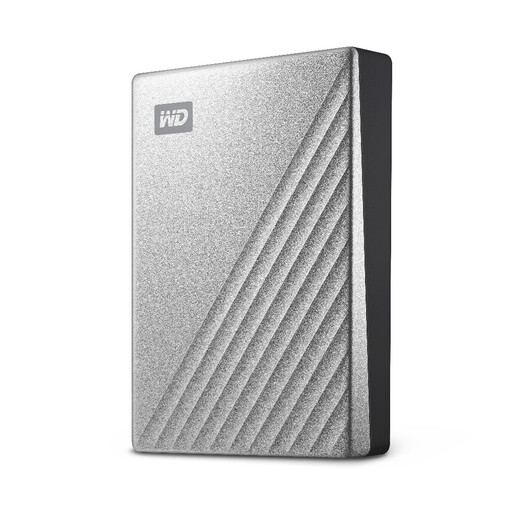
Western Digital My Passport Ultra 4 TB, silver
This portable hard drive offers a local place for a large file library or computer backup.
Check the connection and formatting required by both computers before moving files. The product information describes an NTFS drive and a downloadable driver for macOS read-and-write use; confirm the setup needed for your Mac.
View on Joybuy
 No image available
Western Digital My Passport 2 TB, black
A local hard-drive option for photos, videos and documents moved between compatible computers.
Check the USB-A connection against your devices. The product information mentions a downloadable NTFS driver for macOS, so confirm the required Mac setup; do not assume direct phone or tablet support.
View on Joybuy
 No image available
SanDisk Portable SSD 2 TB
A portable local-copy option for a photo, video or document library.
Before buying it for a particular phone or computer, confirm the drive’s connector and file format and the device’s power and storage support. Check the exact model’s security features if you need them.
View on Joybuy
Backup questions
Should I use cloud storage, a removable drive or both for irreplaceable photos?
Consider both if the photos would be difficult to replace. The National Cyber Security Centre advises considering cloud and removable-media copies for irreplaceable data. Check that recent files appear in the cloud backup, and disconnect the drive when it is not in use because malware can spread to attached media.
Can an Android backup restore everything to any new phone?
No. Google says Android backup information can restore to the original phone or some other Android phones, and not all apps back up or restore all settings and data. Confirm your new phone’s migration method and check important files before wiping the old one.
What if I cancel a cloud plan while using more than its free allowance?
Check the provider’s terms before cancelling. Microsoft says that, if account use exceeds its free storage allowance after cancellation, you cannot upload, edit or sync new files. Other providers’ allowances and consequences need their own checks.
Should I erase my old phone after moving my files?
If you are selling, recycling or giving it away, first check that the backup is complete and the new device can access the files you need. The Information Commissioner’s Office says a factory reset through settings can adequately erase personal information from most mobile phones.


