Choose a cloud route if automatic, off-device copies are your priority; choose an external drive for a local copy you can disconnect, or consider a NAS when several computers need a shared backup destination. For irreplaceable photos and documents, combining routes reduces reliance on one connected copy, provided you check what each route includes and can restore files from it. The National Cyber Security Centre advises keeping important backups in a separate safe location.
Who is this for?
Households wanting less manual backup
If photos and documents live on phones as well as computers, check which devices and folders a cloud or computer-backup setup can copy automatically. Apple, Google and Microsoft describe different backup coverage for their respective systems.
Families with growing photo and video libraries
Measure the files you want to keep before choosing local storage, and consider how you would move and restore them. Microsoft describes external drives and network locations as destinations for Windows File History.
Households planning for loss or malware
A separate copy matters if a device is lost, fails or is erased. The National Cyber Security Centre also warns that ransomware can affect backup drives left connected to a computer or network.
What matters when choosing?
Start with the files and devices you need to recover, then decide where a separate copy will live and how you will restore it. Cloud services, removable drives and NAS devices can serve different parts of that plan; none removes the need to check backup coverage.
| Concern |
What to check |
Who this matters to |
| Automatic coverage |
Check supported devices and which photos, folders and device data the scheduled backup includes. |
If I move between a phone and a computer, I want recent copies made without remembering every file. Around 29% of consumers put automatic coverage first. |
| A copy that survives a loss |
Check where the copy is kept and whether a local drive can be disconnected between backups. |
After theft, failure, deletion or malware, I need a copy I can still reach. Keeping that separate copy is the primary concern for around 29% of consumers. |
| Capacity and restoration |
Measure the library and allow for growth; check how to restore files to another device. |
With a growing collection of family videos, I need room for the files and a manageable way to retrieve them. Around 21% of consumers make local capacity and restoration their main priority. |
| Several household devices |
Check per-user access, device support and whether NAS-held files have a separate backup destination. |
When several people use different computers, I want to know whose files are covered and who can restore them. Shared-device management comes first for around 21% of consumers. |
Backup mistakes to avoid
-
Assuming a mirror preserves deleted files
Seagate says its Toolkit mirror updates the paired folder when files are added, changed or deleted. An unwanted deletion can therefore reach the mirror too.
Check whether the exact software offers older file versions or a separate scheduled backup, rather than relying on the word ‘mirror’.
-
Leaving the only local backup connected
The National Cyber Security Centre reports ransomware incidents affecting both original files and connected USB or network backup drives.
Keep at least one copy separated from live systems when it is not being updated, and plan how to reconnect it for a restore.
-
Choosing storage before checking what needs copying
A backup set might cover selected folders rather than every photo, document or item of device data. A drive with enough space is still of limited use if important files are outside the backup.
List the devices and folders first, measure the files and check the chosen method’s coverage before selecting capacity.
-
Never trying a restore
Finishing a backup does not show whether you know the account details, password or steps needed to recover a file on another device.
Find the restore instructions and, where practical, try recovering a non-critical file before depending on the setup.
Relevant brands and services
Apple
Relevant to iPhone and iPad households choosing between iCloud and a backup on a Mac or PC.
- Apple Support says an iCloud device backup can be made over Wi-Fi; a computer backup uses space on the computer.
- Apple says iCloud Photos and data already synced to iCloud are not included in an iCloud device backup. A computer backup needs encryption enabled to include Health, Activity and Keychain data; keep its password safe.
Google
Relevant to Android households using a Google Account for device backup and Google Photos for media.
- Google describes device-backup controls that can be managed on a mobile device.
- Google says backed-up device data other than Google Photos content may be erased after 57 days of device non-use. Check the selected account, covered data and current retention settings.
Microsoft
Relevant to Windows households considering OneDrive-linked folder backup or File History.
- Microsoft says Windows Backup can sync selected folders to OneDrive, while File History saves versions of libraries to an external drive or network location.
- The two methods depend on different destinations. Check the folders selected and whether the account or local storage needed for your chosen method is available.
Seagate
Relevant to buyers considering an external drive and its accompanying computer-backup tools.
- Seagate documents mirror folders and Windows backup plans for its cited Backup Plus Portable and Toolkit setup; check the tools supplied with the exact drive you choose.
- A Toolkit mirror follows deletions as well as additions. Check for a suitable backup plan or version history before treating it as your recovery copy.
Synology
Relevant to households considering a NAS as a shared destination for files and backups.
- Synology documents manual and scheduled Hyper Backup jobs for NAS data, including shared folders and system configurations.
- A NAS remains connected storage, not an offline or off-site copy by itself. Plan a separate destination for NAS data and check the drives and setup the chosen model requires.
External drives on Joybuy
These portable drives are options for keeping a local copy of household files. Choose capacity against the files you need to protect, then check your device compatibility and backup software; a connected drive should not be your only recoverable copy.
 No image available
Western Digital My Passport 2TB Portable Hard Drive, Black
Consider this for a local copy of photos and documents if 2TB fits your measured library and planned growth.
Portable external hard drive; 2TB. Check the backup schedule, version history and restore procedure you intend to use.
View on Joybuy
 No image available
Western Digital My Passport Ultra for Mac 5TB Portable Hard Drive, Silver
Consider this for a larger local library, subject to checking that its setup suits the computers that will make and restore the backup.
Portable external hard drive; 5TB. Confirm any Windows setup needed, along with backup scheduling, older file versions and restoration steps.
View on Joybuy
 No image available
SanDisk Portable SSD 2TB
Consider this portable local destination if 2TB covers the files you plan to copy.
External SSD; 2TB. Check compatibility with the intended devices and arrange backup scheduling, version history and a restore process separately.
View on Joybuy
 No image available
Samsung T7 Shield 1TB Portable SSD, Blue
Consider this for a portable local copy when 1TB is sufficient for your selected files.
USB 3.2 Gen 2 external SSD; 1TB. Confirm device compatibility and how backups, older versions and restores will be handled.
View on Joybuy
 No image available
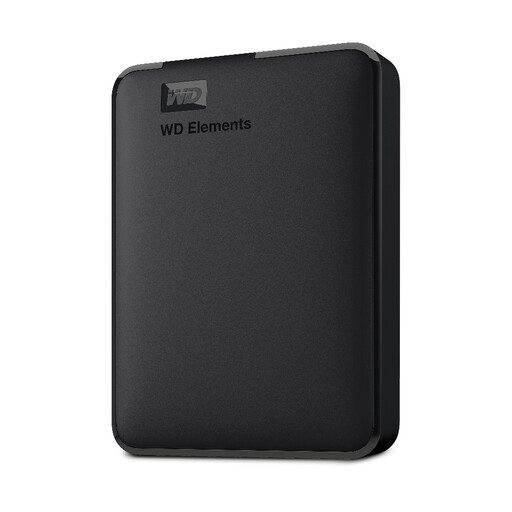
Western Digital Elements 1TB Portable Hard Drive
Consider this as a local destination if your selected photos and documents, plus expected growth, fit within 1TB.
Portable external hard drive; 1TB. Check formatting for your operating system and how you will schedule backups and restore files.
View on Joybuy
Frequently asked questions
Is one external hard drive enough for family backups?
An external drive can be one backup destination, but do not rely on it as your only recoverable copy if it stays connected. The National Cyber Security Centre reports ransomware affecting connected backup drives and advises keeping a backup offline.
What should I check before choosing iCloud or a computer backup for an iPhone?
Check the data included and how you would restore it. Apple says an iCloud device backup excludes iCloud Photos and data already synced to iCloud; a computer backup needs encryption enabled to include Health, Activity and Keychain data, and you will need its password to restore an encrypted backup.
What should Android users check in Google backup?
Confirm the selected Google Account, covered device data, photo and video settings, and account recovery details. Google says backed-up device data other than Google Photos content may be erased after 57 days of device non-use.
Can Windows back up files to an external drive automatically?
Windows File History can automatically save versions of libraries to an external drive or network location, according to Microsoft. Check that the folders you care about are covered, the destination has enough space and you can restore an earlier version.


