Keep a usable local copy and a separate recovery copy if losing access to your photos or documents would be unacceptable. Cloud storage can make selected files available offline, but synchronisation can also carry deletions between locations. An external drive offers direct local access; a home storage hub can serve several devices, but either route still needs a separate backup destination.
Who needs local access?
Photo-library owners who need offline access
If important folders must open without internet, distinguish files stored on your device from cloud placeholders. Microsoft Support and Google Drive Help describe settings for keeping selected files available offline.
Households protecting their only copy
If a laptop fails or a file is accidentally deleted, another synced view of the same library may not provide the recovery copy you expected. The National Cyber Security Centre advises keeping a backup offline at least some of the time.
Homes sharing files across devices
A local storage hub can put a shared collection within reach of several devices. Synology describes local access for BeeStation, but also recommends backing its data up to an external location.
What matters when choosing a backup?
Decide which files must open locally, then choose a separate destination from which you could recover them.
| Concern |
What to check |
Who this matters to |
| Offline access |
Check which cloud folders remain downloaded and whether each device has enough free space for them. |
If the connection drops, I still need my chosen photos and documents to open. About 31% of consumers put offline access first. |
| Independent recovery |
Check whether a copy is separate from two-way sync and how you would restore a deleted file. Plan for an offline or off-site copy. |
One mistaken deletion or incident must not remove every usable copy of my files. For about 31% of consumers, recovery is the primary concern. |
| Portable local storage |
Choose capacity for the library you intend to carry, and check the connector and supplied cable against your devices. |
I need to move a sizeable collection between devices without relying on a connection to the cloud. Portable local storage comes first for about 23% of consumers. |
| Shared home access |
Check local-network access, the backup mode and how the hub itself will be backed up. |
Several devices at home need access to one local collection, and I can manage the storage hub. About 15% of consumers make shared access their first priority. |
Mistakes that can leave files exposed
-
Treating a synced folder as an independent backup
Google Drive Help says files put in the bin through mirrored or streamed Drive for desktop are binned everywhere. Apple Support says deleting an iCloud Drive file also deletes it from devices with iCloud Drive enabled.
Keep a separate recovery copy of irreplaceable files, and check how you would restore an accidental deletion.
-
Allowing for cloud capacity but not local space
Files kept offline use storage on the computer. Microsoft Support describes OneDrive files that are always available locally, while Google Drive Help distinguishes mirrored files from streamed files selected for offline use.
Size the folders you need offline and check available device space as well as cloud capacity before moving the library.
-
Leaving the only backup drive attached
A drive connected to an affected computer can be exposed to the same incident. The National Cyber Security Centre advises against leaving an external backup device connected when it is not in use.
After a backup, check that it can be used, then disconnect the drive and keep another copy where the files warrant it.
-
Assuming a home hub protects itself
A hub keeps files in one physical location. Synology says BeeStation restore points do not replace full backups and recommends an external backup location.
Set up a second destination before relying on a hub as the main home collection.
That plan also requires capacity at the second destination.
Relevant brands and product lines
Microsoft OneDrive
Cloud synchronisation with local-availability settings for Windows files.
- Microsoft Support says selected files and folders can be kept available offline.
- An online-only file needs internet access; a synced folder should not be your only recovery copy.
Google Drive / Google One
Cloud storage with mirrored or streamed files through Drive for desktop.
- Google Drive Help says mirrored content is available offline; individual streamed items can also be selected for offline use.
- Google Drive Help says binning a mirrored or streamed file through Drive for desktop bins it everywhere.
Apple iCloud
Cloud file storage for Apple-device households, with options for keeping selected files on a Windows PC.
- Apple Support describes keeping selected iCloud items downloaded for local use.
- Apple Support says an iCloud Drive deletion also removes the file from devices with iCloud Drive enabled. Keep an independent archive if needed.
Western Digital
Direct-attached portable hard drives for a local file archive.
- Western Digital lists My Passport USB-C variants with USB-C and USB-A connection options and capacities up to 6 TB.
- One portable drive is still one physical destination; keep another recovery copy.
SanDisk
Portable SSD storage for files carried or accessed away from the main computer.
- SanDisk describes its Extreme Portable SSD family in capacities up to 8 TB.
- Check the selected variant’s capacity and connection. A portable SSD also needs a separate backup destination.
Synology
BeeStation home storage for locally held files shared across devices.
- Synology describes local access and optional SMB access for BeeStation when the relevant settings are enabled.
- Setup requires a router connection, and Synology recommends backing up BeeStation data to an external location.
Joybuy drives for local copies
These portable hard drives and SSDs are options for keeping photos and documents on a directly attached local drive. Pair a local copy with a separate recovery destination rather than relying on one drive alone.
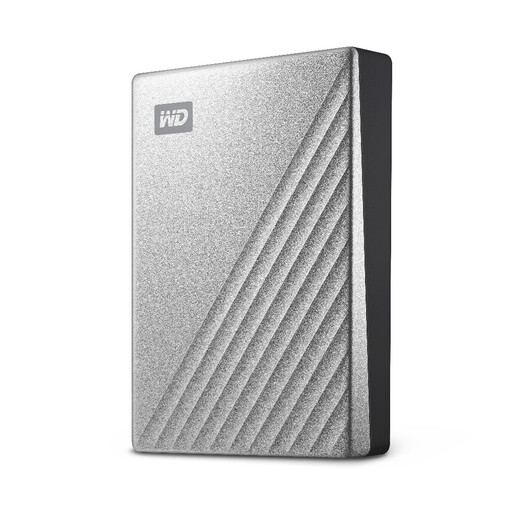 Image unavailable
Western Digital My Passport Ultra 4TB, Silver
Consider this portable hard drive if you want a 4TB local destination for a substantial photo and document library.
The product information describes it as pre-formatted for Windows and says macOS use requires reformatting. Check the file-system setup your devices need, and keep a separate recovery copy.
View on Joybuy
 Image unavailable
Western Digital My Passport 4TB, Black
This 4TB portable hard drive is another direct-attached option for keeping a local file library.
The product information describes a downloadable-driver condition for macOS use; confirm the setup for your computer. Disconnect the drive between backup runs when it is not needed, and maintain another copy.
View on Joybuy
 Image unavailable
Samsung Portable SSD T7 2 TB, Blue
Consider this 2 TB portable SSD when you want a local copy you can carry between compatible devices.
The named variant specifies USB Type-C 3.2 Gen 2 (3.1 Gen 2). Check your device’s connection before choosing it, and use another destination for recovery rather than treating the SSD as the only backup.
View on Joybuy
 Image unavailable
SanDisk Portable SSD 2TB
This 2TB portable SSD is an option for carrying a local copy of personal files.
Check the cable and connection against the device you intend to use. Keep a separate recovery copy for files you cannot afford to lose.
View on Joybuy
Common backup questions
Is cloud synchronisation enough to back up my files?
Not if the synced locations are your only copies. Google Drive Help says binning a file through mirrored or streamed Drive for desktop bins it everywhere, and Apple Support describes deletions across devices with iCloud Drive enabled. Keep a separate copy from which you can recover important files.
How do I keep cloud files available without internet?
Select an explicit offline setting and allow enough space on the device. Microsoft Support describes keeping OneDrive files on the device; Google Drive Help describes mirrored files and offline selection for streamed files. Check that the particular folders you need have downloaded before relying on them offline.
Can an external drive back up a Windows PC or Mac automatically?
Yes, with a compatible drive and the appropriate software setup. Microsoft Support says File History can use an external drive or network location, and Apple Support says Time Machine can automatically back up a Mac to external storage. Check the connection and retain another copy of important files.
Should I leave an external backup drive connected?
Disconnect a drive intended as an offline backup when it is not in use. The National Cyber Security Centre warns that some viruses can also affect storage connected to an infected computer. Reconnect it for backup runs and check that you can access the resulting copy.


