Choose a backup arrangement by how you will restore your photos and files, not by capacity alone. Cloud storage can make files accessible across devices, while a separate local copy gives you another route if a device or account is unavailable; a portable SSD suits regular transfers, an external hard drive suits an archive kept near a computer, and a NAS suits a household prepared to manage shared storage. Check device compatibility, account access and the restore process, then open files from the backup before relying on it.
Who needs a backup plan?
Households changing devices
If you are moving to a new phone or computer, you need to know how to retrieve photos and documents on the replacement before the old device is erased. The National Cyber Security Centre identifies moving to a new device as a reason to make a backup.
Families with a growing photo library
A collection of photos and videos needs enough room for the files you intend to retain, as well as a copy you can restore if the main device fails. Check the size of the library before choosing local storage or a cloud quality setting.
Households using several devices
If family files move between phones and computers, shared access and an independent copy are different needs. Apple Support says a deletion in iCloud Photos also removes the content from connected devices using that service.
What matters when choosing?
Start with the files you must be able to restore; then decide whether everyday access, portable transfers or a shared archive calls for another storage route.
Cloud storage and a separate local copy
Consider it when: Files need to be accessible across devices, but recovery should not depend entirely on one account.
Trade-off: A synced deletion can reach connected devices, so download and test the separate copy rather than assuming synchronisation preserves it.
Portable SSD
Consider it when: You regularly carry or copy a substantial photo or video library between compatible devices.
Trade-off: Transfer speeds depend on the host and cable; one drive stored with the computer is not a separate recovery location.
External hard drive
Consider it when: You want a local archive that usually stays beside a computer rather than travelling with you.
Trade-off: It needs to be connected for backups, stored safely afterwards and checked by restoring sample files.
Network-attached storage
Consider it when: Several household members need a central library or scheduled backups from multiple devices.
Trade-off: A NAS needs setup and ongoing management, and important files on it still need another backup destination.
USB flash drive
Consider it when: You have a deliberately limited set of documents or selected photos to copy and keep separately.
Trade-off: A small drive is easy to misplace and should not become the only archive for a growing library.
| Concern | What to check | Who this matters to |
|---|
| A recoverable second copy |
Locate the copy outside the original device or account, and restore a sample photo and document from it. |
If losing a device or deleting a file would leave me unable to recover family records, I need a separate copy I can actually open. About 36% of consumers put recoverability first. |
| Portable transfers |
Check the ports and cables on the devices you will use, and whether they support the drive’s stated interface. |
When I move a large library to another device regularly, carrying the files and completing the copy matters most. About 29% of consumers primarily need portable transfers. |
| Archive capacity |
Measure the library and allow for growth; if using cloud storage, check how original-quality files count towards account capacity. |
Years of photos and videos are what I want to keep, so the archive must accommodate the files I select. For about 21% of consumers, capacity is the primary concern. |
| A manageable file set |
Decide which files belong in the copy and how you will protect sensitive files if the media is lost. |
I only need to safeguard selected documents and photos, and I want to recognise and retrieve them without managing a larger archive. That limited-file need comes first for about 14% of consumers. |
Backup mistakes to avoid
-
Assuming synchronisation is a separate backup
Apple Support says deleting content from a device also removes it from iCloud and other devices using iCloud Photos. A synced library may therefore reflect the same deletion everywhere.
Keep another copy in a separate location or system, and test that you can restore from it.
-
Choosing an SSD by headline speed alone
Samsung says the T7’s stated maximum speeds require a USB 3.2 Gen 2 host, compatible cable and UASP support. Your connection determines whether that specification is relevant.
Check the ports and cables on the devices that will make and restore the backup.
-
Assuming every cloud upload preserves the original
Google says its Photos Storage saver setting may resize photos above 16 MP and videos above 1080p. Original quality retains captured resolution but counts towards Google Account storage.
Check the upload setting and your existing library before removing local originals.
-
Protecting a drive but losing its recovery password
Encryption can restrict access if removable media is lost, but a forgotten password can also prevent you from opening your own files.
Keep the password or recovery method somewhere secure and separate from the drive, and test that you can unlock the backup.
Relevant brands and services
Samsung
Samsung’s T7 portable SSD range is relevant to compact local copies and transfers between compatible devices.
- Samsung states T7 read speeds of up to 1,050 MB/s and write speeds of up to 1,000 MB/s, and lists USB-C-to-C and USB-C-to-A cables.
- Those maximum speeds require a USB 3.2 Gen 2 host, compatible cable and UASP; check operating-system and formatting needs too.
Synology
BeeDrive offers a personal local-backup route, while DiskStation products address households prepared to manage shared network storage.
- Synology says BeeDrive can back up selected computer folders and mobile photos, with up to five past versions retained for its stated workflow.
- A DiskStation requires setup and drive management; files kept on it also need another backup destination.
Apple
iCloud Photos is relevant when a household wants its photo library available across signed-in Apple devices.
- Apple Support explains how to download original photos and videos to a computer or external storage destination.
- Apple says deletions propagate to iCloud and connected devices using iCloud Photos; synchronisation alone is not an independent copy.
Google
Google Photos offers cloud photo backup with a choice that affects whether captured resolution is retained.
- Google says Original quality stores photos and videos at their captured resolution.
- Original quality counts towards Google Account storage; Storage saver may resize photos above 16 MP and videos above 1080p.
Microsoft
OneDrive is relevant to households using Microsoft accounts that want synced files and access to earlier file versions.
- Microsoft Support says OneDrive Version History can restore an earlier version of many file types, including photos and videos, one file at a time.
- Check the current version-retention terms for your account and whether restoring files individually suits your library.
Joybuy removable-storage options
These drives cover portable SSD transfers, external hard-drive archives and a USB flash drive for selected files. Whichever you choose, plan where the separate copy will live and how you will restore it.
 Image unavailable
Samsung Portable SSD T7 2 TB, grey
Consider this for a portable local copy when you regularly transfer a substantial file set. Its name specifies 2 TB and USB 3.2 Gen 2; check that your devices and cables suit the connection. Keep another copy of irreplaceable files and test how you will restore them.
View on Joybuy
 Image unavailable
Western Digital My Passport Ultra for Mac 5 TB, silver
Consider this external hard drive for a Mac-centred household keeping a broad local archive. The named capacity is 5 TB; if the archive must also work with Windows devices, check the drive format and any required driver before choosing it. Test access to copied files on the device you expect to use for recovery.
View on Joybuy
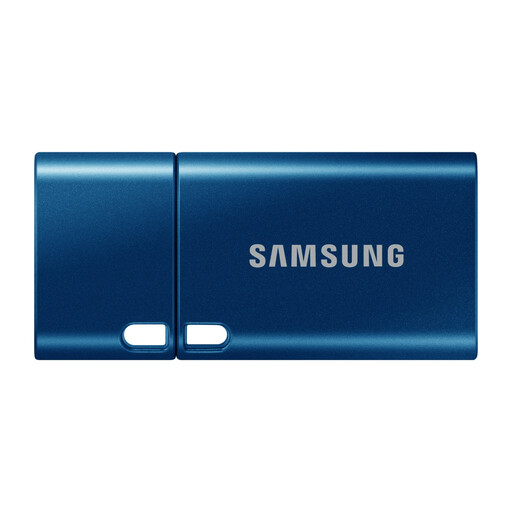 Image unavailable
Samsung MUF-512DA 512 GB USB-C flash drive, blue
Consider this for a selected set of documents and photos rather than assuming it will hold a whole family archive. Its name specifies 512 GB, a USB-C connector and USB 3.2 Gen 1. Compare the file set with that capacity, check the ports on your devices and keep the drive separately from the original files.
View on Joybuy
 Image unavailable
SanDisk Portable SSD 2TB
Consider this 2 TB portable SSD when you want to carry a local copy of a substantial file set. Confirm its connector and interface against the devices that will make and restore the copy, then test that representative files open from the drive.
View on Joybuy
 Image unavailable
Western Digital Elements portable 4 TB hard drive, black
Consider this external hard drive for a local photo and document archive kept near a computer. Its name states 4 TB and USB 3.0. Check the format needed by your operating system, keep another copy of important files and periodically restore a sample.
View on Joybuy
Frequently asked questions
Is cloud photo synchronisation a separate backup?
Not necessarily: Apple Support says a deletion from a device also removes that content from iCloud and devices using iCloud Photos. Keep an independently stored copy of irreplaceable files and test that you can open it without relying on the same account.
Should I use Google Photos Original quality or Storage saver?
Choose Original quality if retaining captured resolution matters. Google says it counts towards account storage, whereas Storage saver may resize photos above 16 MP and videos above 1080p; check your upload setting before removing local originals.
What should I check before replacing a phone or computer?
Make a copy before erasing the old device, then retrieve representative photos, videos and documents on the replacement and confirm they open. The National Cyber Security Centre identifies a move to a new device as a situation in which a backup may be needed.
Can a Windows PC back up family folders to an external drive?
Yes. Microsoft Support says File History can make regular backups to an external drive or network location once enabled. Check which folders are included and periodically restore a sample file.
Should I encrypt a portable backup drive?
Consider encryption if the drive holds sensitive personal files and could be lost or stolen. Keep its password or recovery method secure and separate from the drive, and check that you can unlock the files when needed.


