Choose an external drive for a local copy, cloud storage when access across supported devices matters, or a NAS when several household devices need shared storage and someone can maintain it. For files you cannot replace, keep copies in separate locations rather than relying on one drive or a synchronised folder; whichever route you choose, check how to restore a deleted file and test the process.
Who needs which backup?
Households protecting photos and documents
If losing a phone or computer would also mean losing files you cannot recreate, plan for a recoverable copy outside that device. A local copy plus one in another location avoids depending on a single place; the National Cyber Security Centre advises disconnecting an external backup device when it is not in use.
People with large PC or photo libraries
Check how much storage your selected folders use and leave room for growth before choosing a drive. A drive kept beside the computer serves a different routine from one carried regularly; Samsung's T7 Shield is an example of a portable SSD, though its rated transfer speed requires a compatible connection.
People backing up several devices
If files and photos need to be available across a phone, tablet and computer, check what your Apple, Google or Microsoft account actually backs up. Confirm the shared storage allowance, supported devices and deletion-recovery settings rather than assuming that access across devices creates a separate backup.
What matters when choosing?
Start with the files you need to recover and where another copy will live. Then choose enough capacity and a backup routine that works with the devices you use.
| Concern |
What to check |
Who this matters to |
| Independent recovery |
Check version retention and whether you can restore a deleted file. Test a restore before relying on the backup. |
If a document is overwritten or a device fails, I need an earlier copy I can actually retrieve. About 33% of consumers put independent recovery first. |
| Room for growing libraries |
Measure the files to be backed up and allow for growth. For cloud storage, check which other services use the same allowance. |
A growing photo or PC library has to fit without repeatedly changing the storage arrangement; about 27% of consumers make capacity their primary concern. |
| Access across devices |
Confirm which phones and computers are supported, what is copied automatically and how to recover deleted files. |
When I move between my phone and computer, I want the files I need to be accessible on both. That cross-device need comes first for about 20% of consumers. |
| Portable local copies |
Check the drive connector, capacity and the computer's supported USB interface. Treat rated speeds as conditional. |
For work files or photos copied between locations, I need a drive I can carry and use with my devices; about 20% of consumers prioritise portable backup. |
An external hard drive can stay with a home PC, while an external SSD may suit a drive carried between locations. Cloud storage depends on account access and the provider's recovery options. A NAS provides shared local storage but still needs maintenance and a separate recovery copy; combining local and cloud copies can protect against losing access to either one location.
Backup mistakes to avoid
-
Treating a synced folder as the only backup
Synchronisation keeps locations aligned, including some unwanted changes. Microsoft says deleting a synced online-only file removes it from devices and the cloud.
Keep a separate recoverable copy and check the service's version and deletion-retention settings.
-
Leaving the only backup drive connected
A drive connected to an infected computer may also be affected. It remains a single physical copy at the same location.
Make backups part of a routine, then disconnect and store the drive securely when it is not needed, as the National Cyber Security Centre advises.
-
Choosing cloud storage by its headline allowance
Google says its account storage is shared across Drive, Gmail and Photos. Available space and deletion-recovery options therefore depend on more than the backup folder alone.
Check current account usage, expected growth and the provider's restore rules before choosing a plan.
-
Assuming every SSD reaches its rated speed
Samsung says the T7 Shield's top rated speed requires a compatible USB 3.2 Gen 2 host, cable and UASP support. Its resistance claims are specific to that model and its test conditions.
Check the exact drive and your computer's connection. Keep another backup copy rather than relying on a rugged rating.
Brands and services to consider
Samsung
Its portable T7 Shield SSD is relevant when a local backup drive needs to travel with other devices.
- Samsung rates the T7 Shield at up to 1,050 MB/s read and 1,000 MB/s write and describes IP65 testing and a 3 m drop claim.
- Those speed ratings require the specified host, cable and UASP support. Samsung says liquid or dust damage is not covered by the warranty.
Google
Google storage is relevant to households already using Drive, Gmail, Photos or Android backup features.
- Google says a standard account includes up to 15 GB shared across Drive, Gmail and Photos.
- Because those services share space, check total account usage before deciding how much room remains for backup files.
Microsoft
OneDrive is a cloud route for households using Windows and Microsoft accounts across devices.
- Microsoft lists 100 GB with Microsoft 365 Basic and 1 TB with Microsoft 365 Personal on its UK plans page.
- Microsoft says deleting a synced online-only file also removes it from devices and the cloud. Check the recovery options for your account.
Apple
iCloud is relevant to households backing up iPhones or iPads and accessing files across Apple devices.
- Apple lists iCloud+ storage tiers including 50 GB, 200 GB and 2 TB.
- Apple says Advanced Data Protection requires an account-recovery method; Apple cannot recover data protected by it if you lose account access.
Synology
Its NAS devices are relevant when a household wants shared local storage and can manage backups and user access.
- Synology describes workstation, laptop and mobile backup capabilities for its DS224+ and DS124 devices; its separate C2 Backup service describes multiple file versions and restore options.
- A NAS at home still needs a separate copy elsewhere and a tested restore process. Check which capabilities require a separate service.
External drives on Joybuy
These drives offer local storage for home PC files and photo collections. Choose between portable SSDs, portable hard drives and a desktop hard drive according to where the copy will be kept; check your backup software and phone workflow separately.
 Image unavailable
Samsung T7 Shield MU-PE1T0S 1TB SSD
Consider this portable local drive if you regularly move backup files between locations. The listed model has 1TB of storage and USB Type-C 3.2 Gen 2; Samsung says its rated transfer speeds require a compatible host, cable and UASP support. Check how your devices will create and restore backup copies, especially if you intend to back up a phone directly.
View on Joybuy
 Image unavailable
Samsung Portable SSD T7 4 TB, grey
The 4 TB capacity may suit a larger local photo or PC library when the drive also needs to be portable. Its name specifies USB Type-C 3.2 Gen 2. Check your computer's connection, how you will restore earlier file versions and whether your intended phone backup workflow works with the drive.
View on Joybuy
 Image unavailable
Western Digital My Passport Ultra for Mac 5TB
This portable hard drive is a local-copy option for a sizeable photo or document collection, particularly if you are shopping for a Mac-labelled drive. Check compatibility before using it with Windows, and confirm the backup software's version retention and restore process before relying on it.
View on Joybuy
 Image unavailable
Western Digital Elements Portable 4TB, black
This 4TB USB 3.0 portable drive provides space for a local household file copy. Check its connection and file-system compatibility with the computer you will use, particularly if moving between operating systems. Decide separately how you will keep earlier versions and restore a file.
View on Joybuy
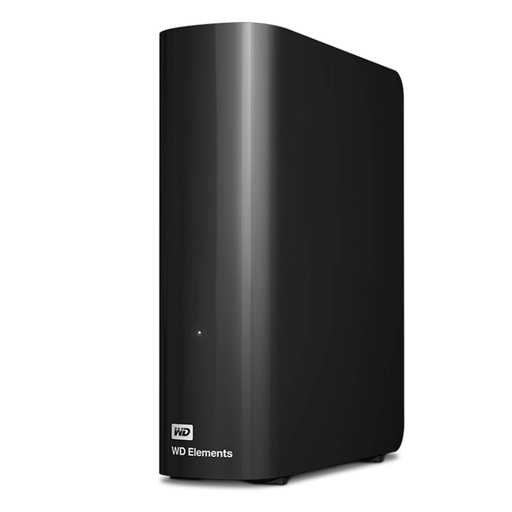 Image unavailable
Western Digital Elements Desktop 10TB
Consider this desktop hard drive for a large archive kept beside a home computer rather than a backup you need to carry. Confirm its power and computer connections, your intended backup and restore routine, and whether you need another copy away from the same location.
View on Joybuy
Backup storage questions
Is cloud syncing the same as a backup?
No: synchronisation can copy a deletion to your other devices and the cloud. Microsoft describes this behaviour for synced online-only files. Keep a separate recoverable copy and check how long earlier versions or deleted files remain available.
How much space do common cloud accounts provide?
Google says a standard account has up to 15 GB shared across Drive, Gmail and Photos. Microsoft lists 100 GB for Microsoft 365 Basic and 1 TB for Personal, while Apple lists iCloud+ tiers including 50 GB, 200 GB and 2 TB. Check your current usage and the plan details before choosing an allowance.
Can I recover a file deleted from cloud storage?
Recovery depends on the service and what happened to the file. Apple says deleted iCloud Drive files can be recovered within 30 days unless permanently removed; Microsoft says deleted files in personal OneDrive accounts can be restored within 30 days. Check the relevant account's restore options before depending on either window.
What should I do before relying on an external backup drive?
Check that it holds the files you need and connects to the computer used for backups, then restore a test file. Disconnect and store the drive securely between backup sessions: the National Cyber Security Centre warns that storage left connected to an infected computer may also be affected.


