Laptop owners running out of space
An external drive can hold a local copy of photos and documents. If you also need those files on other devices, consider cloud access and decide which folders should be backed up rather than merely moved.


Choose cloud storage if access across devices and an off-site copy matter most; choose an external hard disk drive (HDD) for a local archive, or an external solid-state drive (SSD) if you regularly carry and transfer large files. For photos and documents you cannot replace, keep both a cloud copy and a separate local copy, disconnect the drive after updates, and check that you can restore your files.
An external drive can hold a local copy of photos and documents. If you also need those files on other devices, consider cloud access and decide which folders should be backed up rather than merely moved.
Recovery matters more than adding capacity alone. The Information Commissioner's Office describes an outside-the-home cloud copy as part of a backup solution; the National Cyber Security Centre also advises keeping a separate backup drive disconnected when it is not being updated.
A portable SSD is worth considering for frequent transfers or work from the drive. Check that the devices, ports and cables you use support the connection required by the exact model.
Start with how you would recover a lost file, then check capacity and how each copy will be kept up to date. An HDD, SSD and cloud account can serve different parts of the same plan.
| Priority | What to check | Your needs |
|---|---|---|
| Recoverable copies | Check where each copy lives, whether deleted files or earlier versions can be recovered, and whether you can open a restored file. The National Cyber Security Centre warns that connected drives and cloud locations can both be affected in ransomware incidents. | I would struggle to replace family photos or important documents, so I want a separate copy as well as a way to test recovery. |
| Capacity | Compare your current library and expected growth with the drive capacity or cloud allowance. Google One says its free 15 GB allowance is shared across Drive, Gmail and Google Photos; Apple lists iCloud+ tiers from 50 GB to 12 TB. | My photo and video collection is growing, and I need enough room for new files without overlooking what already uses a shared cloud allowance. |
| Backup upkeep | Check which folders and devices are included, when updates run, and what happens if a drive is unplugged. Seagate says scheduled backups with its Dashboard software require the computer, software and compatible drive to be running and connected. | I want new files copied regularly without having to remember every manual transfer. |
| Account access | For cloud storage, review sign-in protection, sharing permissions and account recovery. Apple says its Advanced Data Protection requires a recovery contact or key for covered data because Apple cannot recover the relevant encryption keys. | I want to keep private files restricted while still being able to regain access to my own account. |
| Portable transfers | For an SSD, match the drive's interface to the computer port and cable. Samsung says the T7 Shield's quoted maximum transfer rates require USB 3.2 Gen 2, a suitable cable and UASP; those figures should not be assumed for other models. | I regularly carry large files between devices, so the connection I can actually use matters more than a headline speed. |
A change to a synced file can spread across devices, while one local drive can be lost or damaged. Neither arrangement alone covers every recovery scenario.
Keep another copy in a separate location or through a different route, and try restoring a sample file before relying on the arrangement.
The National Cyber Security Centre reports ransomware incidents affecting connected USB and network backup drives.
Connect the drive to update the backup, check that the update has finished, then disconnect and store it securely.
A shared allowance may be used by more than photos. Google One says its Google Account allowance covers Drive, Gmail and Google Photos together.
Review usage across the included services and allow room for new files and device backups when choosing capacity.
Transfer rates depend on the drive and its connection. Samsung specifies USB 3.2 Gen 2, a suitable cable and UASP for the T7 Shield's stated maximum rates.
Check the exact SSD model, laptop port and cable rather than applying another model's figures to your setup.
These provider examples help identify features and conditions to check; a feature described for one product line does not automatically apply to every model.
My Passport is a portable HDD line to consider for a local photo and document archive.
Seagate's drive software offers a way to plan local backups on compatible products.
The T7 Shield is an example of a portable SSD for people who move large files frequently.
iCloud suits Apple-device users considering cloud access to photos, files and device backups.
Google One is relevant when photos and files share storage with other Google services.
These portable SSD and HDD options provide local storage for photos and files. Choose capacity for your own library, and plan separately for any cloud copy you need.
 No image available
A portable local copy to consider if you move a large photo or file collection between devices. The listed connection is USB Type-C 3.2 Gen 2 (3.1 Gen 2); check your computer's port and cable, and how you will update and restore the backup.
 No image available
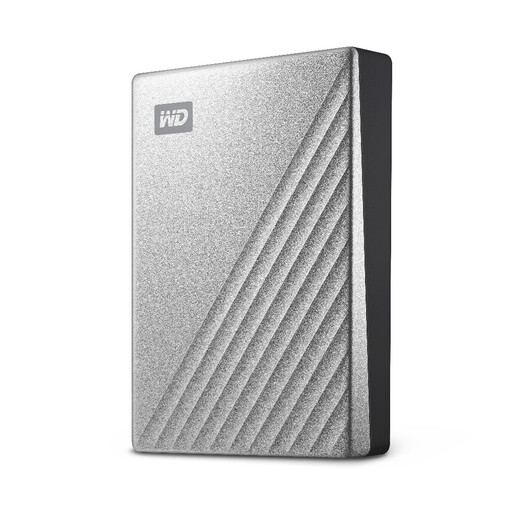
This portable HDD offers 4 TB for a local photo and document archive. Check the required operating-system setup, backup schedule and restore process for the exact drive before relying on it as a backup.
 No image available
A 4 TB portable HDD for keeping a local copy of a growing file library. Confirm the connections and macOS setup you intend to use, then check how backups are restored.
 No image available
This portable HDD provides 5 TB for a local archive that needs more room than the listed 4 TB models. Check its operating-system setup and backup restoration steps before putting important files on it.
 No image available
A 2 TB portable HDD for a local copy of personal photos and documents. Confirm that this capacity fits your collection; if you use macOS, check the exact driver or formatting requirements, as the product descriptions disagree about setup.
Not on its own if you need a separate, recoverable copy. Changes can sync across devices, and the National Cyber Security Centre warns that cloud locations can be affected in ransomware incidents. Check the service's deleted-file recovery, version history and restore process.
Consider an HDD for a local archive you update occasionally, or an SSD if you frequently carry and transfer large files. Compare capacities for your collection, and check the exact SSD's connection requirements rather than assuming its quoted speed will work with your laptop.
Update it regularly, check that you can restore files, and avoid leaving it permanently connected. The National Cyber Security Centre reports ransomware affecting connected backup drives and advises keeping a separate backup.
Check your current usage, which services share the allowance and how much room new files will need. Google One says Drive, Gmail and Google Photos share the Google Account storage allowance, so photos are not necessarily its only use.
No. Apple says Advanced Data Protection makes covered data decryptable only on trusted devices and requires a recovery contact or recovery key because Apple cannot recover the relevant encryption keys. Keep that recovery method protected and accessible.