Choose cloud storage if you need an off-site copy and access across devices; choose an external hard drive for a large local backup, or a portable SSD if carrying the drive and copying files frequently matter more. For files you cannot replace, the National Cyber Security Centre advises considering both online storage and a storage device, so that losing one copy does not leave you without another. Whichever route you use, check which folders are included and test that you can restore a file.
Who needs which kind of backup?
People protecting irreplaceable files
If family photos or personal documents would be difficult to recreate, prioritise a copy that remains available if the computer is lost, stolen or damaged. The National Cyber Security Centre advises considering both online and device-based copies.
People using files across devices
If you need documents or photos on a computer, phone and tablet, cloud access may suit you. Which? notes that cloud-held files can be accessed from these devices with an internet connection; check which folders your chosen service actually includes.
People backing up large libraries locally
If your photo, video or computer-file library is large, an external drive offers local backup capacity. Which? distinguishes HDDs for longer-term file backup from usually faster, more portable SSDs; either drive still needs a backup routine.
What matters when choosing a backup?
Decide how you would recover your files if the computer became unusable, then weigh access, capacity and the practicalities of keeping a local drive. These priorities apply whether you choose cloud storage, an external drive or both.
| Concern |
What to check |
Who this matters to |
| Independent recovery |
Confirm that important folders are copied and that at least one copy can be kept separate from the everyday computer. |
If losing my computer could also mean losing irreplaceable photos, I want another copy I can restore. Around 31% of consumers put independent recovery first. |
| Access and automatic copying |
Check which folders and devices the service supports, and review the enabled backup settings. |
When I move between devices, I need current files to be accessible without remembering every manual copy. Around 23% of consumers primarily value access and automatic copying. |
| Capacity and commitment |
Measure the files to protect, allow for growth and check whether other services share a cloud allowance. For Time Machine, Apple recommends a disk with at least twice the Mac’s storage capacity. |
With a growing photo library, I need enough room for backups without taking on an unsuitable ongoing subscription. Capacity and commitment come first for around 23% of consumers. |
| Portability and compatibility |
Check the drive’s connection and file format against each computer you intend to use; confirm any encryption setup you need. |
If I carry a local copy or switch computers, I need the drive to connect and work with both systems. Around 23% of consumers chiefly prioritise portability and compatibility. |
Backup mistakes to avoid
-
Assuming synchronisation or extra disk space is a recoverable backup
A folder may not be selected for cloud backup, while another partition on the same internal disk can be lost with the original. The National Cyber Security Centre also warns that ransomware has affected connected drives holding backups.
List the folders you need to protect, confirm that each is included and test restoring a file. Disconnect a local backup drive when it is not needed.
-
Choosing capacity from today’s files alone
Cloud allowances may be shared with email or photos, leaving less room for a growing backup. Google says its account storage is shared across Drive, Gmail and Photos; Microsoft says its allowance is shared across several Microsoft services.
Measure the files you intend to protect, check what else uses the allowance and leave room for growth and any backup history you want to keep.
-
Assuming a drive works unchanged with Windows and macOS
Western Digital says My Passport drives ship formatted as NTFS and need reformatting for macOS use. Reformatting a drive containing files can erase them.
Check the exact model’s format, ports and cable requirements. Copy existing files elsewhere before reformatting.
-
Overlooking files on a portable drive you may lose or dispose of
A carried drive can contain personal files. The National Cyber Security Centre cautions that simply deleting files may not prevent their recovery.
Consider encryption, keep the credentials needed to regain access, and use an appropriate secure-erasure process before passing on or disposing of the drive.
Relevant brands to consider
Google
A cloud-storage route for people already using Drive, Gmail and Google Photos.
- Google says a standard account includes up to 15 GB shared across these services.
- Email and photos use the same allowance, so check total account usage before relying on it for file backup.
Microsoft
A cloud route for people using OneDrive and selected standard folders on a Windows computer.
- Microsoft says OneDrive folder backup can make enabled folders available across devices.
- Its 5 GB free allowance is shared across OneDrive files and photos, Outlook.com attachments and Microsoft 365 apps; check both usage and enabled folders.
Apple
An iCloud and external-disk route for people backing up files and a Mac.
- Apple offers 5 GB of free iCloud storage and supports automatic Mac backups to an external disk with Time Machine.
- For Time Machine, Apple recommends a disk with at least twice the Mac’s storage capacity and advises using it only for those backups.
Samsung
A portable-SSD route for people who regularly copy or carry large files.
- Samsung specifies maximum sequential speeds of 1,050 MB/s read and 1,000 MB/s write for its 1 TB Portable SSD T7 using USB 3.2 Gen 2.
- Those are manufacturer maximums for that model and variant, not a promised backup speed; check the computer’s port and cable.
Western Digital
An external-drive route, with My Passport as an example of a portable HDD range.
- A local drive can serve as a separate place to keep copied files when used in a backup routine.
- Western Digital says My Passport drives ship as NTFS and need reformatting for macOS use; check the exact model before buying.
External drives on Joybuy
These portable SSDs and external hard drives are local-storage choices for backing up personal files. Choose a drive you can use with your computer, and keep another independent copy of files you cannot replace.
 No image available
Samsung MU-PG2T0B 2 TB portable SSD
Consider this local-drive option if you regularly carry copies of files. The product name specifies 2 TB, USB Type-C and USB 3.2 Gen 2x2; check your computer’s connection if transfer speed matters.
View on Joybuy
 No image available
Samsung T7 Shield 1 TB portable SSD, blue
This portable SSD is a local-copy choice if you need to carry a backup. Its product name specifies 1 TB and USB 3.2 Gen 2; confirm the connection and plan how you will copy and restore files.
View on Joybuy
 No image available
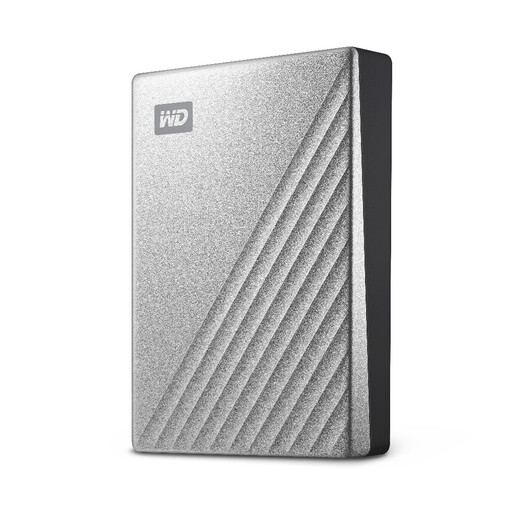
Western Digital My Passport Ultra 4 TB external hard drive, silver
This 4 TB portable hard drive is a local option for a sizeable file library. If you use a Mac, check the exact drive’s format and access requirements before setting up backups.
View on Joybuy
 No image available
Samsung Portable SSD T7 2 TB, grey
Consider this portable local-copy option if you move files between computers. The product name specifies 2 TB and USB 3.2 Gen 2; check the intended devices and set up a repeatable backup routine.
View on Joybuy
 No image available
Western Digital Elements 4 TB portable hard drive, black
This 4 TB external hard drive is a local-storage choice for a larger collection of photos and documents. Its product name specifies USB 3.0; check file-format requirements if you intend to use it with a Mac.
View on Joybuy
Backup questions answered
Is an external drive still a backup if it stays connected?
It holds a copy, but it is less isolated from the computer. The National Cyber Security Centre says ransomware has affected connected USB and network drives holding backups; disconnect a local backup drive when it is not needed and store it securely.
Does cloud storage back up every file on my computer?
No. Coverage depends on the service and the folders you enable. Microsoft says OneDrive folder backup protects selected standard folders, so check the enabled folders and backup status rather than assuming every file is included.
How large a drive do I need for Time Machine?
For a Mac using Time Machine, Apple recommends an external backup disk with at least twice the Mac’s storage capacity. That guidance is specific to Time Machine, not a capacity rule for every backup method.
What happens if my cloud storage fills up?
New backups may stop, so check the provider’s allowance and your current usage before depending on it. Google says reaching its account storage limit can prevent new Drive uploads and photo or video backups; its allowance is shared across Drive, Gmail and Photos.


