Choose cloud storage if automatic, recent copies across everyday devices matter most; choose an external drive if you want a removable copy that does not depend solely on access to an online account. For irreplaceable photos and documents, using both gives you another recovery path, provided you check what each backup includes, keep the drive separately and test that you can restore a file.
Who these backup options suit
Households that rely on automatic phone backups
If photos and device data mainly live on a phone or tablet, check which categories are copied automatically and how you would restore them on a replacement device. Apple and Google both describe device-backup options, but the settings and included data need checking for your device.
Households with growing libraries
Several people or devices can make storage capacity and family-sharing settings important. Check existing use alongside photos and videos, and find out what other members can see before choosing a shared cloud plan.
People who want a separate, portable copy
An external drive can hold a local copy without making recovery depend entirely on an online account; a USB stick can hold a deliberately limited file set. The National Cyber Security Centre identifies removable media as a backup option, but the copy still needs updating and safe storage away from the original device.
What matters when choosing
Start with the files you would need to recover, then decide how they will be copied and where a separate copy will be kept. Cloud storage, an external drive and a USB stick can serve different parts of that plan rather than replacing one another in every situation.
| Concern |
What to check |
Who this matters to |
| Automatic backup and restoration |
Check the included folders and device data, then restore a test file. Google advises Android users to review Backup details; Microsoft says Windows File History backs up library folders once configured. |
If my phone is lost or my computer fails, I need a recent copy I can actually restore. Around 33% of consumers would put automatic recovery first. |
| Capacity and household sharing |
Measure storage already used by photos, documents and other account data; check which family members can use the plan. Apple lists 5 GB of included iCloud storage, while Google says up to 15 GB is shared across Drive, Gmail and Photos. |
As our household's photo library grows, I need enough usable space without confusing shared storage with shared files. Roughly 25% of consumers would make capacity and household sharing their primary concern. |
| A separate local copy |
Check drive capacity and connection compatibility, arrange regular copying and store the drive separately. A drive warranty should not be treated as a backup of its contents. |
I want another way to retrieve important files if I cannot access my device or online account. About 25% of consumers would prioritise a separately stored local copy. |
| A limited portable file set |
Choose the documents to copy, check the USB connector and update the copy after changes. A USB stick holding selected files is not a full-device backup. |
I only need to carry a small set of essential documents and can keep that copy up to date myself. Around 17% of consumers would put this limited-file need first. |
Backup mistakes to avoid
-
Assuming a cloud account copies everything
Backup coverage depends on the device, service and settings. Google directs Android users to review Backup details, while Windows File History covers library folders after it is configured.
Check the categories and folders you care about, then use the relevant restore function to recover a non-sensitive test file.
-
Treating included cloud storage as photo-only space
Google says its included storage is shared across Drive, Gmail and Google Photos. Other account data can therefore use space you expected to keep for pictures.
Check your current use and the space available to each household member before settling on a capacity.
-
Treating a rugged SSD as damage-proof
Samsung's resistance claims for the T7 Shield are based on specified tests; Samsung says real-world resistance may vary and that liquid, dust and drop damage are not covered by its warranty.
Keep another copy of irreplaceable files rather than relying on the drive's casing to protect your only copy.
-
Assuming a drive warranty protects the files
Seagate says its standard limited warranty does not cover data loss or data-recovery costs unless the product was purchased with its Rescue Data Recovery Services programme.
Check the exact model's service eligibility and maintain an independent backup regardless of warranty coverage.
Brands relevant to personal backups
Apple
iCloud is relevant if your household uses Apple devices and wants to consider device backup, restoration or Family Sharing.
- Apple lists 5 GB of included iCloud storage and additional iCloud+ capacity options.
- Apple says family members keep separate accounts and private files, but their storage use can be visible within the family group. Check available capacity and sharing settings.
Google
Google Backup and Google One are relevant to Android users and households storing files across Google Photos, Drive and Gmail.
- Google says an Android phone can be set to back up automatically and that up to 15 GB of included account storage is shared across its services.
- Review Backup details to see which device data is covered, and count email and Drive files when checking available space.
Microsoft
Windows File History and OneDrive offer different ways to recover files for households using Windows.
- Microsoft says File History can make regular copies of library folders to a configured external drive or network location; OneDrive offers version history for supported stored files.
- Check whether the folders you need are included and which restore route applies. File versions in OneDrive do not establish that every file on a computer is backed up.
Samsung
Samsung's T7 Shield portable SSD range is relevant when a compact, removable local copy is part of the backup plan.
- For its T7 Shield MU-PE1T0S/EU, Samsung states maximum sequential read and write speeds of 1,050 and 1,000 MB/s under compatible USB 3.2 Gen 2 and UASP conditions.
- Samsung's resistance claims are model-specific, and it says liquid, dust and drop damage are not covered by warranty. Keep another copy of important files.
Seagate
Seagate external drives are worth considering if you want local storage and plan to check whether a particular model includes Rescue Data Recovery Services.
- Seagate lists external-drive families eligible for its Rescue programme; eligibility needs checking for the exact model.
- Seagate says its standard limited warranty does not cover data loss or recovery costs without the applicable Rescue programme. Neither coverage nor a recovery attempt replaces a separate backup.
Joybuy removable-storage options
These external drives and USB flash drive are options for keeping a removable copy of personal files. Choose capacity for the files you intend to copy, check your device's connection and set up a routine for updating and testing the copy.
 No image available
Western Digital My Passport Ultra for Mac 5TB external hard drive, silver
Consider this for a removable copy of a large photo and document library used with a Mac. The named variant has 5TB capacity; check the required device setup, which folders your backup process will copy and how you will restore them. Confirm the applicable warranty terms before buying.
Joybuy
 No image available
Samsung MU-PG4T0B 4 TB USB Type-C external SSD, black
This 4 TB removable drive is an option for a local copy of a sizeable file library. Its named connection is USB Type-C with USB 3.2 Gen 2x2; check your computer's port if connection speed matters, and establish a backup and restore routine before relying on it.
Joybuy
 No image available
Western Digital My Passport 2TB portable external hard drive, black
Consider this 2TB drive for a separate copy of selected photos and documents. If you use a Mac, confirm the setup it requires; whichever computer you use, check the folders included in your backup and test a restore.
Joybuy
 No image available
Samsung MU-PE1T0S 1TB USB Type-C external SSD, black
This 1TB removable SSD can hold a separate local copy of files that fit its capacity. Check USB Type-C compatibility and how you will copy and restore your files; do not treat resistance to everyday damage as a reason to keep only one copy.
Joybuy
 No image available
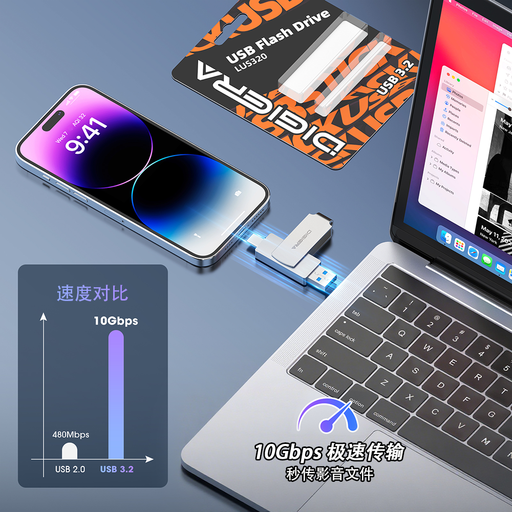
DigiEra LUS320 128GB USB flash drive, USB-A and Type-C
Use this for a deliberately selected set of documents rather than assuming it will back up a whole device. Its 128GB capacity and USB-A and Type-C connectors may suit moving those files between compatible devices; check file-system compatibility and update the copy after important changes.
Joybuy
Questions about backing up personal files
Will the included cloud storage hold my photos and documents?
It may, but compare your current use with the space available to your account. Apple lists 5 GB of included iCloud storage; Google says up to 15 GB is shared across Drive, Gmail and Google Photos, so photos do not have that entire allowance to themselves.
Can we share cloud storage without sharing our files?
Yes, with the provider's family-sharing settings. Apple says family members keep private files in separate Apple Accounts, although each person's storage use can be visible to the group. Google says family members cannot access one another's files without permission and that invitees must live in the same country.
How can I check that a backup will restore?
Restore a non-sensitive test file or folder using the service or operating system you intend to rely on, then open it on the intended device. Microsoft documents restore functions for Windows File History and OneDrive; check that the route you choose also covers the files most important to you.
Does a drive warranty mean lost files can be recovered?
No. Seagate says its standard limited warranty does not cover data loss or recovery costs unless the product was purchased with its Rescue Data Recovery Services programme. Check the exact drive's terms and keep another copy of important files.


