What matters when choosing a setup?
Choose between one router and mesh according to where people use the archive, then check that the broadband handoff and wired connections suit the equipment the club already has.
Single router
Choose it when: The archive desk or storage device can connect by Ethernet and users work mainly near the router.
Allow for: One router may leave distant or obstructed rooms with weak Wi-Fi.
Mesh system
Choose it when: Archive users work across rooms or floors where a single router gives weak coverage.
Allow for: Additional units need suitable positions and power; mesh cannot increase the speed of the broadband line, as Ofcom notes.
| Concern |
What to check |
Who this matters to |
| Secure, maintainable access |
Check update arrangements and the access controls the club needs; assign someone to manage archive accounts and backups. |
If I manage membership records, I need to control who can open them and recover them if something goes wrong. Around 37% of consumers put secure, maintainable access first. |
| Access at the archive desk |
Confirm the ISP connection requirements, the number of LAN ports needed and the Ethernet capability of the archive device. |
When I work from a fixed archive PC or NAS, a dependable local connection matters more to me than a higher advertised wireless rate. Roughly 36% of consumers prioritise access at the main desk. |
| Coverage across rooms |
Test the rooms where records are used; consider node placement and wired backhaul if cabling is practical. |
If committee members need records away from the main router, I want a usable connection in those rooms. About 27% of consumers place multi-room coverage first. |
Joybuy router and mesh choices
These choices include mesh kits for access across rooms and a standalone router for a more concentrated setup. Match the number of units and wired connections to the club’s archive locations, then confirm broadband compatibility before replacing existing equipment.
 No image available
NETGEAR Orbi 370 RBE373 Wi-Fi 7 Mesh System, 3-Pack
Consider this three-unit mesh kit if authorised users need archive access across several rooms. The product name specifies dual-band BE3600 Wi-Fi and 2.5Gbps Ethernet; confirm that its connections, unit count and required modem or gateway fit the club’s setup.
View on Joybuy
 No image available
TP-Link Deco BE22 BE3600 Wi-Fi 7 Mesh System, 3-Pack
This three-unit system is a choice to assess for archive use across rooms. Check the exact Ethernet port speed before planning a wired archive connection: the product descriptions give conflicting 1.0Gbps and 2.5Gbps figures.
View on Joybuy
 No image available
TP-Link Deco BE25 Wi-Fi 7 Mesh System, 3-Pack
Consider this mesh kit if the club needs connections in rooms beyond the main router. Before using it with an archive PC or NAS, check how many Ethernet ports the exact units have, how they are assigned and how firmware updates are managed.
View on Joybuy
 No image available
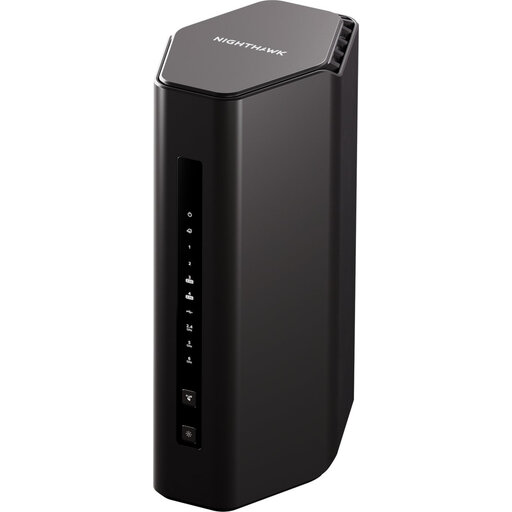
NETGEAR Nighthawk RS300 BE9300 Wi-Fi 7 Router, 5PT
This standalone router is worth assessing when archive use is concentrated near one wired workstation. NETGEAR lists a 2.5GbE internet port for the RS300; test Wi-Fi in any other archive-use rooms before relying on a single unit. NETGEAR Armor is a subscription after the included first year, so check its current terms if that service matters to the club.
View on Joybuy
 No image available
TP-Link Deco BE65 BE9300 Tri-Band Wi-Fi 7 Mesh System, 3-Pack
This three-unit mesh system is relevant when authorised archive users work across several rooms. Check the Ethernet port arrangement of the exact pack before connecting an archive PC or NAS, and establish its firmware-update process as part of the club’s maintenance plan.
View on Joybuy
Questions about club archive access
Should a fixed archive computer use Wi-Fi or Ethernet?
Use Ethernet for a fixed archive computer or NAS where practical. Ofcom says a direct Ethernet connection to the router should be faster and more reliable than Wi-Fi; authorised mobile users can still use wireless access elsewhere.
Can the club replace its broadband provider’s router?
Possibly, but confirm the provider’s connection and configuration requirements before buying. Ofcom notes that self-bought routers can be harder to set up and may not receive provider troubleshooting support; an ONT at a full-fibre site does not, by itself, establish compatibility.
When does a mesh system make sense for archive access?
Consider mesh when authorised users need the archive in rooms or floors where Wi-Fi from the main router is weak. Test those locations first and plan where units can go. Ofcom says mesh can improve coverage, but it cannot make the broadband line faster.
What if the archive contains members’ personal records?
The club should assess security measures against the circumstances and risks of processing that personal data, as the Information Commissioner’s Office advises under UK GDPR. Router settings are only part of the task: control archive permissions, maintain the equipment and archive service, and plan and test recovery from backups.


