Who this setup suits

Administrators working beside a bright window

If you spend long periods checking renewals, payments and member details, plan where the screen will sit before choosing the computer. The Health and Safety Executive advises arranging screens to avoid glare and bright reflections; Dell lists anti-glare treatment and stand adjustments for its P2425HE monitor.

Volunteer treasurers with limited desk space

A compact desktop may leave more room for forms and other equipment while allowing the screen to sit separately. Dell describes its Pro Micro range as ultracompact, and HP offers an ultra-small Pro Mini configuration; check the space needed for the monitor and peripherals as well as the computer.

Club teams already using Macs

If the club’s files, applications and support arrangements work with macOS, a Mac mini can be paired with an external monitor. Apple lists multiple-display support for Mac mini, subject to the model and connection configuration; confirm compatibility with any specialist club software first.

What matters when buying

Windows mini desktop and separate monitor

Choose when: The club needs Windows software or peripherals, or the screen must be positioned independently of the computer.

Trade-off: Allow for a suitable monitor, keyboard and mouse, and check their connections before ordering.

Windows all-in-one

Choose when: Fewer separate components matter more to the club’s shared desk than changing the display independently later.

Trade-off: The screen is part of the computer, so check that model’s finish, adjustment and placement options carefully.

Mac mini and separate monitor

Choose when: The club already uses macOS-compatible applications, files and support practices.

Trade-off: Check specialist software and peripheral compatibility, as well as the monitor, keyboard and mouse needed for the setup.

Concern What to check Who this matters to
Screen readability and glare Check the screen’s anti-glare finish and stand adjustments, then whether it can be positioned away from direct window reflections. If I’m reading member names and payment entries for long stretches, reflected daylight makes screen placement my first concern. Around 33% of consumers would put readability first.
Existing workflow Confirm the operating system works with required membership software, files, printers, scanners and card readers. I need the next computer to work with the club’s existing tools and the people who support them. For roughly 27% of consumers, that continuity would be the primary need.
Desk footprint Measure space for both computer and screen; check the display connections and peripheral ports you need. Forms and other equipment already occupy the desk, so I want a small computer without fixing the screen in place. About 20% of consumers would prioritise that arrangement.
Shared-desk simplicity For an all-in-one, check the exact screen finish, stand adjustment and connections before choosing fewer components. Different volunteers use the same station, and I would rather have fewer separate pieces to arrange. That would be the leading concern for around 20% of consumers.

Purchasing pitfalls

  • Upgrading the computer instead of addressing window glare

    A faster processor will not remove a bright reflection from subscription records. The Health and Safety Executive advises arranging the desk and screen to avoid glare and bright reflections.

    Plan the screen position first. Where light reaches the display, consider a side-on position and curtains or blinds; check the monitor’s finish and adjustment too.

    If the position cannot be made comfortable, changing the window covering or screen arrangement may require additional equipment.

  • Assuming every all-in-one screen suits a bright desk

    An all-in-one keeps the computer and display together, so the exact screen and stand matter when positioning it near a window.

    Check the chosen model’s screen finish, adjustment and placement options. If those do not suit the desk, consider a desktop with a separate monitor.

  • Choosing a compact computer without checking compatibility

    A small chassis does not establish whether the club’s membership software, printers or card readers will work with its operating system.

    List the applications, files, licences, connections and peripherals the club relies on, then check each against the proposed Windows or macOS setup.

    Changing platforms may also mean replacing an incompatible peripheral or arranging a suitable adapter.

  • Recycling an old computer with club records still on it

    An old machine may still hold member details or account credentials. Oxfordshire County Council advises removing personal information and data from computers before recycling them.

    Back up records the club needs, sign out of services and erase stored data before using an appropriate electrical-equipment recycling route.

Brands to consider for this setup

Dell

Dell offers compact Windows desktops, all-in-ones and separate office monitors relevant to different ways of arranging a club desk.

  • Dell lists anti-glare treatment and height, pivot, swivel and tilt adjustments for the P2425HE monitor, which can be considered alongside a compact desktop.
  • For a Dell all-in-one, check the exact integrated screen and stand rather than assuming they offer the same adjustment as a separate monitor.

HP

HP’s compact Windows desktop range is relevant when desk space is limited and the club wants to choose its monitor separately.

  • HP lists a Pro Mini 400 G9 configuration with Windows 11 Pro, 16 GB RAM and a 512 GB SSD.
  • Those specifications belong to the cited configuration, not every Pro Mini; the screen for the bright-window position remains a separate choice.

Apple

Mac mini is relevant to a club with an established macOS-compatible workflow that wants a compact computer and a separately positioned display.

  • Apple lists support for multiple external displays, depending on Mac mini model and connection configuration.
  • Check Windows-only software, specialist integrations and existing peripherals before changing the club’s platform.

Compact desktops on Joybuy

These mini desktops are options for a desk where the screen can be chosen and positioned separately. Check each computer’s operating system and connections against the club’s tools, and assess the intended monitor and window-light control independently.

SOYO M5 mini PC

SOYO M5 mini PC, Ryzen 4300U, 16 GB RAM, 512 GB SSD

Consider this compact Windows 11 desktop if the club wants to position its screen separately.

The listed configuration has an AMD Ryzen 4300U processor, 16 GB LPDDR4 memory and a 512 GB SSD; its title lists HDMI 2.0, Type-C and DisplayPort 1.4 display connections.

Check the club’s software and peripherals, what equipment is included, and the chosen monitor’s glare control and adjustment.

View on Joybuy
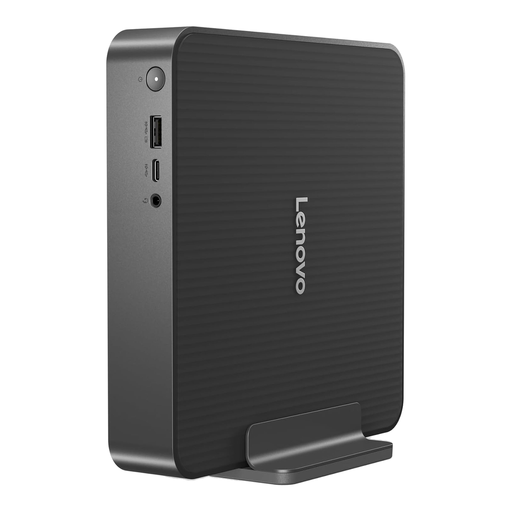
Lenovo IdeaCentre Mini PC 01IRH10R

Lenovo IdeaCentre Mini PC 01IRH10R, 91B2000XUK

This compact desktop is worth considering where desk space is limited and the club wants a separately positioned screen.

The named variant lists an Intel Core 5 processor, 16 GB RAM and a 512 GB SSD. Confirm the operating system, required software, display connections and included equipment for this configuration.

Assess the monitor’s finish and stand adjustment for the bright-window position.

View on Joybuy
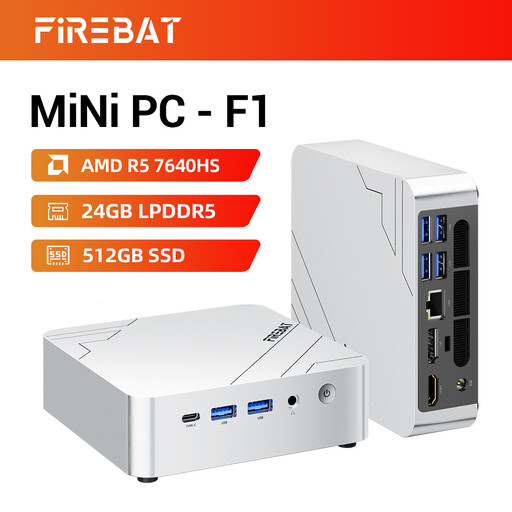
FIREBAT F1 mini PC

FIREBAT F1 mini PC, Ryzen 5 7640HS, 24 GB RAM, 512 GB SSD

This mini PC may suit a small club desk if its operating system and connections meet the club’s requirements.

Its title lists an AMD Ryzen 5 7640HS, 24 GB LPDDR5 memory, a 512 GB PCIe 4.0 SSD and triple-screen output support. Check which display connections the intended setup needs.

Confirm software and peripheral compatibility, included equipment and the separate screen’s glare and stand characteristics.

View on Joybuy
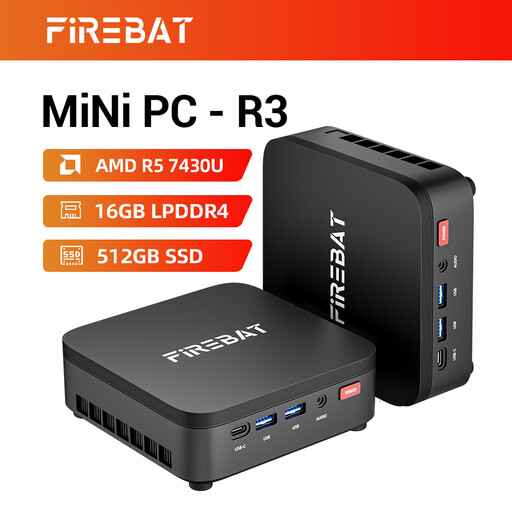
FIREBAT R3 mini PC

FIREBAT R3 mini PC, Ryzen 5 7430U, 16 GB RAM, 512 GB SSD

Consider this compact format if the club has room to place its display independently of the computer.

The title lists an AMD Ryzen 5 7430U, 16 GB LPDDR4 memory, a 512 GB SSD and triple-screen display support. Check the exact video outputs before planning the screen connections.

Confirm the operating system, club-software compatibility and included equipment; choose the monitor for its position beside the window.

View on Joybuy

SOYO Y5Pro mini PC

SOYO Y5Pro mini PC, Intel Core i5 8250U/8350U option, 8 GB RAM, 256 GB SSD

This Windows 11 mini PC is another compact format for routine club administration with a separately positioned screen.

Its title lists 8 GB DDR4 memory and a 256 GB SATA SSD, but names the processor as an 8250U/8350U option. Confirm which processor the selected unit has.

Check the club’s applications and peripherals, included equipment, and the monitor’s anti-glare finish and adjustment.

View on Joybuy

Common questions

Should the monitor face the bright window?

Position it to avoid glare and bright reflections rather than assuming it will be comfortable facing the window. The Health and Safety Executive advises arranging the desk and screen around those reflections; curtains or blinds can help control intrusive light.

What should the club check before switching from Windows to a Mac mini?

Check the membership system, accounting tools, files, printer and scanner drivers, card readers, licences and available support against macOS. Apple’s multiple-display support for Mac mini does not establish that Windows-specific club software or peripherals will work.

What if a desktop bought for the club is faulty?

Keep the order record, specification and any written promises about compatibility or included equipment, then contact the seller about the fault. GOV.UK explains that the Consumer Rights Act 2015 covers faulty goods in consumer purchases; the applicable route depends on how the club made its purchase.

What should happen to the old club computer?

Remove stored club and personal data before arranging electrical-equipment recycling. Oxfordshire County Council advises against putting electrical items in general waste and recommends clearing personal information from computers; check the disposal or take-back arrangements available to the club locally.