Four-player couch-co-op hosts
When several people share a cooking-game session, the setup needs enough paired and powered controllers for everyone playing. Team17 says Overcooked! All You Can Eat supports up to four players across its platforms.


Choose a controller that works with the console or PC running your cooking game before considering how it looks in a dark room. For a local group, pair and test every controller together, plan how to keep them powered, and do not assume that a glowing finish or player indicator means the face buttons are illuminated.
When several people share a cooking-game session, the setup needs enough paired and powered controllers for everyone playing. Team17 says Overcooked! All You Can Eat supports up to four players across its platforms.
If the game runs on PS5, Xbox or Nintendo Switch, start with compatibility with that console rather than features advertised for a different platform. Check the exact model when adding a controller to an existing group.
A Windows PC offers several controller connection options, but a pad working on its own does not settle how the whole group will connect. Xbox Support says performance with more than one Bluetooth controller can vary by host device.
Identify the device running the game, then check the group connection, low-light setup and power plan. These concerns apply to consumers preparing dark-room co-op cooking sessions; each percentage refers to those who put that need first.
| Concern | What to check | Who this matters to |
|---|---|---|
| Host compatibility | Match the exact controller model and connection method to the console or PC running the game. | If my group plays on one particular device, I need to know the extra controller will connect to it. Around 33% of consumers put host compatibility first. |
| Group connections | Check the game’s player limit and pair all controllers at once; test the full Bluetooth setup if playing on PC. | When everyone joins in, I need the controllers to keep working together, not just individually. For around 27% of consumers, reliable group connections are the primary concern. |
| Low-light controls | Set up player assignments before dimming the room and check whether the controls are easy for your group to identify. | In a dim room, I want to find my own controller and orient my hands without confusion. Around 20% of consumers prioritise that low-light confidence. |
| Session power | Check the battery or charging arrangement and what comes in the exact package. | I do not want a planned group session interrupted while a controller charges. Keeping every pad ready is the first concern for around 20% of consumers. |
Similar names can conceal different host support: 8BitDo specifies the Ultimate 2C Wireless for Windows and Android, while the Ultimate 2C Bluetooth is specified for Switch and Switch 2.
Match the full model name to the device running the game before buying.
A successful one-pad connection does not establish that every player’s controller will work together. Xbox Support cautions that connecting more than one controller over Bluetooth may have variable performance depending on the device.
Pair the whole group before the session and check which supported connection alternatives are available if the PC setup is inconsistent.
A player indicator or decorative finish may help identify a controller, but it does not establish that its face buttons light up.
Assign controllers and familiarise players with their layouts before dimming the room. If individual button illumination matters, check the exact model for that feature.
A spare controller still needs a workable power arrangement. PlayStation’s standard UK DualSense listing says a connection and charging cable is not included.
Check the contents of each exact bundle and prepare the cables or batteries your controllers need before play.
An additional compatible cable or charging arrangement may be needed when it is not already available.
A controller family to consider when the game runs on an Xbox console or a compatible Windows PC.
The DualSense route fits a PS5-hosted game, with other compatible devices worth checking if the controller will move between setups.
Nintendo’s Switch Pro Controller is an option for Switch or Switch 2 play in TV or tabletop setups.
A third-party option when the exact Ultimate 2C variant matches the device hosting the game.
These controllers cover different Switch-family, Xbox, PS5 and Windows-PC setups. Choose from the models compatible with the device running your game, then check how each additional controller will connect and stay powered during group play.
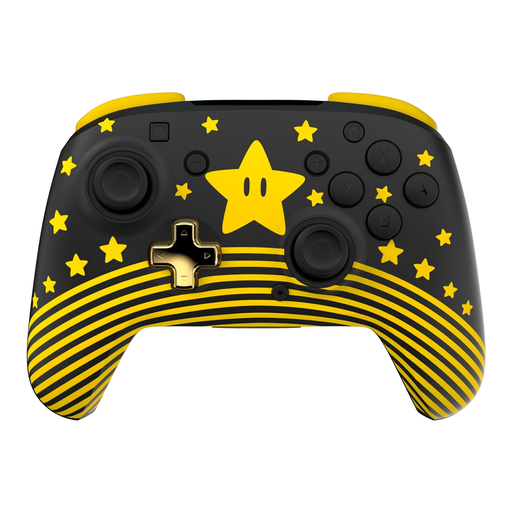 Image unavailable
For a Switch-family cooking-game setup, this wireless controller’s described glow-in-the-dark finish may help players distinguish it in a dim room. Do not take that finish as evidence of illuminated face buttons; also check whether you need a C Button for Switch 2 use.
 Image unavailable
Consider this model when the game runs on Xbox or a compatible Windows PC. For a PC group using Bluetooth, test all controllers together: Xbox Support says performance with more than one can vary by host device. The colour does not establish whether the buttons are illuminated.
 Image unavailable
For a PS5-hosted game, this DualSense variant is a platform-matched option; PlayStation also describes DualSense connections to compatible PCs. Check the contents of this exact package before planning to charge several controllers, as cable inclusion can differ by bundle or region.
 Image unavailable
Choose this model only for a Nintendo Switch 2 setup; do not confuse it with the earlier Switch Pro Controller discussed above. Charge it before a group session and check its controls under your room lighting if finding individual buttons in darkness matters.
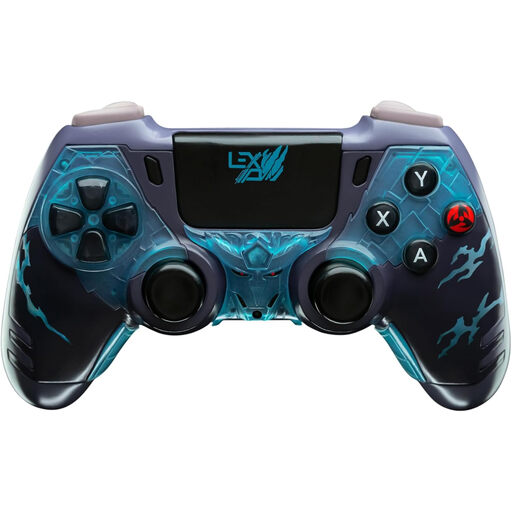 Image unavailable
Consider this controller if your game runs on a compatible Switch or Windows PC. If a cable is important to your group setup, confirm the connection mode of the exact unit before buying; do not assume every variant offers the same wired option.
Prepare a working controller for each person who needs one in your setup. Team17 says Overcooked! All You Can Eat supports up to four players across its platforms; check that every controller is paired and powered before the group starts.
Test the complete controller group on that PC before relying on Bluetooth for a session. Xbox Support says connecting more than one Bluetooth controller may be possible, but performance can vary with the host device; check for a supported connection alternative if your setup proves inconsistent.
PlayStation’s standard UK DualSense listing says a cable is not included. Check the contents of the exact bundle you are buying, particularly if you need to charge several controllers before play.
Use an appropriate collection route rather than putting electrical products or batteries displaying the crossed-out wheelie-bin symbol in household rubbish. UK government guidance directs consumers to recycling collection points; treat a device with a non-removable battery as electrical equipment.