Choose a controller that works with the console or PC you will use, then check the exact cooking game’s local-player limit and supported controller layouts before buying enough for the group. On Switch, a supported single-Joy-Con layout may let you use controllers you already own; for PS5, Xbox or Windows PC, start with a compatible controller and decide whether wireless play or a wired connection better suits your seating and setup.
Who needs another controller?
Switch households adding local players
If you already have a Nintendo Switch, check whether your cooking game accepts one horizontally held Joy-Con per player before adding full-size controllers. Nintendo describes individual Joy-Con play as a supported arrangement, but the game must allow it.
Console players wanting full-size controllers
For a group playing mainly on PS5 or Xbox, a controller intended for that console gives each additional player a full-size layout. Check how each controller connects and how you will keep the group’s controllers ready to use.
Windows PC couch-co-op players
If your Windows PC feeds a living-room display, match every controller’s connection method to the PC’s available hardware. Wireless play can keep cables away from the seats, while a suitable USB connection gives you another way to connect or troubleshoot.
What to check before buying
Settle the game, platform and number of simultaneous players before choosing how the controllers will connect and charge.
| Concern |
Buying check |
Who this matters to |
| Platform and local play |
Check the exact game’s local-player limit and controller layouts on your console or PC before counting how many controllers to add. |
If everyone is to join the same cooking game, I need to know that each planned controller works with its local-play layout. Around 42% of consumers would put platform and player compatibility first. |
| Connection around the seats |
Match Bluetooth, a dedicated wireless connection or USB to your device; check that a wired cable carries data. |
I want people to move around the seating area without trailing play cables, but I still need a dependable connection. Avoiding cables while keeping that connection reliable would come first for around 33% of consumers. |
| Controllers and charging |
Count the controllers and any required cables or adapters for the whole group; check charging arrangements and the conditions attached to battery-life figures. |
When several people play together, I need every controller ready for the session without overlooking an accessory. Keeping the group’s controllers manageable and charged would be the primary concern for around 25% of consumers. |
Common buying mistakes
-
Assuming one Joy-Con always works for one player
Nintendo says a Joy-Con can be held horizontally as an individual controller, but the game must support that play style.
Check the cooking game’s supported controller layouts and local-player count before deciding how many more controllers to order.
If the game needs a different layout, each intended player may need access to a full controller instead.
-
Choosing wireless without checking the PC connection
Windows connection methods differ by controller. For example, Xbox documents USB, Bluetooth and Xbox Wireless routes, while 8BitDo specifies 2.4G or wired Windows use for its Ultimate 2C Wireless model.
Check the controller’s stated connection method against the ports, Bluetooth capability or adapter available on your PC.
Your chosen method may also require a suitable USB data cable or wireless adapter.
-
Leaving Bluetooth audio connected for a larger Switch group
Nintendo states that a Switch with a Bluetooth audio device connected can connect no more than two wireless controllers at once.
Before a session needing three or four wireless controllers, disconnect the Bluetooth audio device and arrange another way to hear the game.
-
Treating a battery-life figure as a session guarantee
Nintendo says its Switch Pro Controller’s estimated battery life varies with use. A published duration should not replace a charging plan for every controller in the group.
Charge controllers before play and compare battery figures only with their stated conditions in mind.
Relevant controller brands
Nintendo
Nintendo’s Joy-Con and Switch Pro Controller offer different ways to equip a Switch group.
- Nintendo says each Joy-Con can be held horizontally as an individual controller when the game supports that layout.
- Nintendo lists USB-C charging and an estimated battery life of approximately 40 hours for the Switch Pro Controller; duration varies with use.
- With Bluetooth audio connected, Nintendo limits the Switch to two wireless controllers.
Xbox
The Xbox Wireless Controller is a route for Xbox play and offers documented connection choices on Windows.
- Xbox Support documents USB, Bluetooth and Xbox Wireless Adapter connections for Windows, alongside built-in Xbox Wireless where available.
- Wired PC use needs a data-capable cable. For its wireless adapter, Xbox advises staying within 6 metres and keeping the controller in line of sight.
PlayStation
DualSense is the PS5 controller route and can also connect by Bluetooth or USB-C to compatible computers and mobile devices.
- PlayStation documents DualSense connection options for supported Windows PCs and Macs as well as PS5.
- On PC, haptic feedback requires USB and a compatible game; adaptive triggers depend on game support. Check the contents of the particular listing if you need a cable.
8BitDo
8BitDo’s Ultimate 2C versions serve different platforms, so the version name matters more than the shared design family.
- 8BitDo specifies 2.4G and wired Windows modes for the Ultimate 2C Wireless Controller.
- The Ultimate 2C Bluetooth Controller is the distinct Switch and Switch 2 version. Do not assume that either version has the other’s platform support.
Controller choices on Joybuy
These choices cover Xbox or Windows PC, Switch and PS5 controller setups. Start with the system you use, then check your cooking game’s player count and layouts; a controller’s platform compatibility alone does not settle local-play support.
 No image available
Xbox Wireless Controller – Robot White
Consider this Xbox controller for an Xbox or Windows PC group. If the PC is away from the seats, check that your intended connection works from where people will play; also confirm the game’s local-player and controller support.
View on Joybuy
 No image available
Lexip SteelPlay Twin Pads Controllers
These twin controllers are a choice to assess for a Switch household adding players. Before relying on separate-controller play, confirm that your exact cooking game supports the intended layout and number of local players.
View on Joybuy
 No image available
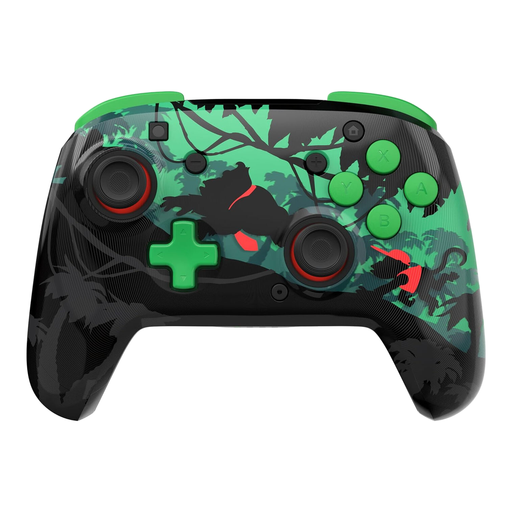
Turtle Beach Rematch Wireless Controller for Nintendo Switch – Donkey Kong Reveal
This is a single wireless controller for a Switch setup rather than a pair for two additional players. Check the cooking game’s controller layout before buying; if you plan to use it with Switch 2, also check whether your intended use needs a C Button.
View on Joybuy
 No image available
Sony PlayStation 5 DualSense Wireless Controller – Starlight Blue V3
Consider this DualSense variant when adding a controller for PS5 or a compatible PC. For PC use, PlayStation says haptic feedback requires USB and a compatible game, while adaptive triggers depend on game support; check the cooking game’s local-play arrangements separately.
View on Joybuy
Frequently asked questions
How many controllers do we need for a local cooking game?
Plan for the number of people playing at once, then check the exact game’s supported layouts before buying. Team17 describes local co-op for up to four players in Overcooked and Overcooked! 2, but that does not establish which controller arrangement your edition accepts; on Switch, a single Joy-Con works as an individual controller only when the game supports that layout.
Can we use three or four wireless Switch controllers with Bluetooth headphones?
Not while the Bluetooth audio device remains connected: Nintendo says the Switch can then connect no more than two wireless controllers. Disconnect Bluetooth audio before setting up a larger wireless-controller group.
What cable connects an Xbox Wireless Controller to a Windows PC?
Use a USB cable that supports data transfer. A charging-only cable will not serve as the controller’s wired PC connection, according to Xbox Support.
Will DualSense features work wirelessly in a PC cooking game?
Do not assume every PS5 controller feature will work in the PC game. PlayStation says PC haptic feedback requires a USB connection and a compatible game, while adaptive triggers depend on game support.
Can I choose the 8BitDo Ultimate 2C Wireless for Switch play?
Choose by the exact version rather than the Ultimate 2C name alone. 8BitDo specifies the Ultimate 2C Wireless for Windows and Android; its distinct Ultimate 2C Bluetooth version is specified for Switch and Switch 2, subject to the stated system-version requirements.


