Console co-op households
You play on PS5, Xbox or Nintendo Switch and want extra controllers for the same console without assuming you need another wall charger.


Choose a controller that works with your gaming device and the co-op game’s local-player requirements before deciding how to power it. With few plug sockets available, consider charging through an existing console or dock USB port, or using a controller with replaceable batteries. Check controller-count limits, USB power settings and charging accessories before relying on any arrangement for a group.
You play on PS5, Xbox or Nintendo Switch and want extra controllers for the same console without assuming you need another wall charger.
You want wireless control for a supported Windows PC or Android game and need to plan how controllers will connect and recharge.
You would rather keep spare AA cells ready for another player than wait for a controller with a built-in battery to recharge.
Start with the console or other host device and the game’s local co-op rules. Then choose a power arrangement that fits the USB ports, batteries and plug sockets you can actually use.
Consider when: Your game supports PS5 local co-op and you need another DualSense controller. PlayStation says up to four controllers can be used at once on PS5, and compatible controllers can charge through console USB.
Bear in mind: Rest Mode charging depends on the console’s USB-power settings; DualSense feature support also varies outside PS5.
Consider when: You use a supported Xbox device and prefer the Xbox Wireless Controller’s choice of AA batteries or a compatible rechargeable battery pack.
Bear in mind: Rechargeable AA cells must be charged outside the controller; a battery pack needs a suitable charging arrangement.
Consider when: Your game accepts an individual Joy-Con for each player, or you want a full-size Switch Pro Controller that Nintendo says can charge from a dock USB port.
Bear in mind: Control schemes differ by game. Nintendo says Bluetooth audio limits the Switch to two connected wireless controllers.
Consider when: Your game supports controllers and you can match the controller’s wireless mode to your device. 8BitDo states that its Ultimate 2C Wireless uses 2.4G on Windows and Bluetooth on Android.
Bear in mind: A 2.4G receiver occupies a USB port, and PC or Android support does not establish console compatibility.
| Concern | What to check | Who this matters to |
|---|---|---|
| Platform and local co-op | Confirm the exact device, the game’s player limit and whether each player needs a full controller. | If my game cannot use the extra controller or the planned number of players, its charging method is beside the point. Around 31% of consumers put compatibility and player count first. |
| Wall-socket use | Check available powered USB ports, Rest Mode settings where relevant, and whether a charging dock needs its own adaptor. | With the available sockets already occupied, I need a way to power another controller without adding a mains charger. Around 31% of consumers make socket use their primary concern. |
| Power during longer sessions | Check the applicable charging time or battery arrangement, and compare runtime claims only under equivalent connection modes. | If a guest controller runs flat mid-session, I want a practical way to keep that player involved. Around 23% of consumers prioritise power continuity. |
| PC and mobile wireless use | Match Bluetooth or receiver requirements to the device, including any USB port the receiver will occupy. | When moving between supported PC or mobile games, I need the connection method and controller features to work on each device. Around 15% of consumers place that flexibility first. |
A controller’s wireless connection does not establish that a particular console or game supports it. Local-player counts and controller layouts can also restrict co-op play.
Check the controller against your exact device and the game’s local multiplayer requirements, including whether a single Joy-Con can serve as one player’s controller.
A dock helps with limited sockets only if its power input suits a connection you already have available.
Check its power input and cable, then make sure the console or dock has a suitable free USB port.
It may occupy a USB port needed by another accessory or require a separate power connection.
8BitDo describes its Ultimate 2C Wireless battery figures as laboratory results for different connection modes; PowerA also says its stated runtime can vary.
Compare claims for the mode you intend to use, and plan a charging or spare-battery option for guest controllers.
GOV.UK identifies batteries and electrical products as items for appropriate recycling rather than ordinary disposal.
Use a suitable battery or electrical-waste collection route; take particular care with damaged batteries.
DualSense is the PS5 controller route for local co-op.
Xbox lists its Wireless Controller for Xbox consoles, Windows PC, iOS and Android.
Nintendo offers individual Joy-Con play where the Switch game supports it, alongside the full-size Switch Pro Controller.
The Ultimate 2C Wireless is a Windows and Android option with different stated connection modes.
The Advantage Wireless Controller is an Xbox-oriented rechargeable controller.
These controllers relate to Switch-family, PS5 and Xbox co-op setups. Match the exact console and game first, then check how the controller or any supplied charging accessory draws power in your setup.
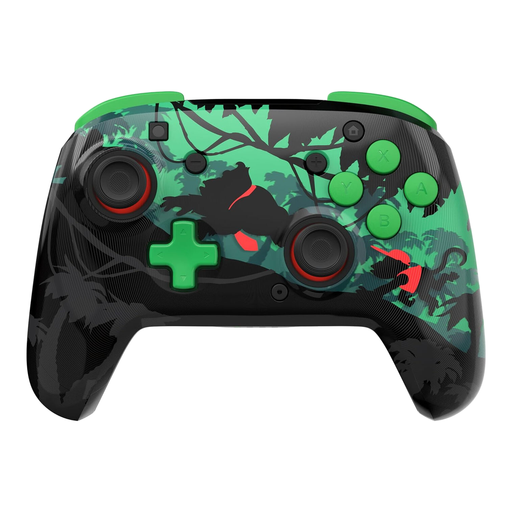 Image unavailable
Consider this for a compatible Nintendo Switch co-op game if you want a wireless controller in the Donkey Kong Reveal variant.
Check which USB power source its charging arrangement requires. Also check whether your intended use needs a Switch 2 C Button, which the listing says this controller does not have.
 Image unavailable
This is a full-size controller option for a Nintendo Switch 2 game that supports your planned co-op layout.
Confirm that an available console or dock USB connection suits your charging plan before counting on it to save a wall socket.
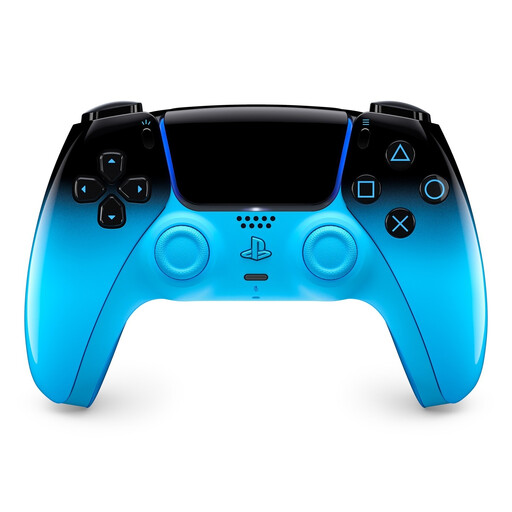 Image unavailable
For PS5 co-op, check that your game supports the additional player and controller.
PlayStation says compatible controllers can charge through console USB; Rest Mode charging depends on USB-power settings. Check that you have a suitable cable and free port. Feature availability can differ on PC, Mac and mobile.
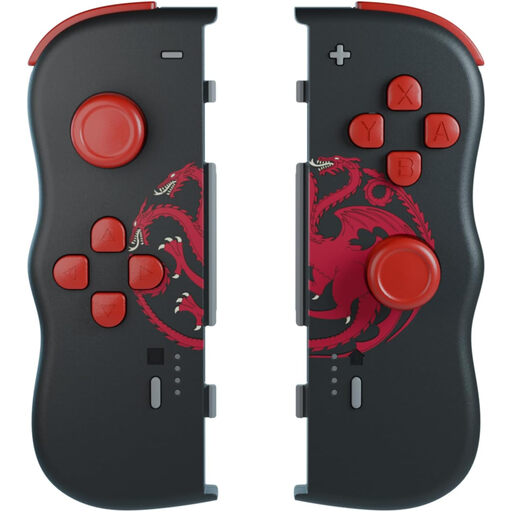 Image unavailable
Consider this Switch controller set if your game supports the intended two-player controller layout.
Check the required USB charging source before relying on your console or dock. Plan session length without relying on a single runtime figure, as the listing gives conflicting battery-life figures.
 Image unavailable
For an Xbox co-op setup, confirm this controller’s support for your exact console and game before choosing it.
If the charging station is part of your socket-saving plan, check its power requirements and whether it can use an available connection.
Yes, when a suitable powered console or dock USB port is available. PlayStation says compatible controllers can charge from console USB while the console is on or in Rest Mode, subject to its USB-power settings; Nintendo says a Switch Pro Controller can charge from a Switch dock USB port. Check port availability and the requirements of the exact controller.
They can if you keep suitable spare cells ready. Xbox says its Wireless Controller accepts AA batteries or a compatible rechargeable battery pack, but rechargeable AA cells must be charged outside the controller.
The answer depends on both the game and the device. PlayStation says up to four controllers can be used at once on PS5; Nintendo says Switch limits vary with controller type and features, and Bluetooth audio restricts connected wireless controllers to two. Check the game’s player count and control scheme as well.
Not necessarily: DualSense feature support varies by device and game. PlayStation says haptic feedback may require USB on PC and is not compatible with Mac or mobile devices, while adaptive triggers are not compatible with Android-based mobile devices. Check the features you want on your intended device.
Use an appropriate electrical-waste or battery collection route rather than household rubbish. GOV.UK advises recycling batteries and electrical products and taking care with removable lithium battery terminals before recycling.