Start with the console or computer running the puzzle game: an Xbox Wireless Controller suits an Xbox setup, DualSense is the PS5 route, and a Nintendo controller needs to match the particular Switch console. Before adding controllers around a shared kitchen-diner screen, check the game’s local-player limit and each player’s controller compatibility. Wireless play can keep leads off the table, but the charging or battery arrangement differs between models.
Who needs another controller?
Households adding a second or third controller
If several people will play on one screen, match each extra controller to the host device and check how many local players the particular game accepts. A console’s controller capacity does not determine a game’s player limit.
Players sharing a kitchen-diner screen
If controller leads would cross a dining table or walkway, wireless pairing may make the playing position easier to arrange. Plan where controllers will be stored and how their batteries will be charged or replaced.
PC and multi-device players
If the same controller might also be used with a computer, tablet or phone, check the supported device and game rather than relying on the controller’s familiar button layout. Features available on a console may work differently elsewhere.
What matters when choosing?
Choose for the device running the game, then check the game’s local-player mode before deciding whether wireless convenience or use across other devices matters more.
Xbox or Windows PC
Consider it when: The game runs on Xbox or a compatible Windows PC and you want an Xbox Wireless Controller.
Allow for: Microsoft Xbox Support describes AA batteries or a compatible rechargeable pack for the standard controller; confirm controller support in the PC game.
PS5
Consider it when: DualSense is for a game running on PS5; PlayStation says the console can use up to four controllers at once, subject to the game’s player limit.
Allow for: PlayStation says some DualSense features depend on the game and device, while its UK direct-purchase page says a charging cable is not included.
Nintendo Switch or Switch 2
Consider it when: The game runs on a Switch console and you choose a controller explicitly listed for that particular console.
Allow for: Nintendo says the connected-controller limit can vary with controller types and enabled features; the game may allow fewer players.
| Concern |
What to check |
Who this matters to |
| Device and local-player compatibility |
Match the controller to the host device; check the game’s local-player count and supported inputs. |
We need a controller for each person at the shared screen, but only if the game accepts them together. Around 50% of consumers put this compatibility need first. |
| Wireless play and power |
Check the connection method, included cable and whether power comes from a rechargeable battery or AA cells. |
I would rather keep leads off the dining table, provided we can manage charging or spare batteries. For around 30% of consumers, that practical setup is the primary concern. |
| Use across devices |
Check each intended device and game, including any feature limits outside the controller’s native console. |
Our group sometimes moves from a console to a PC or mobile device, so I need to know what will still work. This flexibility comes first for around 20% of consumers. |
Checks before you buy
-
Choosing by colour or console branding alone
A controller’s ability to connect does not establish that a particular puzzle game supports it or allows everyone to play locally at once.
Check the game’s local-player mode, the host device and the connection method for every controller you intend to use.
-
Assuming wireless controllers have the same power setup
PlayStation’s UK direct-purchase page says a DualSense charging cable is not included. Microsoft Xbox Support describes AA batteries or a compatible rechargeable pack for the standard Xbox Wireless Controller.
Check the contents and power arrangement of the exact controller listing before planning where it will be charged or stored.
-
Expecting every PS5 feature on another device
PlayStation says DualSense features can depend on the game, device and connection; PC haptic feedback may require USB.
If haptics, adaptive triggers or headset functions matter to you, confirm support for the intended game and connection method.
Controller brands to consider
Microsoft Xbox
The standard Xbox Wireless Controller is a first-party option for an Xbox setup and for compatible Windows PC games.
- Microsoft lists Xbox Wireless and Bluetooth connectivity, device switching and button mapping for the standard controller.
- Microsoft Xbox Support describes AA batteries or a compatible rechargeable pack, rather than a built-in rechargeable battery, for this model.
PlayStation / Sony
DualSense is the first-party PS5 route and can also connect to supported computers and mobile devices.
- PlayStation lists haptic feedback and adaptive triggers for DualSense, where the game and connected device support them.
- Feature availability varies outside PS5; PlayStation’s UK direct-purchase page says a cable is not included.
Nintendo
Nintendo’s full-size Pro Controller range is relevant when choosing a controller for a Switch console; check the exact controller model against your console.
- Nintendo describes wireless and dock-connected pairing for the Nintendo Switch Pro Controller.
- Nintendo’s approximately 40-hour figure applies to the fully charged Nintendo Switch Pro Controller and can be shorter depending on software and functions; it should not be assumed for a different Pro Controller model.
Joybuy controller choices
These controllers cover different host-device needs for shared-screen play. Pick one for the console or computer running your game, then confirm the game’s local-player and controller support.
 No image available
Machenike G3 V2 Tri-mode Controller, White
Consider this model if the game runs on a PC, Switch or Android device. Check which pairing mode works with your host device and whether the game accepts it for local play.
View on Joybuy
 No image available
Xbox Wireless Controller, Robot White
Consider this standard Xbox controller for an Xbox or compatible Windows PC game. Microsoft Xbox Support describes AA batteries or a compatible rechargeable pack for its power supply; check the game’s local-controller support.
View on Joybuy
 No image available
Turtle Beach PDP Victrix Pro BFG for Xbox and Windows PC, Black
Consider it for an Xbox or Windows PC setup if you also want to assess configurable controls. The named variants are Xbox Series X|S, Xbox One and Windows 10/11 PC; confirm that its connection and controls suit the particular co-op game.
View on Joybuy
 No image available
Nintendo Switch 2 Pro Controller, Black
Consider this model when the shared-screen game runs on Nintendo Switch 2. Check the game’s controller support and local-player limit; battery figures for the earlier Nintendo Switch Pro Controller should not be applied to this model.
View on Joybuy
 No image available
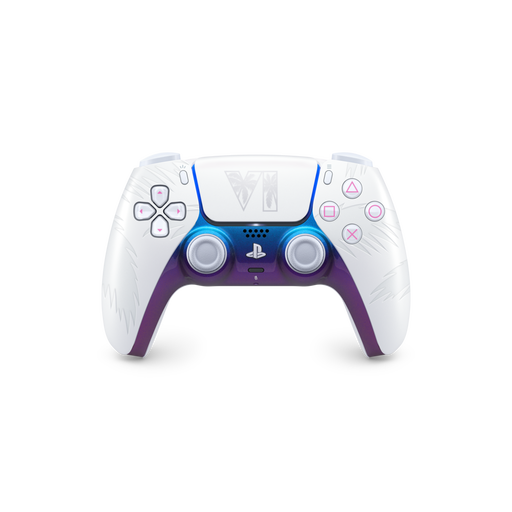
PlayStation DualSense Grand Theft Auto VI White Limited Edition controller
Consider this PS5 controller for a PS5-hosted co-op game, or check its support for an intended PC, Mac or mobile game. Its Grand Theft Auto VI design does not establish compatibility with a different game; PlayStation says some DualSense features depend on the device and connection. Check this listing’s cable contents before arranging charging.
View on Joybuy
Common questions
How many controllers do we need for a local co-op puzzle game?
Plan for the number of people the particular game allows to play locally, with a compatible input for each person. PlayStation says a PS5 can use up to four controllers at once, but that does not mean every PS5 game supports four local players; check the game’s own listing.
Will a DualSense have the same features on PC as on PS5?
Do not assume every PS5 feature will carry over to a PC game. PlayStation says adaptive triggers need game support and PC haptic feedback may require USB, so check the game and connection method if either feature matters to you.
What should we arrange to keep wireless controllers ready to play?
Arrange a charging place or spare batteries according to the exact controller. Microsoft Xbox Support describes AA batteries or a compatible rechargeable pack for the standard Xbox Wireless Controller, while PlayStation’s UK direct-purchase page says a DualSense charging cable is not included.
What should I do with an old controller when replacing it?
Ask the retailer about its electrical-waste take-back arrangements when buying a replacement. GOV.UK says retailers and distributors must offer take-back for waste electrical equipment of the same type as a new item a customer buys, under the applicable arrangements.


