Choose for the device and the exact game’s local-player limit before deciding how many controllers to buy. A Nintendo Switch can normally pair up to eight wireless controllers, according to Nintendo, but the usable number depends on controller features and falls to no more than two with Bluetooth audio connected. PlayStation says a PS5 can use up to four controllers at once; on any platform, the game still determines how many people can play and which controller layouts it accepts.
Who is choosing?
Switch hosts with frequent large gatherings
If the game accepts one Joy-Con per player, a shareable layout may help you arrange more playable seats. Nintendo says each Joy-Con can work independently, but its usual eight-wireless-controller limit varies with controller features and drops to two when Bluetooth audio is connected.
PS5 groups of up to four players
Matching controllers may suit a same-console session. PlayStation says a PS5 can use up to four controllers simultaneously; check whether the particular puzzle game supports that many local players.
Xbox and Windows households
If you plan to use a controller across devices, match its connection method to each host and check the game’s local-controller support. Microsoft lists Xbox console and Windows PC compatibility for the Xbox Wireless Controller; 8BitDo lists different host connections for its Ultimate 2C Wireless model.
What matters when buying?
Start with the game and device, then count usable player inputs. Once those are settled, consider how the controllers will be held, connected and charged through a group session.
| Concern |
What to check |
Who this matters to |
| Game and device compatibility |
Check the exact game edition’s local-player limit and controller requirements against your console or PC. |
I need the controllers to work with both my device and the game’s chosen local-play mode before anything else. Around 36% of consumers put this match first. |
| Playable seats |
Count accepted player inputs, not just controllers in a pack; check whether the game accepts individual Joy-Con. |
When the whole group wants to play at once, I need enough inputs the game will actually recognise. For around 29% of consumers, usable seats are the main concern. |
| Comfort and handoff |
Decide whether players need a full-size pad each or can use compact, shareable controls supported by the game. |
If we will pass controllers around or play several rounds, I want a layout everyone can use comfortably. Holding and sharing the controls come first for around 21% of consumers. |
| Connection and charging |
Match wireless or wired modes to the host, and count the cables and charging positions the group needs. |
I do not want pairing or charging to interrupt a session, especially if controllers move between devices. Around 14% of consumers make setup continuity their primary concern. |
Buying pitfalls
-
Buying a pack before checking the game
A console’s controller capacity does not establish how many local players a particular puzzle game accepts or whether it allows one Joy-Con per person.
Check the game’s store page, manual or local multiplayer menu for its player limit and required layout before buying multiples.
-
Assuming eight Switch controllers will always work
Nintendo says the usual maximum varies with controller types and features. Connecting Bluetooth audio limits the Switch to no more than two wireless controllers.
Plan the whole setup, including audio, and check the game’s own player limit before counting available seats.
-
Confusing two 8BitDo Ultimate 2C models
8BitDo presents the Ultimate 2C Wireless as a Windows and Android model, while the separately named Ultimate 2C Bluetooth is Switch-focused.
Match the full model suffix and connection mode to your host before ordering several.
-
Assuming every charging accessory is in the box
PlayStation’s DualSense listing says a cable is not included, and Nintendo identifies its Joy-Con Charging Grip as a separate accessory.
Count the cables and charging positions needed for your planned controllers.
Your setup may require a compatible cable or separate charging accessory.
Brands to consider for these setups
Nintendo
A Switch route for games that accept independent or shared Joy-Con.
- Nintendo says each Joy-Con can act as a standalone controller, giving supported games a flexible player layout.
- The game decides whether that layout works. Nintendo’s usual limit of eight paired wireless controllers also depends on controller features and falls to two with Bluetooth audio connected.
Xbox
A full-controller route for households using an Xbox console or Windows PC.
- Microsoft lists Xbox Wireless and Bluetooth for the Xbox Wireless Controller, alongside Xbox console, Windows PC, iOS and Android compatibility.
- Device compatibility does not establish that a particular game supports the group’s intended number of local controllers.
PlayStation
A PS5 route for groups whose game supports local play with DualSense controllers.
- PlayStation says a PS5 can use up to four controllers at once and also lists PC, Mac and mobile compatibility for DualSense.
- The game may allow fewer local players. Some DualSense features need game support or a USB connection, and PlayStation’s controller listing says a cable is not included.
8BitDo
Third-party models to assess by exact variant rather than by the Ultimate 2C name alone.
- 8BitDo lists 2.4 GHz or wired use on Windows and Bluetooth on Android for Ultimate 2C Wireless; it lists Switch compatibility for Ultimate 2C Bluetooth.
- Those are different models, so confirm the suffix, host and connection mode before choosing one for a group.
Controller options on Joybuy
These options cover Switch, Xbox or Windows, and PS5 setups. Choose within your device’s options only after checking the game’s local-player limit and accepted controller layout.
 No image available
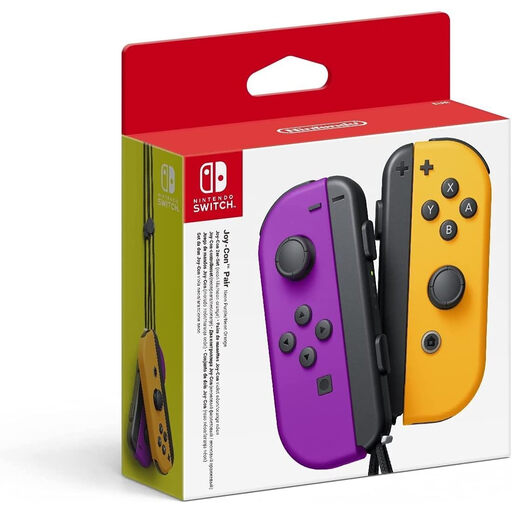
Nintendo Joy-Con Pair – Neon Purple/Neon Orange
For a Switch game that accepts one Joy-Con per player, this pair offers a way to share controls between two people. Nintendo says each Joy-Con can operate independently; confirm that the game accepts this layout.
View on Joybuy
 No image available
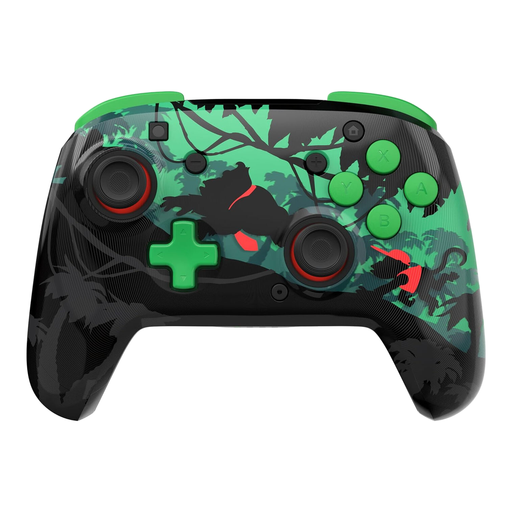
Turtle Beach Rematch Wireless Controller for Nintendo Switch – Donkey Kong Reveal
Consider this wireless Switch controller when you want one conventional controller for a player rather than an individual Joy-Con. Check the game’s local-player limit before buying one for each seat.
View on Joybuy
 No image available
Xbox Wireless Controller – Carbon Black
For an Xbox or Windows group using full controllers, check the game’s multi-controller support before ordering several. Microsoft lists Xbox Wireless and Bluetooth connectivity for this controller model.
View on Joybuy
 No image available
Sony DualSense PS5 Wireless Controller – Midnight Black, V3
For a PS5 group using one controller per player, confirm the game’s local-player limit before buying multiples. PlayStation says a PS5 can use up to four controllers at once, but the game may support fewer players.
View on Joybuy
Common questions
How many controllers can a Nintendo Switch use at once?
Nintendo says a Switch can pair up to eight wireless controllers in most circumstances. The maximum varies with controller type and features, and connecting Bluetooth audio limits it to no more than two wireless controllers; the game sets its own local-player limit.
Can each player use just one Joy-Con?
Yes, if the particular game supports that controller layout. Nintendo says each Joy-Con can work as a standalone controller, but the software determines the available multiplayer holding positions.
Can more than four people use PS5 controllers together?
Not as more than four simultaneous PS5 controller inputs: PlayStation states that a PS5 can use up to four controllers at once. For a larger group, check whether the chosen game provides another suitable way to participate rather than assuming extra controllers will work.
What should Windows players check before buying several wireless controllers?
Confirm both the game’s multi-controller support and the exact model’s Windows connection method. Microsoft lists Xbox Wireless and Bluetooth for its Xbox Wireless Controller, while 8BitDo lists 2.4 GHz or wired Windows connections for Ultimate 2C Wireless; if you use an Xbox Wireless Adapter, Microsoft’s troubleshooting advice is to keep the controller within six metres and in line of sight.


